Low Voltage Structured Cabling: What You Need to Know

Low voltage structured cabling is the organized, standards-based system of copper and fiber cable that carries data, voice, Wi-Fi, security camera and other signal traffic through a commercial building. "Low voltage" means the cable carries communication signals and small amounts of power (such as Power over Ethernet) rather than the 120 or 277 volt power that runs lights and outlets. "Structured" means the cabling follows a defined layout from a central equipment room out to every desk, access point and camera, so any port can be found, tested, moved or upgraded without tearing the building apart. This guide covers what the system includes, which standards apply, how to choose cable, and what to ask before you hire an installer.
What "low voltage" and "structured" actually mean
Electricians and cabling contractors use "low voltage" as shorthand for circuits that are power-limited by design. In the National Electrical Code (NEC), communications cabling falls under Chapter 8 (communications circuits), optical fiber under Article 770, and other power-limited signal wiring under the Class 2 and Class 3 rules. These circuits are treated differently from building power because they carry little energy, but they still have code rules, mostly about fire safety and separation from power wiring.
"Structured" is the part that matters most to a business. An unstructured network grows one cable at a time: someone needs a printer port, a cable gets run from the nearest switch, and after ten years nobody knows which wire goes where. A structured system is planned as a whole. Every cable runs from a patch panel in a telecommunications room to a labeled jack at the work area, and everything between those two points is permanent. Moves and changes happen with short patch cords at the panel, not new cable in the ceiling.
The six parts of a structured cabling system
The ANSI/TIA-568 standards describe a building's cabling as a set of subsystems. Whatever names a contractor uses, a well-designed system has all of these:
- Entrance facility. Where the outside services arrive: the carrier's fiber or copper, the demarcation point (the "demarc," where the provider's responsibility ends), and surge protection for copper lines.
- Equipment room. The main room for core switches, firewalls, servers and phone system hardware. In a small office this may be the same room as the entrance facility.
- Backbone cabling. The cable that links the equipment room to each telecommunications room, often fiber between floors or buildings, sometimes with copper alongside it for voice.
- Telecommunications rooms. The closets (often called IDFs) that hold the patch panels and switches serving one floor or zone.
- Horizontal cabling. The runs from a telecommunications room out to each jack, access point, camera or other device. This is usually the largest share of the cable in a building.
- Work area. The jack in the wall, floor box or ceiling, plus the patch cord that connects the device.
Companion standards cover the rest: TIA-569 for pathways and spaces (conduit, cable tray, room size), TIA-607 for grounding and bonding, and TIA-606 for labeling and records.
Cable types and what each one supports
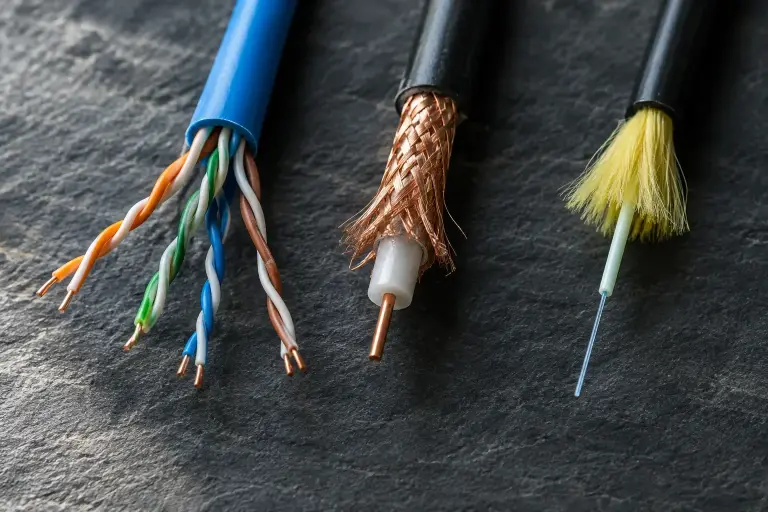
Most horizontal cabling in offices is unshielded twisted-pair copper. The category rating tells you the frequency the cable is built and tested to, which in turn sets the network speeds it can carry. The figures below come from ANSI/TIA-568 for the cable and from the IEEE 802.3 Ethernet standards for the speeds.
| Cable | Tested to | Typical use | Notes |
|---|---|---|---|
| Cat 5e | 100 MHz | 1 Gb/s to 100 m; 2.5 Gb/s in many installations | Still common in existing buildings; rarely the right choice for new work |
| Cat 6 | 250 MHz | 1 Gb/s to 100 m; 10 Gb/s only on shorter runs (roughly 37 to 55 m, depending on conditions) | A common baseline for desk ports |
| Cat 6A | 500 MHz | 10 Gb/s to the full 100 m | Thicker cable; a strong choice for Wi-Fi access points and high-power PoE |
| Multimode fiber (OM3, OM4) | Rated by bandwidth, not MHz category | 10 Gb/s and faster over backbone distances inside a building or campus | Typical for links between closets |
| Single-mode fiber (OS2) | Rated by loss per km | Long distances between buildings or to carriers | Optics cost more, cable reaches much farther |
Coax still shows up for some CATV and older video systems, and cabling for sound masking or CCTV may follow its own manufacturer requirements.
The 100 meter rule
ANSI/TIA-568 limits a twisted-pair channel to 100 meters (328 feet) end to end. That total is split into a permanent link of up to 90 meters (the cable in the walls, from patch panel to jack) plus up to 10 meters of patch cords across both ends. If a device sits farther than that from the closet, the design needs another telecommunications room, a fiber run to a switch closer to the device, or a different layout. A run that "works" at 110 meters today may drop speed or fail intermittently later, so this is not a limit to stretch.
Power over Ethernet changes the planning
Many low voltage devices now take their power from the network cable: Wi-Fi access points, IP phones, cameras, door controllers and even some lighting. The IEEE 802.3 PoE standards allow up to about 15 watts per port (802.3af), 30 watts (802.3at) and 60 or 90 watts at the switch (802.3bt). More power means more heat inside cable bundles, and heat raises the cable's signal loss.
TIA publishes guidance on bundle sizes for PoE (TSB-184), and the NEC has its own ampacity tables for power-limited cable carrying power. In practice this means:
- Plan which ports will carry high-power PoE before choosing cable and bundle sizes.
- Larger-gauge cable such as most Cat 6A handles heat better than thin Cat 5e.
- Avoid packing hundreds of PoE cables into one tight bundle in a hot ceiling space.
Code and fire-rating basics: plenum, riser and pathways
Every cable jacket carries a fire rating printed on it, and the NEC decides where each rating may go:
- CMP (plenum). Required in spaces used to move environmental air, such as a ceiling cavity used as a return-air plenum. Plenum jackets are made to limit flame spread and smoke.
- CMR (riser). For vertical runs between floors through shafts and sleeves.
- CM and CMX. General-purpose and limited-use cable for spaces that are not plenums or risers.
A higher rating can always replace a lower one (plenum can go anywhere riser can), but not the other way around. Fiber has matching ratings (OFNP, OFNR and so on). Fire-rated walls and floors that cables pass through must be sealed with listed firestop. Local inspectors enforce the edition of the NEC their state has adopted, so the installer should confirm the requirements for each site.
Pathways deserve as much thought as the cable. Conduit, EMT and innerduct protect cable in exposed or difficult areas and make later pulls easier. Cable should be supported with J-hooks or tray, not laid on ceiling tiles or tied to sprinkler pipes, and kept away from fluorescent fixtures, motors and power wiring.
Testing, labeling and what a good install looks like
A basic tester only confirms that each wire connects to the right pin. Certification goes further: a field tester measures each link against the ANSI/TIA-568 limits for its category, including insertion loss, near-end crosstalk (NEXT) and return loss, and produces a pass or fail report. Fiber is tested for loss with a light source and power meter, and sometimes with an OTDR. Cabling manufacturers usually require certification reports before they will back a system warranty, so ask how results are delivered. For a closer look at how these testers work, see our guide to how network cable testers work.
Labeling and documentation you should receive
A system you cannot identify is hard to support. TIA-606 sets a labeling scheme so that every patch panel port, jack, cable and closet has a unique, matching identifier. At the end of a project you should have:
- Labels at both ends of every cable, matching the panel port and the wall plate.
- A floor plan or spreadsheet showing where each numbered jack is.
- Test results for every link (see the next section).
- Notes on pathways, firestop locations and spare capacity.
This record is what lets an IT person or a future contractor trace a problem in minutes instead of hours.
Workmanship is visible too. That is what to look for: neat, supported bundles, dressed patch panels, no excess slack piled in the ceiling, and no abandoned cable left behind. Another reviewer, B&D Installs, described Kory and Mack cutting out "miles of useless cable" from a building with decades of old wiring. Removing dead cable reduces fire load and makes the live cabling easier to manage.
Planning a project: questions to answer first
Whether you are fitting out a new office, renovating, or cleaning up an older network, these questions shape the design and the estimate:
- How many connections, and where? Count desks, printers, access points, cameras, phones, TVs and any building systems that need a port. Add spares.
- What speed do you need now and in five years? This decides Cat 6 versus Cat 6A and whether the backbone should be fiber.
- Which devices need PoE, and how much?
- Where will the closets go? Each needs space, power, cooling and a path to every device within the 100 meter limit.
- Is the ceiling a plenum? This sets the cable rating and cost.
- What old cable stays, and what comes out?
- Who coordinates with the general contractor, electrician and IT provider? Timing matters most during construction, before ceilings close.
Be wary of a quote that answers none of these, and equally of one that adds costly cable or conduit you do not need.
Frequently asked questions
Is low voltage cabling the same as structured cabling?
Not quite. Low voltage cabling is any power-limited signal wiring, including a single thermostat or doorbell wire. Structured cabling is the planned, standards-based way of installing network and communications cable so the whole system can be managed. Most commercial structured cabling is low voltage, but not all low voltage wiring is structured.
Should a new office use Cat 6 or Cat 6A?
Cat 6 handles 1 Gb/s to every desk at full length. Cat 6A supports 10 Gb/s at the full 100 meters and handles high-power PoE better, so it is often the choice for Wi-Fi access points and any building where the cabling must last through several equipment upgrades. Many projects mix the two.
How long does structured cabling last?
Properly installed cabling usually stays in service much longer than the switches and devices plugged into it, often through several equipment generations. It is normally replaced because speed needs outgrow the category or a renovation changes the layout, not because the cable wears out.
Can existing cable be reused during a move or renovation?
Sometimes. If the cable is a current category, within length limits, labeled and passes certification testing, it can often stay. Untested, unlabeled or damaged runs usually cost more to troubleshoot than to replace.
Accutech Communications has installed network and communications cabling for businesses across Massachusetts, New Hampshire and Rhode Island since 1993, from our office in Hopkinton, MA. Our structured cabling services cover design, Cat 5e, Cat 6 and Cat 6A copper, fiber, racks and patch panels, cable management, and cable testing and certification. To talk through your building and get a free estimate, call 978-579-0006.