
what does fiber optic cable look like: 7 Powerful Facts 2025
What Fiber Optic Cable Really Looks Like
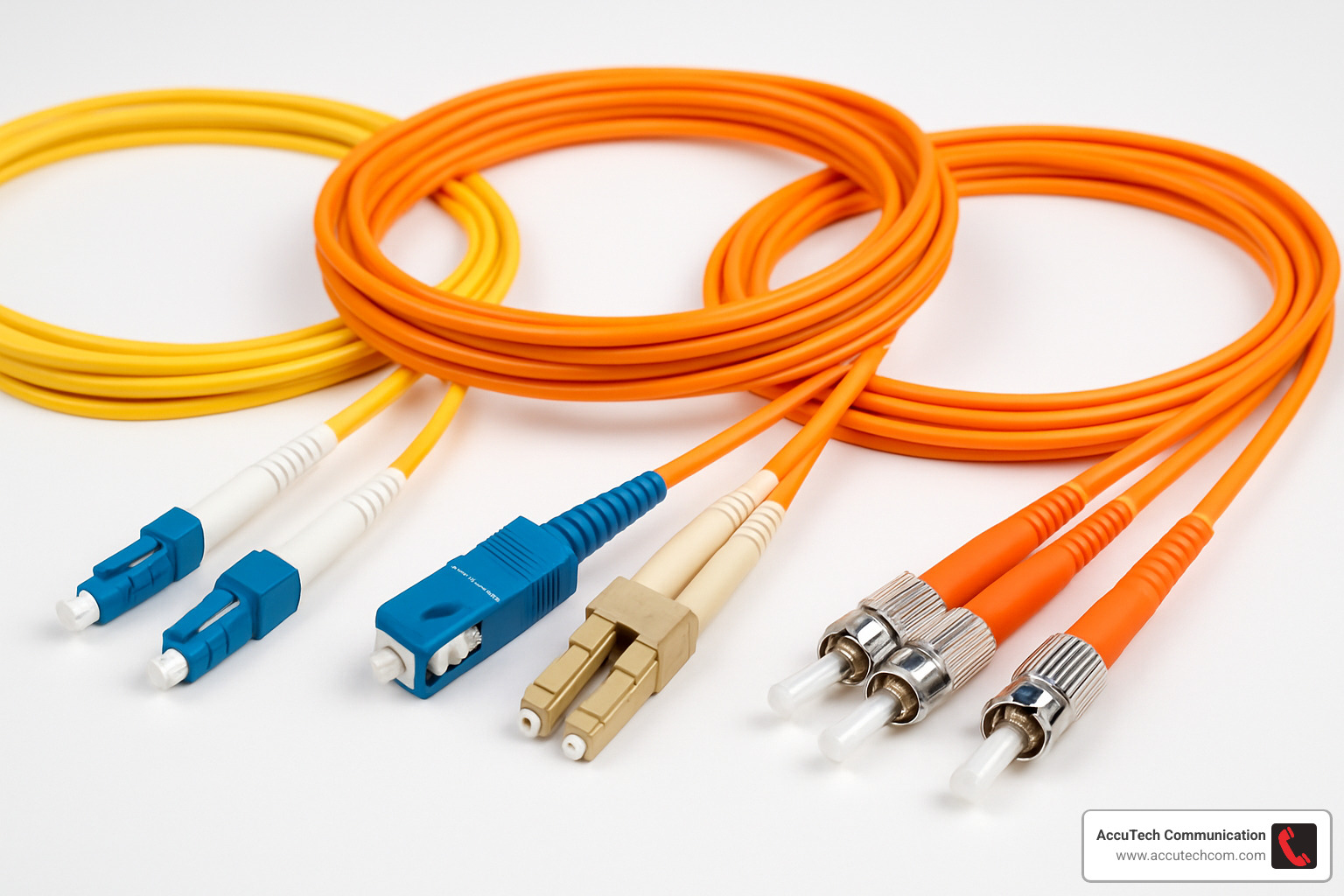
What does fiber optic cable look like? It consists of hair-thin glass strands wrapped in protective layers. From the outside, fiber optic cables typically have colored jackets:
– Yellow jackets for single-mode fiber (long distance)
– Orange or aqua jackets for multimode fiber (shorter distance)
– Black or gray for outdoor installations
– Diameter varies from 5mm (typical outdoor cable) to 1.6mm (indoor patch cable)
The core itself, where light travels, is incredibly thin – about 8-10 microns for single-mode fiber (1/10th the width of a human hair) and 50-62.5 microns for multimode fiber.
When you look at fiber optic cables in a data center or telecommunications closet, they stand out from copper cables with their distinctive colored jackets and specialized connectors. Unlike copper cables that transmit electrical signals, fiber optic cables carry data as pulses of light through ultra-pure glass strands.
These remarkable cables form the backbone of our modern communication networks, delivering unparalleled speed and bandwidth over distances that would be impossible with traditional copper wiring.
I’m Corin Dolan, owner of AccuTech Communications, and I’ve been working with fiber optic cable installations for over 25 years, giving me extensive hands-on experience with what does fiber optic cable look like in various environments from data centers to campus-wide networks.
Common what does fiber optic cable look like vocab:
– how is fiber optic cable made
– types of fiber optic cable
– what are two characteristics of fiber optic cable
What Does Fiber Optic Cable Look Like?
When you step into a server room or peek inside a telecommunications closet, what does fiber optic cable look like compared to other cables? While they might seem similar at first glance to standard network cables, fiber optic cables have distinctive features that make them stand out once you know what to look for.
Fiber optic cables are noticeably slimmer and lighter than their copper counterparts. While a typical Cat6 Ethernet cable measures around 6mm thick, a fiber optic cable might be as thin as 1.6mm for a simple indoor patch cable, or up to about 5mm for a multi-strand outdoor version. This slender profile is remarkable considering the massive amounts of data these cables can transmit!
The color of the outer jacket is often your first clue. Instead of the common blue or gray Ethernet cables, fiber optic cables follow a specific color-coding system that helps us quickly identify their type and purpose.
“The color coding of fiber optic cables isn’t just for show,” our lead technician at AccuTech Communications often tells clients. “When we’re troubleshooting in a crowded data center with hundreds of cables running everywhere, being able to instantly identify a cable by its color saves tremendous time and reduces the chance of mistakes.”
Another visual clue is how these cables are routed. Fiber optic cables have a minimum bend radius (typically about 11 inches for a 48-strand cable) and can’t make sharp turns without damaging the delicate glass fibers inside. You’ll notice fiber cables making gentle, sweeping curves in cable trays, while copper cables might zigzag around corners.
To put the size in perspective, a human hair typically measures between 50-100 microns in diameter. A single-mode fiber core is only about 9 microns – roughly 5-10 times thinner than your hair! Even with all its protective layers, the entire cable remains remarkably slim.
Spotting Cables in a Closet: what does fiber optic cable look like?
In a busy network closet, what does fiber optic cable look like among the tangle of other connections? Several visual cues will help you spot them quickly:
The color-coding system is your best friend here. Yellow cables almost always indicate single-mode fiber (used for longer distances), while orange or aqua cables typically represent multimode fiber (for shorter runs). These bright colors stand out vividly against the more subdued whites, grays, and blues of copper network cables.
You’ll also notice fiber optic cables are routed differently. Because they can’t be bent too sharply, they’re usually installed in dedicated fiber trays or raceways that provide gentle, supported curves. Unlike copper cables that might be tightly zip-tied or crammed into tight spaces, fiber cables need room to maintain their minimum bend radius.
Clear plastic label sleeves or wrap-around identification tags are another telltale sign. Since fiber connections are critical and can be challenging to troubleshoot, proper labeling is essential. These labels typically provide information about the cable’s destination, purpose, or fiber count.
Look for safety tags too – these might include laser warning labels or caution notices advising against looking directly into fiber connectors. These safety indicators are specific to fiber optic cables and won’t be found on copper cabling.
In our installations throughout Massachusetts, New Hampshire, and Rhode Island, we always ensure meticulous cable management and clear labeling. Not only does this create a professional appearance, but it also makes future maintenance so much easier for everyone involved.
Beneath the Sheath: what does fiber optic cable look like up close?
If you could slice open a fiber optic cable and examine it under magnification, what does fiber optic cable look like at this microscopic level?
At the very center lies the core – the highway where light travels. For single-mode fiber, this core is incredibly tiny, typically just 8-10 microns in diameter. Multimode fiber features a larger core, usually 50 or 62.5 microns. To put this in perspective, a human hair is about 75-100 microns thick, making the core of a single-mode fiber about 10 times thinner!
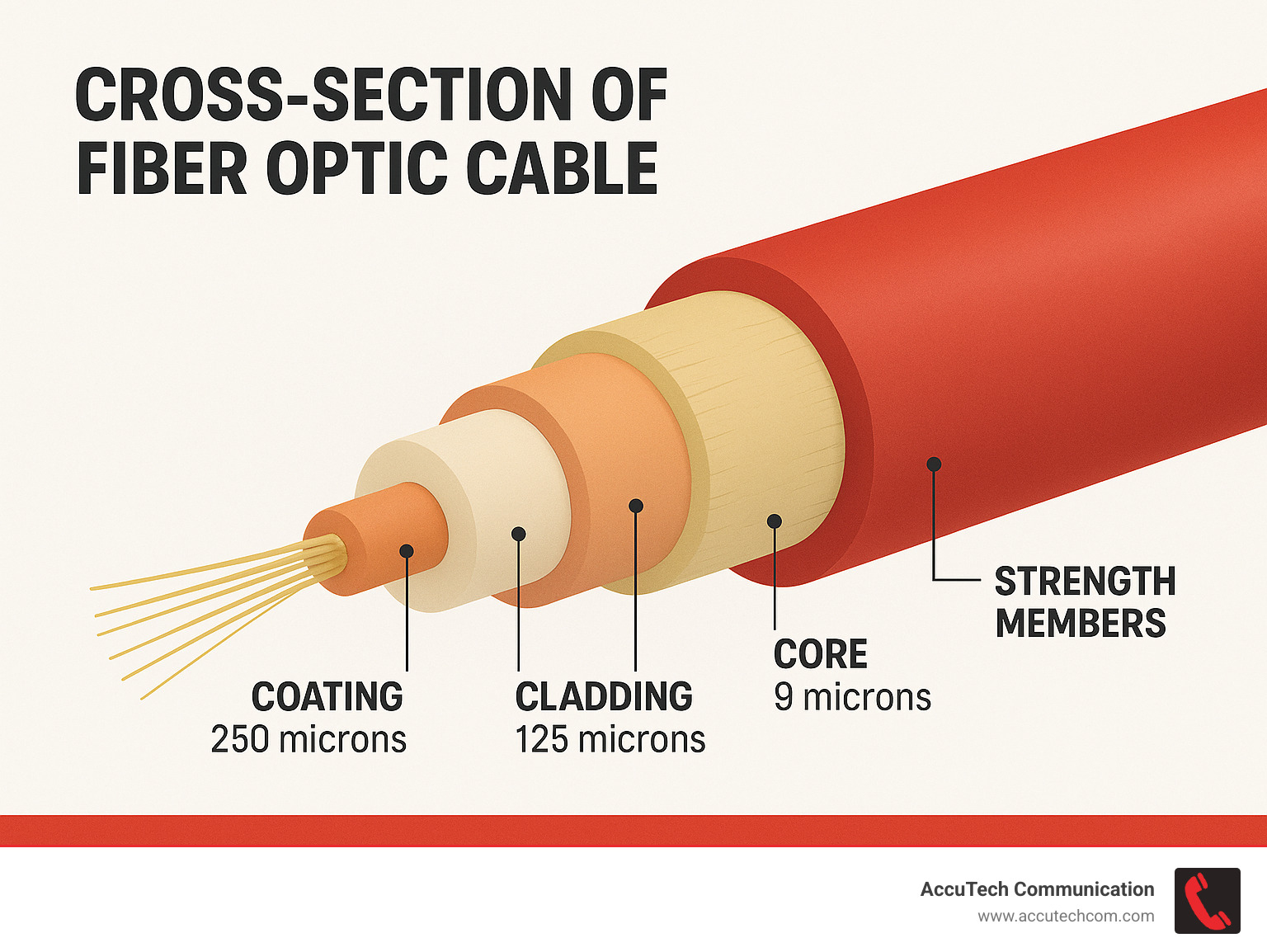
Surrounding the core is the cladding, with a standard diameter of 125 microns regardless of fiber type. The cladding is made of glass with a slightly different refractive index than the core. This difference causes light to bounce back into the core through total internal reflection – the magic that keeps light signals contained within the fiber as they travel.
Next comes the coating or buffer layer, bringing the total diameter to about 250 microns. This polymer coating shields the glass fiber from moisture and physical damage – essential protection for something so delicate.
Around these inner components, you’ll find strength members – typically strands of aramid yarn (Kevlar) that provide tensile strength and protect the fiber from stretching or breaking during installation and use.
“When we’re terminating fiber cables, the Kevlar strength members are quite distinctive,” our senior technician often points out during training. “They’re yellowish in color and feel almost like synthetic hair. They’re so strong we need special scissors to cut through them – regular scissors just won’t do the job!”
Anatomy in Cross-Section: From Core to Jacket
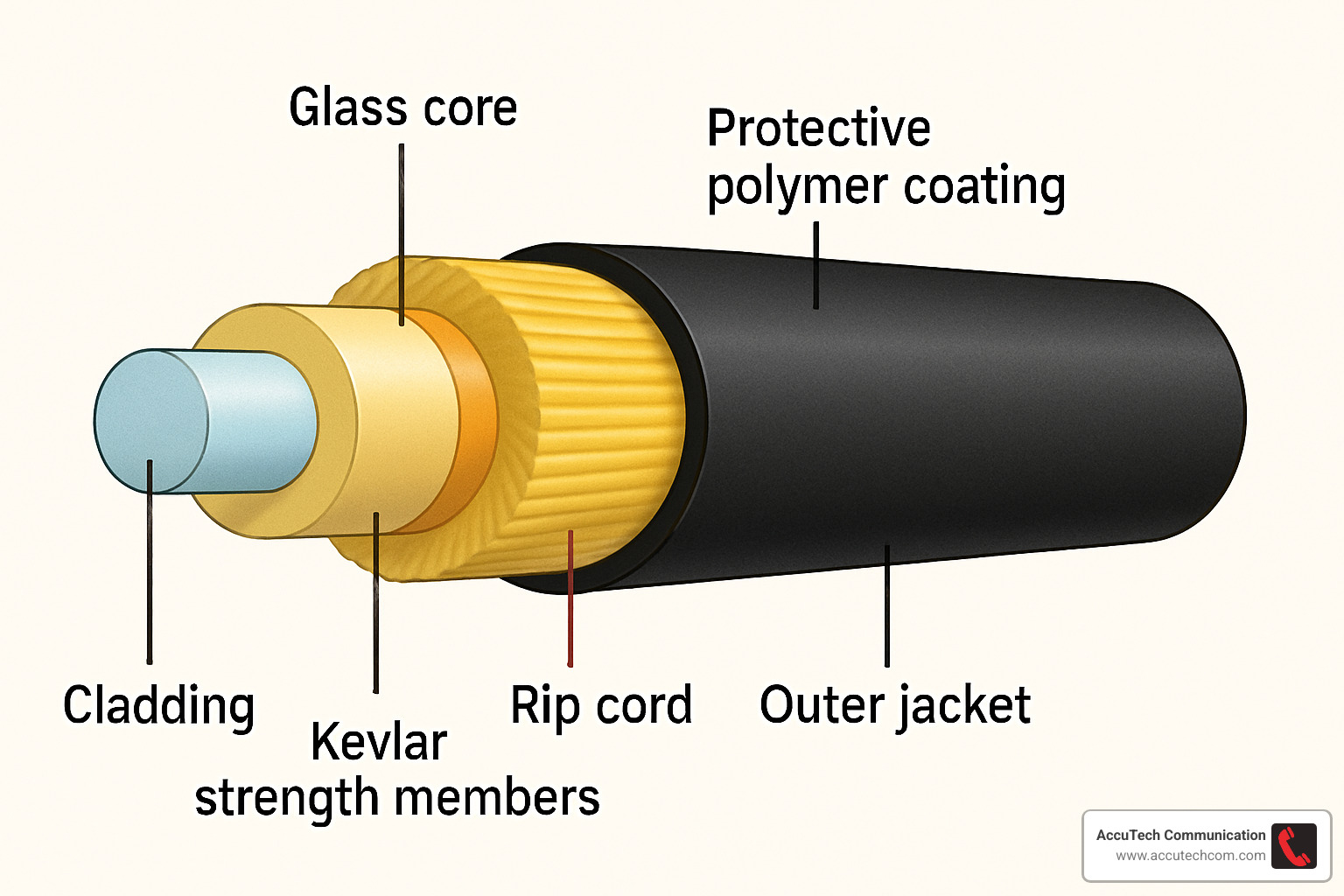
Peeling back the layers of a fiber optic cable reveals an engineering marvel that’s both simple and sophisticated. To truly understand what does fiber optic cable look like beneath its colorful jacket, let’s take a journey from the inside out:
At the very heart lies the core—a strand of ultra-pure glass thinner than a human hair. This is where the magic happens as light pulses travel carrying massive amounts of data. Single-mode cores are tiny at just 8-10 microns (imagine splitting a human hair into 10 parts!), while multimode cores are a bit more generous at 50 or 62.5 microns.
Embracing this core is the cladding, another layer of glass with a different refractive index. This difference creates a mirror-like effect, bouncing light signals back into the core rather than letting them escape—like a highway with invisible guardrails keeping light on track. All fiber types maintain a standard 125-micron cladding diameter.
Next comes the coating or buffer—a soft polymer layer that brings the total diameter to 250 microns (or 900 microns for tight-buffered fibers). Think of this as the fiber’s first line of defense, protecting the delicate glass from moisture and physical stress.
“The buffer coating is actually what gives the bare fiber its color coding,” explains our lead technician. “When you’re splicing fibers inside a cable, these color-coded buffers help ensure you’re connecting the right strands together.”
Surrounding these inner components are the strength members—typically strands of yellow Kevlar yarn that provide incredible tensile strength. These are the same fibers used in bulletproof vests, and they’re essential for protecting the glass during installation when cables might be pulled through conduits.
Many cables also include a thin nylon rip cord—a thoughtful design feature that helps technicians easily open the outer jacket without damaging what’s inside. It’s like the little tab on a package of cookies that makes opening them a breeze.
Finally, there’s the outer jacket—the colorful exterior that protects everything inside from the elements. This could be made of PVC for standard indoor use, special plenum-rated compounds for air handling spaces, or rugged polyethylene for outdoor applications.
In multi-fiber cables, several individual fibers bundle together inside a single jacket. These might be arranged in a neat circle or, for high-density applications like data centers, in flat ribbon formations that can pack hundreds of fibers into a surprisingly compact cable.
For those hungry for more details about fiber optics basics, the Fiber Optic Association offers an excellent resource at More about fiber basics.
Why Each Layer Matters
Each component of a fiber optic cable isn’t just there for show—it’s a carefully engineered solution to a specific challenge.
The core-cladding duo works like a light trap. When light tries to escape the core, the cladding’s different refractive index sends it bouncing back—a phenomenon called total internal reflection. Without this perfect partnership, your Netflix stream would literally leak out of the cable before reaching your home!
The buffer coating is the unsung hero of fiber reliability. Glass, while incredibly effective for transmitting light, is also notoriously brittle. Microscopic surface cracks can quickly spread and snap the fiber. The coating seals and protects the glass surface, dramatically improving its handling properties and longevity.
“I always tell new technicians to respect the buffer coating,” shares our senior installer at AccuTech. “Even though the fiber with its coating looks sturdy enough, it’s still glass at heart and needs gentle handling.”
The Kevlar strength members might seem excessive until you’ve been on an installation where a cable gets caught and pulled unexpectedly. These yellow strands can withstand hundreds of pounds of pulling force, protecting the delicate glass fibers inside. They’re the muscle of the cable, flexing so the glass doesn’t have to.
For cables that venture outdoors, water-blocking materials provide critical protection. Whether it’s water-blocking gel or special water-swellable tape that expands when wet, these components create a moisture barrier that prevents water from traveling along the cable—which could freeze, expand, and damage fibers.
The outer jacket isn’t just about color-coding. In commercial buildings, plenum-rated jackets use special compounds that won’t release toxic fumes during a fire. Underground jackets resist the crushing force of soil and rocks. Aerial cables withstand UV radiation and temperature swings from summer heat to winter ice.
At AccuTech Communications, we’ve seen what happens when the wrong cable construction meets challenging environments across New England—from humid coastal areas to freezing mountain installations. Choosing the right cable for the environment isn’t just about meeting code—it’s about ensuring your network investment lasts for decades.
Want to learn more about what makes fiber optic cable special? Check out our article on What Are Two Characteristics of Fiber Optic Cable?
Single-Mode vs Multimode: Visual Differences & Color Keys
When you’re trying to identify what does fiber optic cable looks like, one of the most important distinctions is between single-mode and multimode fiber cables. These two types not only serve different purposes but also have distinct visual characteristics that make them easy to spot.
Single-mode fiber (SMF) cables almost always have bright yellow outer jackets. If you could see the core itself (which you can’t without specialized equipment), you’d find it’s incredibly tiny—just 8-10 microns in diameter, about one-tenth the width of a human hair! This narrow path allows only one mode or “lane” of light to travel through, which is why it’s called “single-mode.” This design brilliantly minimizes dispersion and signal loss, making these yellow cables perfect for long-distance transmissions up to 125 miles while maintaining high data rates.
Multimode fiber (MMF) cables, on the other hand, come in a rainbow of colors depending on their performance category:
- OM1 (62.5/125 μm) and OM2 (50/125 μm) wear orange jackets
- OM3 (50/125 μm) sports an aqua jacket
- OM4 (50/125 μm) can be aqua or sometimes violet
- OM5 (50/125 μm) stands out with a lime green jacket
“When I walk into a data center, I can immediately tell what kind of fiber infrastructure they’re running just by looking at the colors,” says our senior technician at AccuTech Communications. “It’s like a visual shorthand for fiber professionals.”
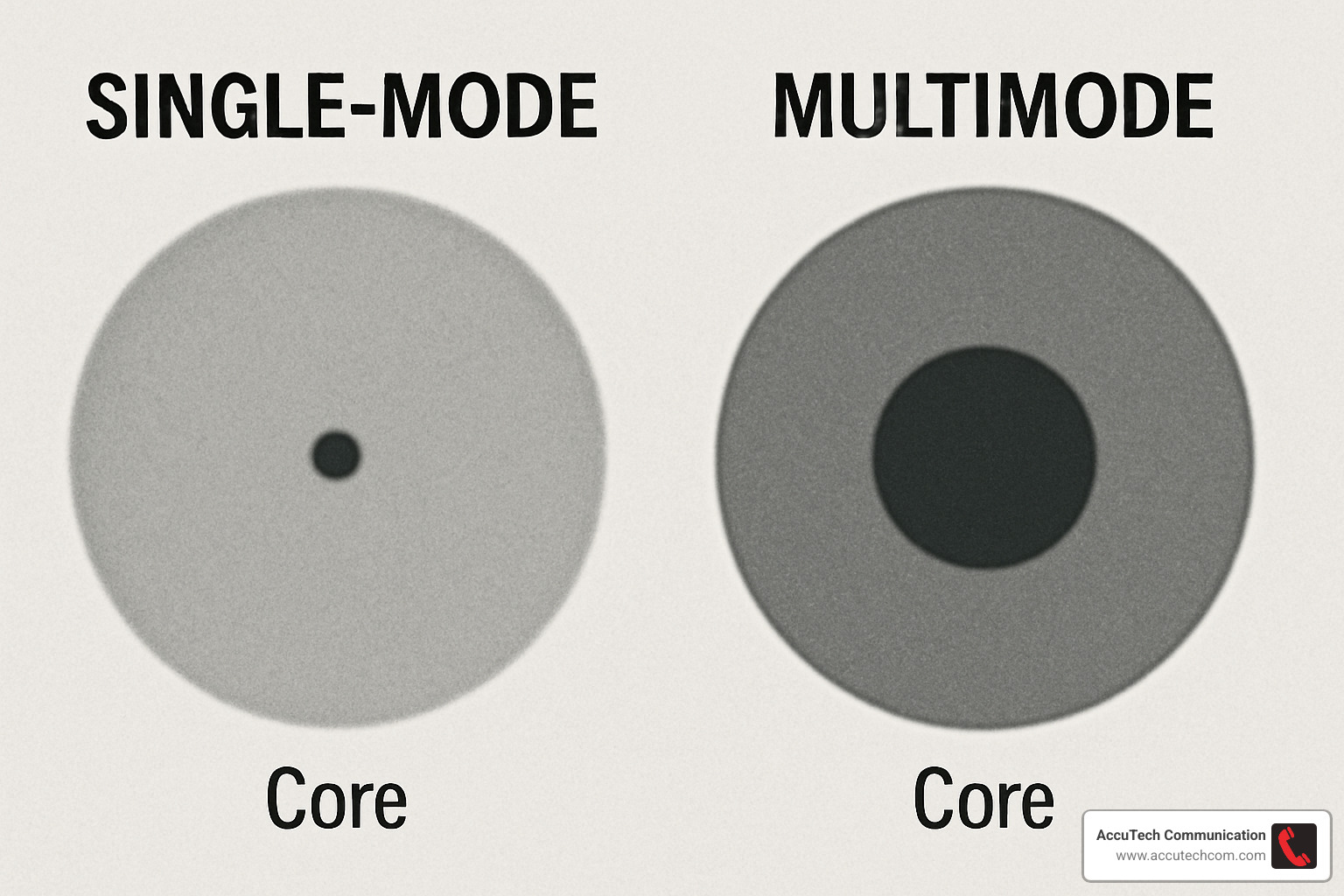
Multimode fibers have much larger cores (50 or 62.5 microns) that allow multiple “lanes” or modes of light to travel through simultaneously. While this design is more cost-effective for shorter distances, the light bounces around more inside the fiber, causing greater dispersion over longer runs.
Here’s how single-mode and multimode specs compare:
| Feature | Single-Mode (OS2) | Multimode OM3 | Multimode OM4 | Multimode OM5 |
|---|---|---|---|---|
| Jacket Color | Yellow | Aqua | Aqua/Violet | Lime Green |
| Core Diameter | 8-10 μm | 50 μm | 50 μm | 50 μm |
| Cladding Diameter | 125 μm | 125 μm | 125 μm | 125 μm |
| Light Source | Laser | VCSEL | VCSEL | VCSEL |
| Typical Wavelength | 1310/1550 nm | 850/1300 nm | 850/1300 nm | 850-950 nm |
| Max Distance (10G) | 10+ km | 300 m | 400 m | 400 m |
| Max Distance (40G) | 10+ km | 100 m | 150 m | 150 m |
| Cost | Higher | Moderate | Moderate | Higher |
If you’re curious about more detailed comparisons, check out Single-Mode VS. Multimode Fiber Cable.
Jacket & Connector Hues That Tell the Story
The world of fiber optics has its own color language that goes far beyond the basic yellow and orange/aqua distinction. This comprehensive color-coding system helps technicians like us at AccuTech quickly identify specific types and configurations without having to test each cable.
The TIA-598 standard defines a specific color palette for fiber components. In multi-fiber cables, individual buffer tubes or fibers follow a rainbow sequence: blue, orange, green, brown, slate, white, red, black, yellow, violet, rose, and aqua. This pattern repeats for higher fiber counts, making it possible to identify fiber #37 out of a 144-fiber cable just by its color position.
Even the connector boots (those flexible parts where the cable meets the connector) have their own color code. Yellow boots typically signal single-mode connectors, while beige or black often indicate multimode. Some manufacturers get fancy with colors like Erika-violet for OM4 multimode fiber.
“I once saved a client from a major network outage because I noticed they were about to connect a yellow single-mode patch cord to an aqua multimode transceiver,” recalls our lead technician. “Those color codes prevented what could have been hours of troubleshooting and downtime.”
Duplex fiber cables, which contain two fibers for two-way communication, often use a “zipcord” design where two individual cables are joined by a thin web. You can separate this web when needed, but the cables maintain their standard color coding based on the fiber type inside.
Want to learn more about fiber optic cable types and their applications? Visit our detailed guide on Fiber Optic Cable.
Choosing the Right Mode for Distance
Understanding what does fiber optic cable look like isn’t just about identification—it helps you select the right type for your specific needs, especially when it comes to how far your signal needs to travel.
Single-mode fiber, with its sunshine-yellow jacket, is the marathon runner of the fiber world. Its narrow core allows light to travel in essentially a straight line with minimal reflection, resulting in remarkably low signal loss—only about 0.35 dB/km at 1310 nm and 0.25 dB/km at 1550 nm. This makes it perfect for connections spanning miles or even tens of miles between buildings, campuses, or cities.
Multimode fiber, with those orange or aqua jackets, is more like a sprinter—great for shorter distances and more budget-friendly. It uses less expensive light sources (LEDs or VCSELs) rather than the precise lasers required for single-mode fiber. However, that larger core causes more light dispersion as signals travel, limiting effective distances:
OM1 gives you up to about 100 feet at 10 Gbps, while OM3 extends to around 1000 feet. The newer OM4 pushes this to about 1300 feet, and OM5 maintains similar distances but is optimized for wavelength division multiplexing—essentially allowing multiple colors of light to travel simultaneously for higher bandwidth.
When planning fiber installations for our clients throughout Massachusetts, New Hampshire, and Rhode Island, we calculate what we call a “loss budget.” This accounts for the cable’s length, number of connections, and splices to determine whether a particular fiber type will support the required distance and bandwidth.
“We’ve seen many cases where businesses initially chose multimode fiber to save on equipment costs, only to find they needed to upgrade to single-mode when their network expanded,” shares our project manager. “At AccuTech Communications, we always design with future growth in mind, sometimes recommending hybrid installations with both fiber types to balance current budget constraints with long-term scalability.”
Construction Variants: Indoor, Outdoor & Specialized Cables
When you’re trying to figure out what does fiber optic cable look like beyond the basic types, you’ll find a fascinating world of specialized designs created for specific environments and applications.
Indoor installations typically use tight-buffer cables, where each glass fiber is wrapped in a thicker protective coating (about 900 microns compared to the standard 250 microns). This extra padding gives the fiber better protection against crushing and allows for more flexibility when routing through buildings. These cables feel more pliable in your hands and are perfect for running through conduits, cable trays, and between floors in office buildings.
“When we’re working inside corporate headquarters or data centers,” says our senior technician, “tight-buffer cables are our go-to choice. They’re easier to handle and terminate, and they provide the protection needed for indoor environments without being overly bulky.”
For outdoor applications, you’ll encounter loose-tube cables with a completely different construction. These house multiple fibers within gel-filled plastic tubes that shield the delicate glass from moisture and temperature swings. The gel is tacky to the touch and serves as a water-blocking agent – if the outer jacket gets damaged, this gooey substance prevents moisture from reaching and degrading the glass fibers.
If you’ve ever handled an armored cable, you immediately notice the difference – they’re heavier and more rigid due to a layer of corrugated steel tape sandwiched between the inner components and outer jacket. This armor provides excellent protection against both hungry rodents (a serious threat for direct burial cables) and crushing forces. While they look similar to standard cables from the outside, you can feel the difference immediately when you pick one up.
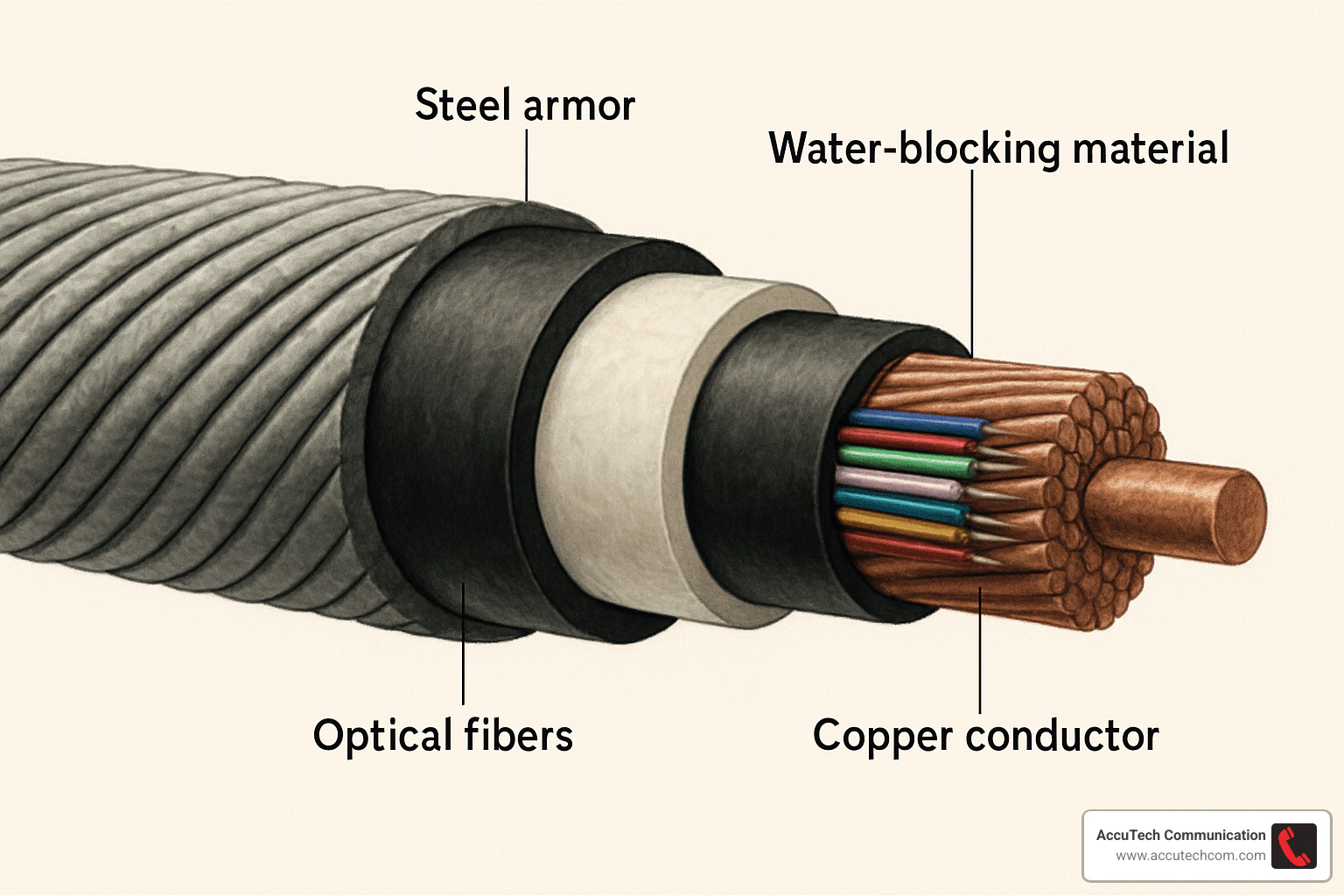
Submarine cables represent the pinnacle of fiber optic engineering, with multiple protective layers designed to survive the crushing depths and harsh conditions of the ocean floor. These impressive cables can measure several inches in diameter and contain water-blocking materials, multiple armor layers, hydrogen-absorbing compounds, and even copper conductors to power signal repeaters along ultra-long routes. These are the cables that connect continents and make global internet possible.
For cellular network installations, we often work with hybrid fiber/copper cables that combine the best of both worlds – fiber strands for high-speed data transmission alongside copper conductors for power delivery. These Fiber-to-the-Antenna (FTTA) solutions are increasingly common as 5G networks expand across New England.
Most outdoor cables are wrapped in black UV-resistant polyethylene (PE) jackets that can withstand years of harsh sunlight. Some include colored tracer stripes to help with identification. The industry standard GR-20 standard defines the requirements these cables must meet to ensure they’ll hold up in challenging outdoor environments.
“Having installed fiber across Massachusetts, New Hampshire, and Rhode Island for decades, we’ve seen how environmental factors affect cable performance,” explains our operations manager at AccuTech Communications. “From coastal salt spray to freezing winters and humid summers, selecting the right cable construction for each unique environment is absolutely essential for a reliable, long-lasting network.”
Indoor vs Outdoor at a Glance
The visual and tactile differences between indoor and outdoor fiber cables reveal a lot about their intended use. When identifying what does fiber optic cable look like in various settings, these distinctions become important clues.
Indoor cables typically feature a softer, more flexible jacket that’s easy to work with in confined spaces. These jackets are specially formulated with fire safety in mind – plenum-rated versions for air handling spaces and riser-rated versions for vertical runs between floors. Both are designed to produce minimal smoke and toxic fumes if they ever catch fire, with Low-Smoke Zero-Halogen (LSZH) variants offering even greater safety in sensitive environments like hospitals.
These indoor cables generally operate comfortably in temperature ranges from freezing (32°F) up to about 158°F – perfect for climate-controlled buildings but not for the extremes of outdoor exposure.
By contrast, outdoor cables feel noticeably different in your hands – tougher, more rigid, and built to withstand nature’s challenges. Their black polyethylene jackets resist UV degradation and weathering, while internal water-blocking materials (either gel or dry water-swellable elements) keep moisture at bay. Many outdoor cables include a layer of corrugated steel to thwart hungry rodents – a surprisingly common cause of cable failures in direct burial applications.
For aerial installations, you might spot cables with integrated messenger wires creating a distinctive figure-8 or snowshoe profile. These support elements bear the weight of the cable when strung between poles. Outdoor cables are also engineered for much wider temperature extremes, typically from -40°F to 185°F – essential for New England’s variable climate.
“One quick way to identify a cable’s intended use is simply by touch,” our lead technician points out. “If it feels soft and flexible, it’s likely an indoor cable. If it’s tough and rigid with a metallic layer beneath the jacket, you’re probably holding an armored outdoor cable designed for direct burial or other harsh conditions.”
Specialty Builds You Might See
The fiber optic world includes several fascinating specialty cables with unique appearances and purposes that go well beyond standard telecommunications.
Optical Ground Wire (OPGW) cables represent a brilliant engineering solution that combines fiber optics with electrical ground wire for high-voltage transmission towers. These distinctive cables feature a spiral of aluminum or steel wires protecting the fiber optic core within. They serve dual purposes – providing both electrical grounding for the power lines and a secure path for telecommunications signals.
For aerial installations without metal components, All-Dielectric Self-Supporting (ADSS) cables offer a specialized solution. These non-conductive cables have a thicker, more rigid construction that allows them to span between utility poles without requiring a separate support wire. When you see these installed, you’ll notice the specialized hardware used to secure them directly to poles.
The world of sensing applications has driven development of specialized sensor fiber cables that might look similar to standard fiber but are engineered to be highly sensitive to temperature, strain, or acoustic signals. These sophisticated cables essentially turn the entire fiber length into a distributed sensor, enabling applications like pipeline monitoring, perimeter security, and structural health assessment of bridges and buildings.
In high-density applications like major data centers, high-count ribbon fiber cables organize fibers in flat, stacked ribbons that maximize capacity while minimizing diameter. These engineering marvels can pack up to 864 individual fiber strands into a cable less than an inch thick.
“We recently completed a campus-wide network for a university in Massachusetts using a 288-strand ribbon fiber cable,” shares our project manager. “Despite containing hundreds of individual fibers, the cable was only about 0.75 inches in diameter thanks to the ribbon design. This allowed us to use existing conduits without expensive excavation work, saving our client significant time and money while future-proofing their network.”
At AccuTech Communications, our decades of experience with these specialized cable types across New England environments helps us select exactly the right product for each unique installation challenge.
Connector Ends, Patch Cords & the Look of Splicing
A key aspect of understanding what does fiber optic cable look like is examining the connector ends, which are the most visible parts in everyday use.
When you’re working with fiber networks, you’ll encounter several connector types. The most common is the LC (Lucent Connector), a small form-factor connector with a push-pull latching mechanism that dominates modern data centers. Its compact size allows for higher density installations compared to older styles.
Before LC became standard, the SC (Subscriber Connector) was king. These square connectors with push-pull latching are still found in many existing networks, though they’re less common in new installations. If you’re dealing with older equipment, you might encounter the ST (Straight Tip) connector with its distinctive bayonet twist-lock mechanism – think of it as the old-school veteran of fiber connections.
For high-density applications like busy data centers, you’ll see MPO/MTP (Multi-fiber Push-On) connectors. These rectangular connectors are impressive workhorses, terminating 12 or 24 fibers in a single connector, dramatically reducing the space needed for high-fiber-count installations.
“The connector landscape has evolved significantly over my 25 years in the business,” says our lead technician. “What used to require a rack full of ST connectors can now be handled by a handful of MPO connections, saving tremendous space and simplifying cable management.”
The end face of fiber connectors comes with different polishing finishes that affect performance:
– PC (Physical Contact) connectors have a slightly curved end face
– UPC (Ultra Physical Contact) connectors feature a more pronounced curve for better return loss
– APC (Angled Physical Contact) connectors have an 8-degree angle to minimize reflections and are easily identified by their green color
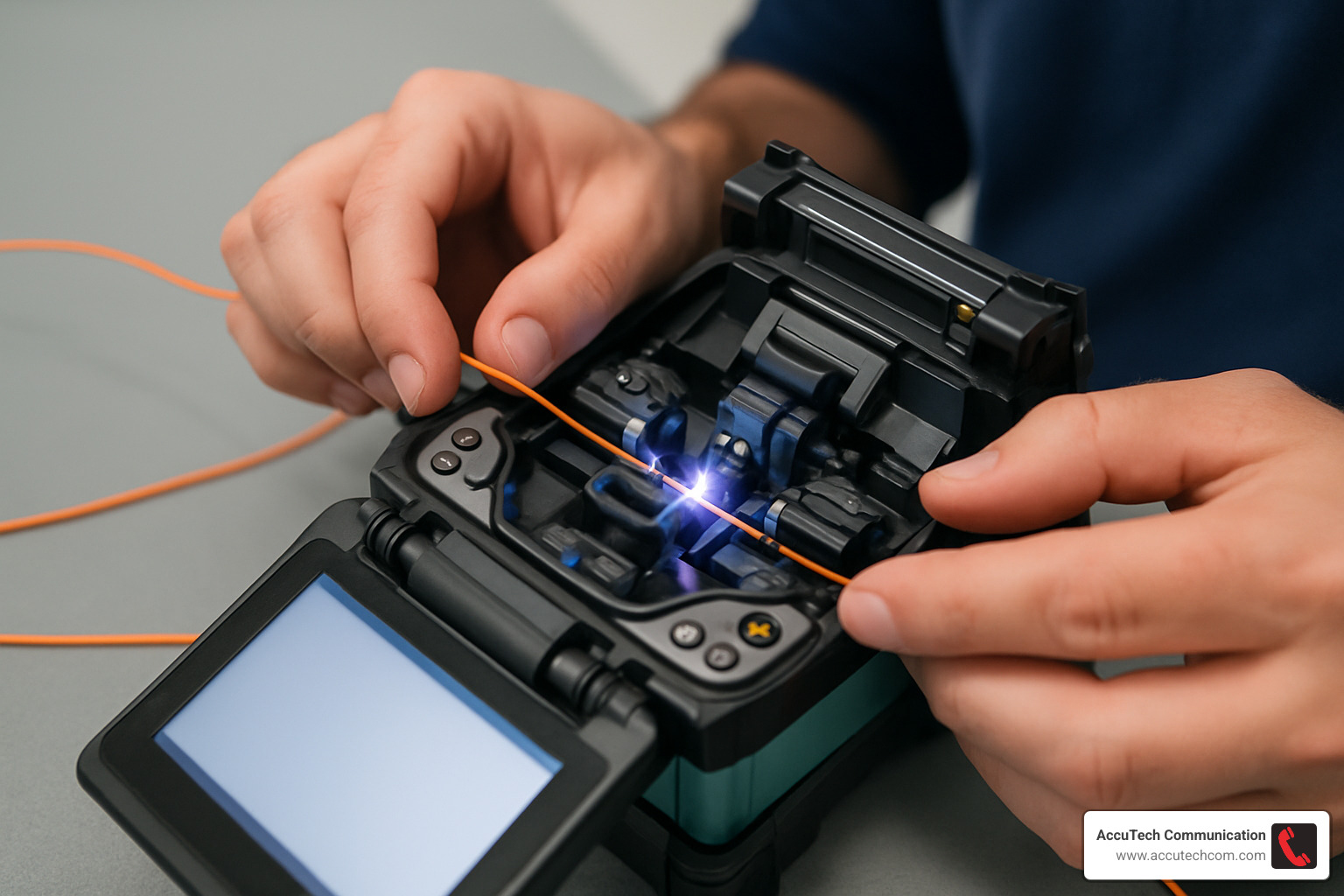
Patch cords are the fiber optic equivalent of extension cords – short cables with connectors on both ends used to connect equipment in data centers or telecom rooms. They follow the same color-coding as their fiber type (yellow for single-mode, orange or aqua for multimode), making them easy to identify at a glance.
When fiber cables need to be joined together, splicing comes into play. There are two main approaches:
With fusion splicing, we use an electric arc to essentially weld the fiber ends together. It’s like performing microsurgery – the machine precisely aligns the hair-thin glass strands and melts them together to create a permanent, low-loss joint. Afterward, a protective sleeve covers the delicate splice point. The result is nearly perfect light transmission, with typical loss of just 0.05dB or less.
Mechanical splicing is the quicker alternative, using a small alignment device to hold the fiber ends together without melting them. Think of it as a fiber connector that’s installed in the middle of a cable run. While faster to install, these typically introduce more signal loss than fusion splices.
When working with multi-fiber cables, buffer fan-out kits help transition from bundled fibers to individual connectorized strands. These kits provide the necessary protection for exposed fibers during the termination process.
“I can’t stress enough how important proper connector cleaning is,” shares our senior technician at AccuTech Communications. “We’ve seen network issues that stumped IT teams for days that were solved with a simple connector cleaning. Even invisible dust particles can cause significant problems or equipment damage.”
For more information on handling damaged fiber, check out our guide on How to Repair Fiber Optic Cable.
Visual Signs of Damage
Knowing what does fiber optic cable look like when damaged can help identify problems before they cause network outages.
Visible cracks or breaks in the outer jacket are red flags that shouldn’t be ignored. Even small nicks might allow moisture to penetrate the cable, potentially causing long-term degradation of the fibers inside. In dark environments, you might actually see a “bloom” effect where light escapes from a broken fiber, creating a faint glow at the damage point.
Connector problems are another common issue. A burnt or damaged ferrule (the precision cylinder that holds the fiber) may appear discolored or slightly melted. This typically happens when connectors are mated while carrying high-power signals or if they’ve been exposed to excessive heat.
“During a troubleshooting call at a manufacturing facility, we found connectors that looked fine at first glance,” recalls our field technician. “But under inspection, we finded ferrules damaged by excessive heat from being installed too close to industrial equipment. The damage wasn’t obvious without magnification but was causing significant data errors.”
Micro-bends might not be immediately visible but can cause serious performance issues. These subtle kinks in the fiber cause light to leak out at the bend points. Over time, cables suffering from chronic micro-bending will show higher signal loss and potentially intermittent connection problems.
One easily overlooked issue is missing dust caps on unused connectors. Those little plastic caps aren’t just packaging – they’re essential for keeping connector end faces clean and protected. Always check that protective dust caps are in place on unused connectors.
Tools That Reveal the Inside Story
Sometimes the naked eye just isn’t enough when examining fiber optic cables. That’s where specialized tools come into play, allowing technicians to see what’s otherwise invisible.
Fiber inspection microscopes are perhaps the most important tools in a fiber technician’s kit. These devices magnify connector end faces 200-400 times, revealing a world of potential issues invisible to the naked eye. Modern digital microscopes can capture images and even automatically analyze the end face against industry standards. When you see what appears to be a perfectly clean connector under a microscope for the first time, you might be shocked at the contamination that’s actually present.
Visual Fault Locators (VFLs) are ingenious pen-like tools that inject bright red laser light into the fiber. This light will escape at points where the fiber is damaged or bent too sharply, making problems visible even through certain types of cable jackets. They’re particularly useful for finding breaks in patch panels or identifying specific fibers in a bundle.
Optical Time Domain Reflectometers (OTDRs) provide a comprehensive view of a fiber’s performance along its entire length. While not visually examining the fiber directly, OTDR trace screenshots are essentially “x-rays” of your fiber installation, showing splice points, bends, breaks, and other events that affect performance. These traces become valuable documentation of a fiber’s condition and help pinpoint issues that might be miles away from the test point.
“These tools aren’t just nice-to-have gadgets,” explains our technical director at AccuTech Communications. “They’re essential for proper installation and maintenance. When we complete a fiber project, we provide our clients with documentation including microscope images of connector end faces and OTDR traces, giving them confidence in the quality of our work and a baseline for future troubleshooting if needed.”
Frequently Asked Questions about Fiber Cable Appearance
How thick is a typical fiber optic cable compared with copper or hair?
When people ask me what does fiber optic cable look like in terms of size, I often use everyday comparisons to help them understand just how remarkable these cables are.
The glass core of a single-mode fiber is truly microscopic – just 8-10 microns in diameter. To put that in perspective, it’s about one-tenth the thickness of a human hair, which typically measures 75-100 microns across. It’s amazing to think that most of our internet traffic travels through something thinner than a strand of hair!
With its cladding, a standard fiber reaches 125 microns in diameter – still incredibly thin. Once all the protective layers are added, a simplex (single-fiber) indoor cable typically measures about 1.6-3mm across – roughly the thickness of a thin spaghetti noodle.
Multi-fiber indoor cables naturally get thicker as they contain more strands, ranging from 3mm to 10mm depending on how many fibers are bundled together. Outdoor cables are more robust, measuring anywhere from 10mm to 25mm or more for high-fiber-count or armored varieties – similar to your thumb or a garden hose.
“People are often surprised by how thin fiber optic cables can be relative to their capacity,” I tell clients during consultations. “A single-fiber cable that’s thinner than a pencil can carry more data than dozens of copper cables the size of your thumb.”
What’s particularly interesting is that many fiber optic cables are actually thinner than their copper counterparts despite carrying far more data. A standard Cat6 Ethernet copper cable is about 6mm in diameter, yet carries only a fraction of the information a slimmer fiber cable can transmit.
What do damaged fiber strands look like?
Spotting damaged fiber isn’t always straightforward, but there are telltale signs if you know what to look for.
When a fiber is broken and light is being transmitted through it, the break point may appear as a bright dot – almost like a tiny star. This happens because the light that should be contained within the fiber is escaping at the break. It’s actually quite beautiful, though obviously problematic for your network!
Under a microscope, damaged connector end faces tell their own story. You might see scratches cutting across the surface, tiny pits or chips, hairline cracks, or contamination from dust or oils. Even damage too small to see with the naked eye can cause significant signal loss.
If a fiber cable is bent too sharply (creating what we call macro-bends), light can leak from the fiber at the bend point. Sometimes this leaking light is visible as a faint glow, especially when using visual fault locators with their bright red laser light. It’s like the fiber is “bleeding” light where it’s stressed.
“Fiber damage isn’t always catastrophic,” as our service technician often reminds clients. “We’ve seen cases where a fiber link was still functioning but with reduced performance due to damage. This is why regular inspection and testing are so important, especially in critical infrastructure.”
Fusion splices (permanent joints between fibers) can also show visible defects when examined with a splice inspection microscope. Improperly made splices might display tiny bubbles, misalignment of the cores, or other imperfections that affect signal quality.
Are there printed markings or barcodes for identification?
Yes! Fiber optic cables aren’t just color-coded – they also carry important printed information that helps technicians identify exactly what they’re working with.
Outdoor cables typically have details printed directly on the outer jacket at regular intervals – usually every meter or foot. Walking along a cable, you’ll see the manufacturer’s name, cable type and specification, fiber count and type, and date of manufacture. Many also include sequential length markings, which are incredibly helpful when troubleshooting a specific section of a long cable run. Some manufacturers even include a unique cable ID or batch number for full traceability.
Indoor cables, especially pre-terminated patch cords, often have printed or attached labels indicating the fiber type, length, and sometimes specific connection points. This is particularly important in busy data centers where hundreds of similar-looking cables might be running side by side.
The industry is evolving too – some forward-thinking manufacturers now include QR codes or barcodes on cable jackets. Technicians can simply scan these with a smartphone to access detailed specifications or installation instructions. It’s like having the entire manual right there when you need it.
For multi-fiber cables, the individual fibers inside follow the TIA-598 color-coding standard, making it possible to identify specific strands within a bundle without confusion.
“Proper cable identification is crucial for maintenance and troubleshooting,” as our project manager likes to say. “In complex installations across multiple buildings, like those we’ve completed for universities in Boston and Worcester, being able to quickly identify a specific cable can save hours of troubleshooting time.”
At AccuTech Communications, we’ve learned that good labeling practices during installation pay dividends for years to come – it’s one of those small details that makes a big difference in the long run.
Conclusion
Understanding what does fiber optic cable look like isn’t just technical trivia—it’s a practical skill that helps network professionals identify, install, and troubleshoot these vital communication links that power our modern world.
The visual language of fiber cables tells a story at a glance. That distinctive yellow jacket wrapping single-mode fiber signals long-distance capabilities, while aqua sheaths of OM3/OM4 multimode hint at shorter but blazingly fast connections. Inside each cable, a microscopic glass core—thinner than a human hair—carries enormous amounts of data as pulses of light, protected by multiple layers that shield this delicate medium through installation and years of service.
“What always amazes our clients is how something so thin and lightweight can replace bundles of copper cables,” shares our lead technician at AccuTech Communications. “When we upgrade old copper networks to fiber, the difference is immediately visible—cleaner pathways, less weight on cable trays, and of course, dramatically faster connections.”
We’ve been installing and maintaining fiber optic systems across Massachusetts, New Hampshire, and Rhode Island since 1993. Our team has watched fiber technology evolve from a specialty option to the backbone of modern networks, and we’ve developed a deep understanding of how to match the right fiber type to each unique application.
Here’s a quick visual cheat sheet to help you identify fiber cables in your environment:
– Yellow jacket: Single-mode fiber (perfect for long distances)
– Orange jacket: Traditional multimode fiber
– Aqua jacket: Laser-optimized multimode fiber
– Green connector: APC (Angled Physical Contact) polish
– Blue connector: UPC (Ultra Physical Contact) polish
Fiber optic cables require careful handling. Never look directly into a fiber optic connector—even though you can’t see it, infrared light can cause serious eye damage. Always cap unused connectors to protect them from dust and contamination, which can degrade performance over time.
“We once had a client whose network was experiencing intermittent issues,” recalls our service manager. “When we inspected their patch panel, we found several uncapped connectors completely clogged with dust. A simple cleaning restored their connection to full speed—a fifteen-minute fix that saved them from a costly cable replacement.”
At AccuTech Communications, we take pride in designing fiber systems that not only meet today’s needs but anticipate tomorrow’s growth. Whether you’re installing your first fiber connection or expanding an enterprise network, understanding the visual language of fiber optics helps you make informed decisions about this crucial infrastructure.
For more information about our fiber-optic cabling installation services and how we can help your organization build a reliable, future-proof network, visit our page on More info about fiber-optic cabling installation.
