A Practical Guide to Fiber Optic Network Switches
Why the Right Fiber Optic Network Switch Defines Your Business Network
A fiber optic network switch is the backbone of any high-performance commercial network, and choosing the right one can mean the difference between seamless operations and costly downtime.
Quick answer: What is a fiber optic network switch?
| Feature | What It Means for Your Business |
|---|---|
| What it does | Routes data between networked devices using fiber optic connections instead of copper cable |
| Key advantage | Faster speeds, longer distances, and no electromagnetic interference |
| Common types | Managed, unmanaged, PoE, and industrial-grade switches |
| Typical use cases | Enterprise campuses, data centers, surveillance systems, industrial facilities |
| Port technology | Uses SFP/SFP+ slots to accept interchangeable fiber transceiver modules |
If your business in Massachusetts, New Hampshire, or Rhode Island is dealing with slow network performance, signal interference, or infrastructure that can’t keep pace with growth, your switching hardware is likely the first place to look.
Networks today carry more than email. They carry HD video surveillance feeds, VoIP calls, cloud applications, and wireless traffic from dozens of access points, all at once. Copper-based switches can struggle under that kind of load. Fiber switches don’t.
The global fiber optic switch market is on track to reach $2.8 billion by 2028, growing at 8.5% per year. Enterprise adoption of 10G and higher fiber switches jumped 35% year-over-year in 2023 alone. This isn’t a niche technology anymore, it’s the commercial networking standard.
I’m Corin Dolan, owner of AccuTech Communications, and I’ve spent decades designing and deploying structured cabling and fiber optic network switch infrastructure for commercial clients across Massachusetts, New Hampshire, and Rhode Island. In this guide, I’ll walk you through everything you need to know to choose the right switch for your business.
Must-know fiber optic network switch terms:
What is a Fiber Optic Network Switch?
At its core, a fiber optic network switch is a specialized telecommunications device designed to connect different segments of a local area network (LAN) or wide area network (WAN) using fiber optic cables. Unlike traditional network hubs that blindly broadcast data packets to every connected port, a network switch operates at the Data Link Layer (Layer 2) or Network Layer (Layer 3) of the OSI model. It reads the destination MAC address of incoming data packets and selectively routes that data only to the specific device for which it is intended.
By using light pulses transmitted through glass or plastic fibers rather than electrical signals traveling down copper wires, fiber switches deliver unparalleled bandwidth capacities, extremely low latency, and massive transmission distances. They act as the central distribution hubs of modern IT infrastructure, ensuring that high-speed data flows smoothly across your entire organization.
Whether connecting servers in a data center, linking multiple buildings on a corporate campus, or aggregating data from security cameras spread across a massive warehouse, a fiber switch is the engine that keeps business communications moving. To understand why this technology is so critical for modern businesses, it helps to look at how fiber optic cable in computer networks functions as a whole.
How a Fiber Optic Network Switch Differs from Copper Switches
The physical differences between copper (Ethernet) switches and fiber optic switches lie in the physical medium used to transport data. Copper switches rely on standard RJ45 ports and Category cables (such as Cat6 or Cat6a) to transmit electrical currents. Fiber switches utilize specialized optical ports to send light waves down glass cores.
This fundamental difference in the transmission medium translates to several critical real-world performance advantages:
- Signal Attenuation: Electrical signals flowing over copper cables degrade rapidly over distance. Traditional copper Ethernet connections are strictly limited to a maximum length of 100 meters (328 feet) before requiring a repeater or switch to boost the signal. Optical signals traveling through fiber experience minimal signal loss, allowing data to travel miles without any degradation.
- Electromagnetic Interference (EMI) Immunity: Copper cables act like small antennas, making them highly susceptible to electromagnetic interference from fluorescent lights, heavy machinery, power lines, and electrical conduits. Because fiber optic cables transmit light rather than electricity, they are completely immune to EMI, making them the only viable choice for industrial environments, manufacturing floors, and elevator shafts.
- Data Security: Copper cables emit electromagnetic fields that can theoretically be tapped or intercepted without physical detection. Fiber optic cables do not emit electromagnetic radiation and are extremely difficult to tap without physically cutting the glass, which immediately alerts network administrators by dropping the link. This makes fiber switches the standard for high-security environments.
To help you visualize these differences, here is a direct comparison of the two technologies:
| Performance Metric | Traditional Copper Switches | Fiber Optic Network Switches |
|---|---|---|
| Transmission Medium | Electrical pulses over copper wire | Light pulses through glass/silicon fibers |
| Max Distance (Standard) | 100 meters (328 feet) | Up to 100 kilometers (over 60 miles) |
| EMI/RFI Susceptibility | High (susceptible to motors, lighting, power lines) | Completely immune |
| Bandwidth Capacity | Typically maxes out at 10 Gbps over short distances | Easily scales from 10 Gbps to 100 Gbps and beyond |
| Physical Footprint | Thicker, heavier cabling; takes up rack space | Thin, lightweight cabling; high port density |
| Security Risk | Moderate (vulnerable to signal tapping) | Extremely low (nearly impossible to tap undetected) |
Key Types of Fiber Switches and Their Business Use Cases
Not all fiber switches are created equal. Depending on your business size, network complexity, and operating environment, you will need to choose a switch category that matches your specific operational requirements. Investing in fiber optics for business requires a clear understanding of these categories to avoid overpaying for unnecessary features or under-specifying critical infrastructure.
Managed vs. Unmanaged Switches
The choice between managed and unmanaged fiber switches is primarily a question of control, security, and visibility.
- Unmanaged Switches: These are simple, plug-and-play devices. They require zero configuration and operate right out of the box. An unmanaged switch simply receives data and passes it along. While highly cost-effective and perfect for small offices or isolated workgroups, they offer no monitoring capabilities, no security controls, and no way to prioritize traffic. If a network loop occurs, an unmanaged switch cannot stop it, which can bring your entire network to a halt.
- Managed Switches: These switches feature a built-in operating system that allows network administrators to configure, manage, and monitor local network traffic. Managed switches are the standard for enterprise networks because they support advanced features such as:
- Virtual Local Area Networks (VLANs): Segmenting your physical network into isolated virtual networks (e.g., separating guest Wi-Fi, IP cameras, and finance department traffic) to improve security and reduce broadcast traffic.
- Quality of Service (QoS): Prioritizing latency-sensitive traffic, such as VoIP phone calls or video conferencing, to ensure clear communication even during peak network utilization.
- Simple Network Management Protocol (SNMP): Enabling IT teams to remotely monitor switch health, bandwidth usage, and port status in real-time, allowing them to proactively resolve issues before they cause downtime.
- Network Security: Implementing port-based authentication (802.1X), Access Control Lists (ACLs), and IP-MAC-Port Binding to prevent unauthorized devices from accessing the network.
Industrial-Grade Switches for Harsh Environments
Standard commercial network switches are designed to live in clean, dry, climate-controlled server rooms. However, many businesses in Massachusetts, New Hampshire, and Rhode Island operate in demanding environments, such as unconditioned manufacturing plants, shipping warehouses, transit hubs, and outdoor security enclosures.
For these environments, standard switches will quickly fail due to extreme temperatures, dust accumulation, moisture, and physical vibration. This is where industrial-grade fiber switches are required.
Industrial switches feature ruggedized, fanless metal enclosures designed for DIN-rail mounting inside electrical cabinets. They are engineered to withstand extreme temperature ranges, typically from -40°C to +75°C (-40°F to 167°F), and are built with industrial-grade components that resist high vibration and electromagnetic surges.
Furthermore, industrial fiber networks rely on specialized hardware-level redundancy protocols to prevent downtime. Protocols like Ethernet Ring Protection Switching (ERPS) can reroute network traffic in the event of a fiber cut in under 50 milliseconds. For massive enterprise networks or carrier-grade telecom setups, highly specialized systems like the High-Density Duplex Fiber Switch XSOS-576D offer automated, remote fiber switching matrices to maintain uptime even in the most critical environments.
Understanding SFP/SFP+ Ports and Fiber Uplinks
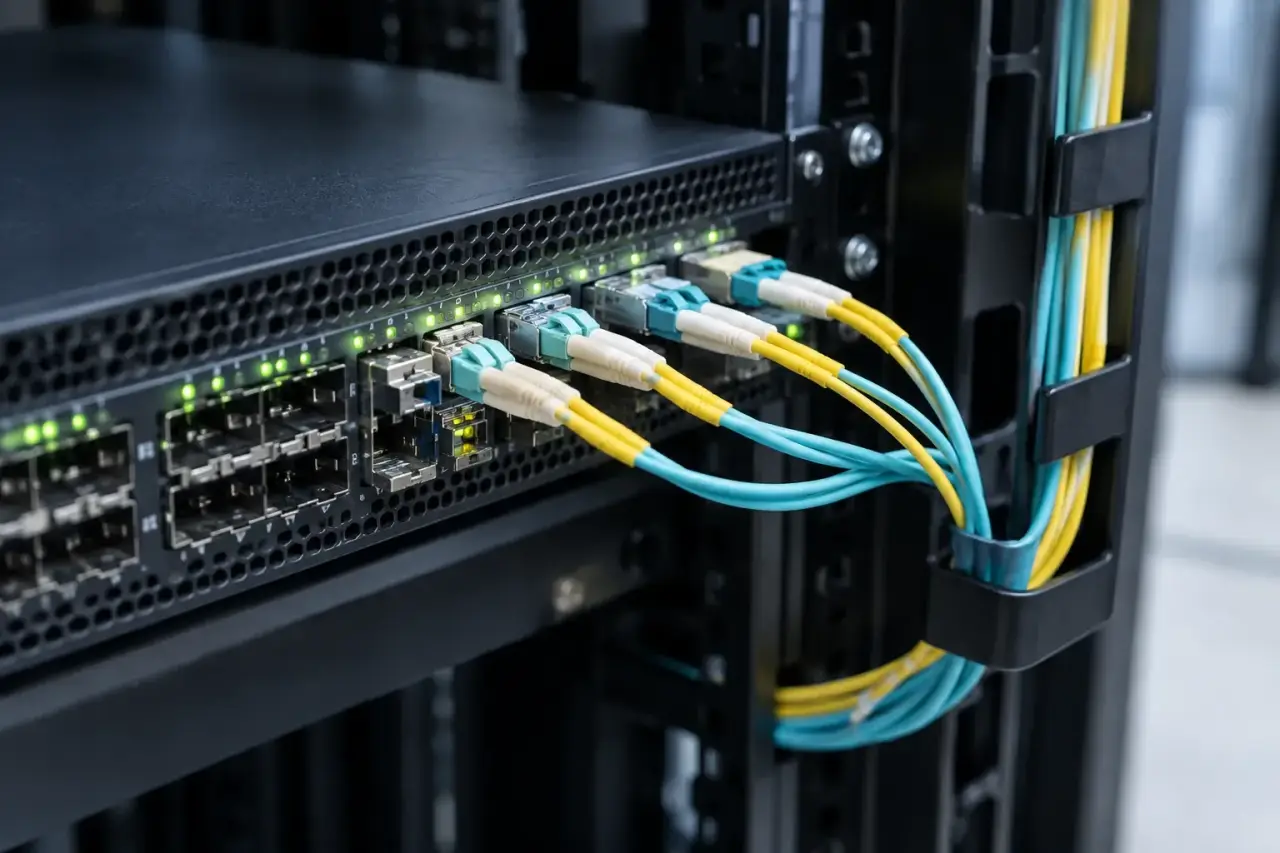
One of the most powerful aspects of a modern fiber optic network switch is its modularity. If you look at the front of a fiber switch, you will notice that instead of standard plastic RJ45 ports, many of the ports are empty rectangular slots. These are Small Form-factor Pluggable (SFP) slots.
SFP slots do not contain any built-in fiber connectors. Instead, they act as universal receptacles that accept small, hot-swappable transceiver modules. This design allows you to customize each port on your switch to match the exact type of fiber cabling, connector, speed, and distance required for that specific connection.
This modularity is incredibly valuable when planning your network. If you need to connect a server in the same room, you can slide in a cheap, short-range multimode SFP transceiver. If you need to link a building three miles away, you can use the exact same switch port by simply swapping in a long-range single-mode SFP transceiver. This flexibility makes future upgrades simple and cost-effective, which is why proper modular planning is a cornerstone of professional fiber optic network design.
Selecting the Right Transceiver for Your Fiber Optic Network Switch
When choosing transceivers for your switch, you must match the transceiver’s specifications to your physical fiber optic cabling plant:
- Multimode Fiber (MMF): Typically used for short distances within a single building (up to 550 meters). Multimode transceivers use cheaper LED light sources and larger core cables (50 or 62.5 microns).
- Single-Mode Fiber (SMF): Used for long-distance runs spanning across campuses, cities, or up to 100 kilometers. Single-mode transceivers use highly focused laser light sources to transmit data down a tiny 9-micron glass core.
- Speed Capabilities:
- SFP: Supports speeds up to 1 Gbps.
- SFP+: Supports speeds up to 10 Gbps.
- SFP28: Supports speeds up to 25 Gbps.
- QSFP28: Supports speeds up to 100 Gbps, typically used for high-capacity backbone links and data center interconnects.
For enterprise campus deployments, combining high-speed copper ports for local workstations with dedicated 10G fiber uplinks for building-to-building runs is the most efficient design. High-performance hardware like the Omada Campus 48-Port Gigabit Stackable L3 Managed Switch with 6× 10G Slots excels in these environments, providing massive local switching capacity alongside ultra-fast 10G fiber uplinks to prevent network bottlenecks.
Key Features to Look For When Selecting a Switch
Selecting the right switch requires balancing your immediate operational needs with your long-term growth plans. When evaluating different models, keep these key technical specifications in mind:
- Port Count and Configuration: Determine how many devices you need to connect today, and add at least a 20% buffer for future growth. Many switches offer hybrid configurations, such as 24 or 48 Gigabit copper ports for local devices, combined with 4 or 6 SFP+ ports for high-speed fiber uplinks.
- Layer 2 vs. Layer 3 Routing:
- Layer 2 (L2) switches route traffic based solely on MAC addresses. They are ideal for connecting devices within the same local network or VLAN.
- Layer 3 (L3) switches have built-in routing engines that can route traffic between different IP networks and subnets directly on the switch itself. This offloads routing tasks from your main firewall, greatly improving internal network speeds and efficiency.
- Physical Stacking: Some enterprise switches support physical stacking, allowing you to connect multiple physical switches using high-speed stacking cables so they behave as a single logical switch. This simplifies management and provides built-in redundancy.
To ensure your network operates reliably, you must also select high-quality patch cables, transceivers, and enclosures. You can learn more about these accessories in our guide on fiber optic network components.
Power over Ethernet (PoE) and Power Budgets
In modern business environments, network switches do more than transmit data, they also deliver power. Power over Ethernet (PoE) allows a single copper cable to transmit both high-speed data and electrical power to compatible devices, such as IP security cameras, VoIP phones, and wireless access points.
While fiber optic cables cannot carry electrical currents, many fiber switches are hybrid devices. They feature SFP slots for high-speed fiber backbones, alongside standard RJ45 copper ports that support PoE. This setup is the gold standard for commercial security and surveillance deployments, allowing you to run fiber backbones over long distances across a facility, and then drop down to copper PoE runs to power local cameras.
When selecting a PoE-enabled switch, pay close attention to the following:
- PoE Standards:
- PoE (802.3af): Delivers up to 15.4W of power per port.
- PoE+ (802.3at): Delivers up to 30W per port, necessary for pan-tilt-zoom (PTZ) cameras and standard dual-band wireless access points.
- PoE++ (802.3bt): Delivers up to 60W or 90W per port, required for high-draw devices like heated outdoor cameras, digital signage, and high-performance Wi-Fi 6/7 access points.
- PoE Power Budget: This is the total amount of electrical power the switch’s internal power supply can distribute across all PoE ports simultaneously. If you have a 24-port PoE+ switch with a total power budget of 180W, you cannot run 30W of PoE+ to all 24 ports at the same time (24 x 30W = 720W). You must calculate the combined power draw of all your devices to ensure they do not exceed the switch’s total budget.
For high-density deployments requiring massive power delivery and high-speed connections, advanced hardware like the Omada Campus 48-Port 2.5G Stackable L3 Managed PoE++ Switch with 6× 25G Slots provides the massive PoE budgets and multi-gigabit speeds required to support modern commercial infrastructure.
Cost Considerations and Market Trends in July 2026
As we look at the networking landscape in July 2026, several major trends are shaping the way businesses invest in switching hardware. High-speed fiber deployments are expanding rapidly across our region. For example, major infrastructure projects like the Lightpath expansion in Boston are bringing high-capacity fiber backbones closer to businesses throughout eastern Massachusetts, driving the demand for 10G and 25G local switching hardware.
When budgeting for a fiber optic network switch deployment, it is important to understand that hardware pricing varies wildly based on port count, management features, PoE capabilities, and environmental ruggedization.
Disclaimer: The pricing ranges listed below represent average costs sourced from publicly available internet data in July 2026. They do not reflect the actual pricing or service rates of AccuTech Communications.
- Entry-Level Unmanaged Switches: Typically range from $150 to $500. These are basic 5-port to 10-port switches with standard gigabit speeds and a couple of SFP slots, perfect for small offices or simple media conversion.
- Mid-Range Smart Managed & PoE Switches: Typically range from $500 to $1,800. These include 24-port and 48-port Layer 2+ switches with 10G SFP+ uplinks and decent PoE budgets, ideal for growing small-to-medium businesses (SMBs).
- Enterprise-Grade Layer 3 & Core Switches: Typically range from $1,800 to $4,500+. These high-performance switches feature full Layer 3 routing, physical stacking capabilities, massive PoE budgets (PoE++), redundant power supplies, and multi-gigabit ports designed for corporate campuses and data centers.
Frequently Asked Questions About Fiber Switches
To help you make an informed decision, here are answers to some of the most common questions we hear from commercial clients regarding fiber optic switching technology.
What is the maximum distance supported by a fiber optic switch?
The maximum distance is determined by the transceiver module and the type of fiber optic cable used, not the switch itself.
- Using multimode fiber (MMF) and standard transceivers, the maximum distance is typically 550 meters (approx. 1,800 feet).
- Using single-mode fiber (SMF) and specialized long-range transceivers, data can easily travel 10 kilometers (6.2 miles), 40 kilometers (24.8 miles), and up to 100 kilometers (62 miles) without requiring any repeaters or signal boosters.
Can I mix copper and fiber connections on the same switch?
Yes. Most modern commercial switches are “hybrid” switches. They feature a combination of standard copper RJ45 ports (often with PoE capabilities) and empty SFP/SFP+ slots for fiber connections. This allows you to connect local office computers and local PoE devices via copper, while using the SFP slots to connect to distant switches, servers, or building uplinks via fiber.
Why are managed switches preferred for enterprise networks?
Managed switches provide the visibility, security, and control that modern businesses require. They allow network administrators to segment traffic using VLANs, prioritize critical voice and video traffic using QoS, monitor network health in real-time, and prevent security breaches by blocking unauthorized devices at the port level. Unmanaged switches offer none of these features, leaving your business vulnerable to network outages and security risks.
Conclusion: Partner with New England’s Commercial Fiber Experts
Investing in a high-quality fiber optic network switch is one of the smartest decisions you can make to future-proof your business network. However, selecting the right hardware is only half the battle. Without precise network design, professional fiber splicing, and certified structured cabling, even the most expensive enterprise switch will fail to deliver its promised performance.
Since 1993, AccuTech Communications has been the trusted commercial network infrastructure partner for businesses across Massachusetts, New Hampshire, and Rhode Island. Based in Massachusetts, we provide high-quality and competitively priced network cabling, business phone systems, and data center build-out services.
Whether you need to link multiple buildings on a campus in Worcester, upgrade a warehouse network in Manchester, NH, or cable an IP surveillance network in Providence, RI, our team of experienced technicians is here to design and install a flawless, end-to-end solution tailored to your business.
Ready to eliminate network bottlenecks and secure your business communications? Schedule a professional fiber optic cabling installation with the experts at AccuTech Communications today, or contact us to request a custom estimate for your project.