
Fiber Optic Cable in Computer Network: 10 Powerful Benefits 2025
The Digital Lifelines of Modern Networks
Fiber optic cable in computer network systems are thin strands of glass or plastic that transmit data as pulses of light, offering superior bandwidth, distance capabilities, and immunity to electromagnetic interference compared to traditional copper cables.
| Key Characteristics of Fiber Optic Cables in Networks |
|---|
| Speed: Can transmit data at rates up to 100 Gbps+ |
| Distance: Can span up to 80km without repeaters |
| EMI Immunity: Not affected by electrical interference |
| Size: Much thinner and lighter than copper equivalents |
| Security: More difficult to tap without detection |
When streaming videos or sending emails, your data likely travels through fiber optic cables. These remarkable information highways transmit data at speeds approaching 200,000 kilometers per second—fast enough to send a high-definition movie in less than a tenth of a second.
Unlike copper cables which use electrical signals, fiber optic cables use pulses of light that bounce along the inside of ultra-pure glass strands about the diameter of a human hair. This seemingly simple difference creates a tremendous advantage for computer networks.
Since their practical development in the 1970s, fiber optic cables have transformed networking capabilities. A single pair of these slender cables can simultaneously transmit the equivalent of 24,000 telephone calls.
For businesses seeking reliable, high-performance network infrastructure, understanding fiber optics is essential for future-proofing operations in our increasingly connected world.
I’m Corin Dolan, owner of AccuTech Communications, and I’ve spent over 25 years designing and implementing fiber optic cable in computer network solutions for businesses across Massachusetts, New Hampshire, and Rhode Island.
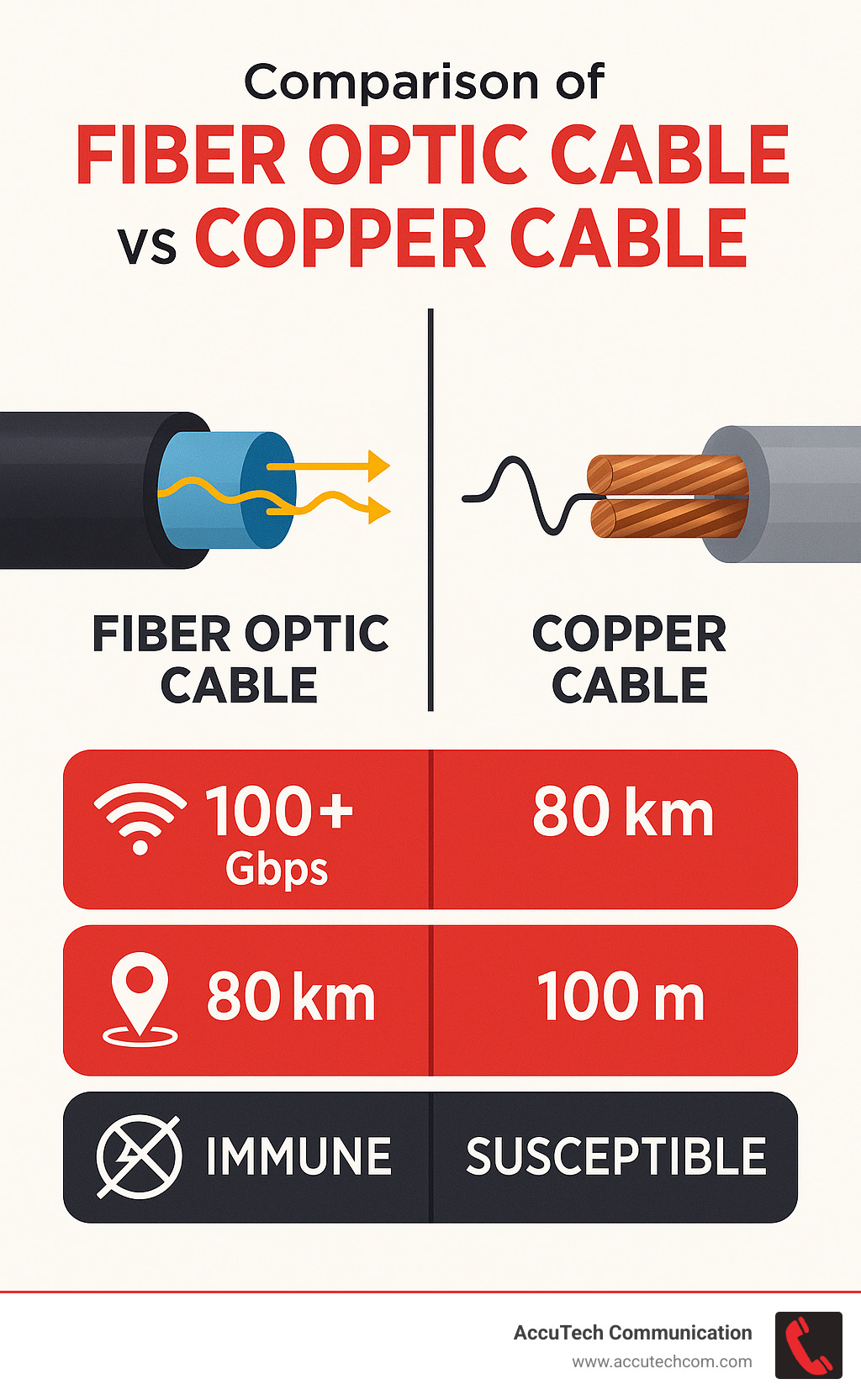
Fiber optic cable in computer network terms simplified:
– fiber optic sensing technology
– fiber optic monitoring system
– fiber optic technology history
Anatomy of a Fiber Optic Cable
Understanding the structure of a fiber optic cable in computer network applications helps explain their remarkable performance. These cables aren’t simple wires—they’re engineering marvels designed layer by layer with purpose.
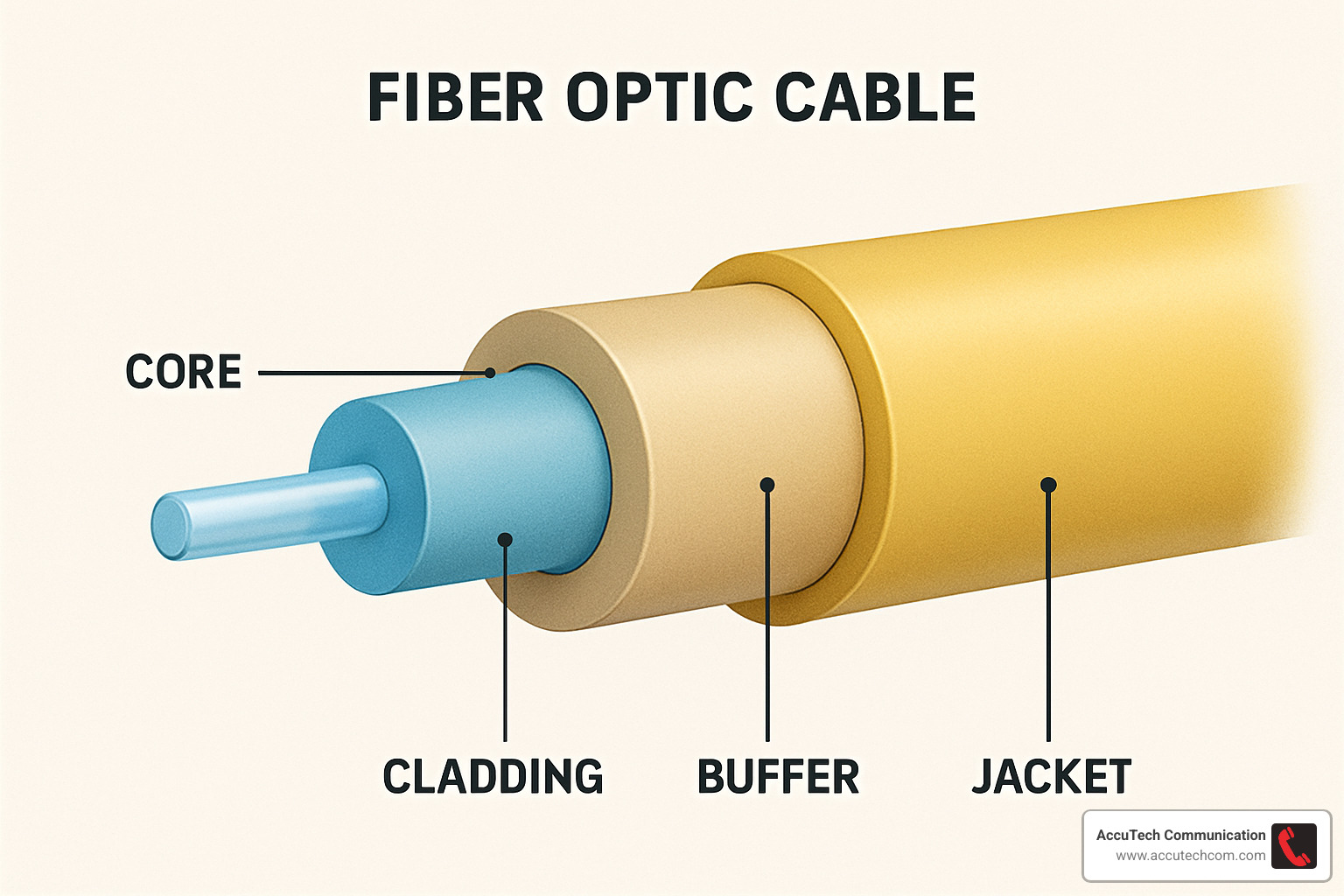
Key Components of a fiber optic cable in computer network
At the center is the core—an incredibly pure glass or plastic cylinder where light travels. Single-mode fiber cores are tiny at just 8-10 microns (about 1/10th the width of a human hair), while multimode fibers have larger 50 or 62.5 micron cores.
Surrounding this core is the cladding, a layer of glass with a slightly different composition that creates total internal reflection—essentially bouncing light signals back whenever they try to escape, forcing the light to travel forward.
A buffer coating wraps around the glass, typically made of materials like silicone rubber or acrylate, shielding the delicate glass from moisture and physical damage.
Kevlar fibers prevent the cable from stretching during installation and daily use. Finally, the outer jacket provides ultimate protection against environmental factors.
The glass used in high-quality fibers is so incredibly pure that if the ocean were made of the same material, you could see the bottom of the Mariana Trench from the surface!
More info about Types of Fiber Optic Cable
Cable Jackets & Color Coding Standards
The industry has developed smart color coding and jacket ratings that tell us exactly what we’re working with at a glance.
OFN (Optical Fiber Nonconductive) cables work for basic applications, while OFNR (Riser Rated) cables are fire-resistant for vertical runs between floors. OFNP (Plenum Rated) cables are designed for air ducts with special low-smoke, fire-resistant properties. LSZH (Low Smoke Zero Halogen) cables emit minimal toxic fumes if they catch fire.
Following TIA-598 standards, yellow jackets indicate single-mode fiber, orange typically means multimode (OM1 or OM2), while aqua signals OM3 or OM4 laser-optimized multimode fibers. Lime green represents OM5 wideband multimode fiber.
| Fiber Type | Core Diameter | Jacket Color | Typical Applications | Max Distance |
|---|---|---|---|---|
| Single-mode | 8-10 μm | Yellow | Long-distance, WAN | Up to 80+ km |
| OM1 Multimode | 62.5 μm | Orange | Legacy LANs | Up to 300m at 1Gbps |
| OM3 Multimode | 50 μm | Aqua | Data centers | Up to 300m at 10Gbps |
| OM4 Multimode | 50 μm | Aqua | High-speed data centers | Up to 550m at 10Gbps |
| OM5 Multimode | 50 μm | Lime Green | Future-proofing | Optimized for wavelength division multiplexing |
How Fiber Optic Cables Transmit Data in Computer Networks
The magic of fiber optic cable in computer network systems lies in how they transmit information. Unlike copper cables that carry electrical signals, fiber optics use pulses of light to represent data—a fundamental difference that enables their superior performance.
Data Flow Inside a fiber optic cable in computer network
When you click “send” on an email, your computer’s electrical signals need to transform into light before they can zip through fiber optic cables.
At the transmitting end, devices called transceivers handle this conversion. These contain either LED light sources (for shorter distances) or laser diodes (for long-haul connections). Special encoding circuits modulate the light to represent binary data—essentially flashing the light on and off in patterns that represent the 1s and 0s of your digital message.
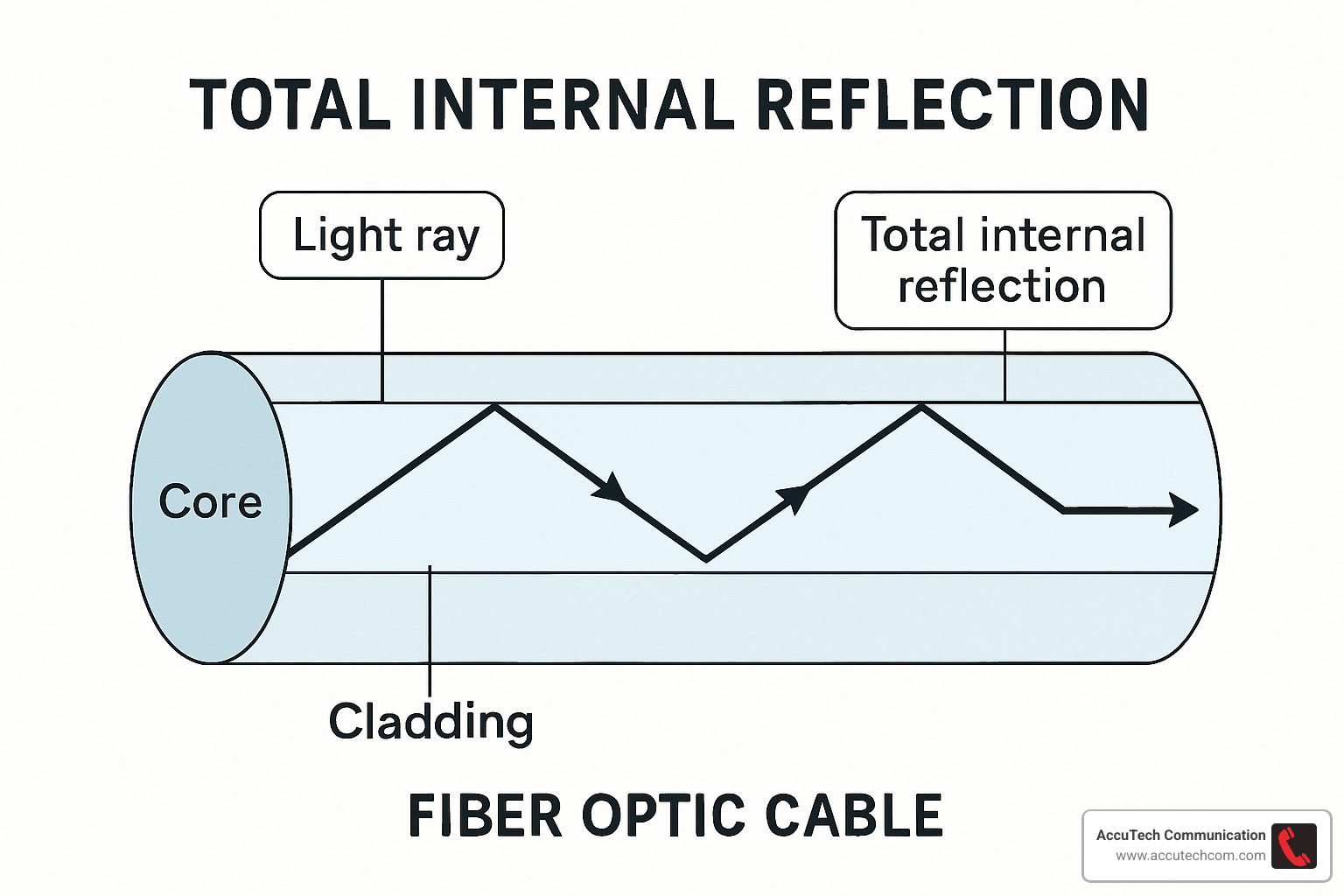
Once converted to light, your data enters the fiber core where total internal reflection keeps the light bouncing within the fiber. In multimode fiber, light zigzags along different paths, while in single-mode fiber, it travels straight down the center.
At the receiving end, photodiode detectors convert those light pulses back into electrical signals that computers can understand.
Most modern networks rely on Small Form-factor Pluggable (SFP) modules—hot-swappable transceivers that plug into network switches. For networks needing even more capacity, Wavelength Division Multiplexing (WDM) technology allows multiple data streams to travel simultaneously through a single fiber by using different light colors (wavelengths).
Performance Metrics of a fiber optic cable in computer network
Bandwidth and speed capabilities of modern fiber networks are truly impressive. While 10 Gbps connections are common in business environments, data centers often implement 40 Gbps, 100 Gbps, and now even 400 Gbps links. At 100 Gbps, you could transfer the entire contents of a 50GB Blu-ray disc in about 4 seconds!
Distance capability is another area where fiber truly shines. Light travels through fiber at roughly two-thirds the speed of light in a vacuum—approximately 180,000-200,000 km/s. Single-mode fiber can transmit signals up to 80-100 km without needing signal boosters.
Signal loss (or attenuation) measures how much the light signal weakens as it travels. Modern single-mode fiber achieves impressively low loss rates—as little as 0.19 dB/km at the 1550 nm wavelength.
Dispersion is the fiber optic world’s version of blurring. It happens when different light paths or wavelengths travel at slightly different speeds, causing the signal to spread out over distance.
More info about How Far Can Fiber Optic Cable Run?
Scientific research on light collection and propagation
Advantages and Limitations for Modern Networking
When it comes to building today’s networks, fiber optic cable in computer network infrastructure offers some remarkable advantages over traditional copper—but it’s not without challenges.
Why Fiber Beats Copper Today
Fiber’s bandwidth capabilities are simply astounding. A single pair of optical fibers can carry what would require thousands of copper wires. This extraordinary capacity means your network won’t hit a ceiling as your data needs grow.
Distance is another game-changer. While copper Ethernet hits a wall at about 100 meters, fiber optic cable in computer network installations can stretch up to 80 kilometers without signal boosters.
Fiber’s complete immunity to electromagnetic interference is essential in manufacturing environments with heavy machinery, healthcare facilities with sensitive equipment, or areas prone to lightning strikes.
Security-conscious organizations appreciate that fiber doesn’t radiate signals that can be intercepted. Any physical attempt to “tap” into fiber typically causes detectable signal loss, making unauthorized access much harder than with copper cables.
With a lifespan exceeding 100 years under normal conditions, and the ability to support increasing bandwidth through equipment upgrades rather than cable replacement, fiber truly represents a long-term investment in your infrastructure.
Environmental resilience is another significant advantage. Fiber operates reliably across extreme temperature ranges and remains unaffected by water (unless physically damaged).
When Fiber Might Not Be Ideal
Despite all these advantages, fiber optic cable in computer network deployments do come with some considerations. The initial investment typically runs higher than copper, though this gap has narrowed significantly in recent years.
Working with fiber requires specialized tools and trained technicians. While remarkably strong for their size, optical fibers can break if bent beyond their minimum bend radius (typically 10-30 times the cable diameter).
When breaks do occur, repairs involve more sophisticated equipment like fusion splicers rather than simple crimping tools.
Mitigation Tips for Fiber Limitations:
1. Use armored fiber cables in vulnerable areas where physical damage is more likely
2. Install proper cable management systems to maintain appropriate bend radius
3. Include spare “dark fibers” in your initial installation for future expansion or backup
4. Document cable paths thoroughly for faster troubleshooting if issues arise
5. Train your IT staff on basic fiber handling procedures to prevent accidental damage
With proper planning and professional installation, these limitations rarely become significant issues for most businesses.
More info about What are Two Characteristics of Fiber Optic Cable?
Installation, Connectors, and Maintenance Best Practices
Even the most advanced fiber optic cable in computer network systems won’t perform well if they’re not properly installed and maintained.
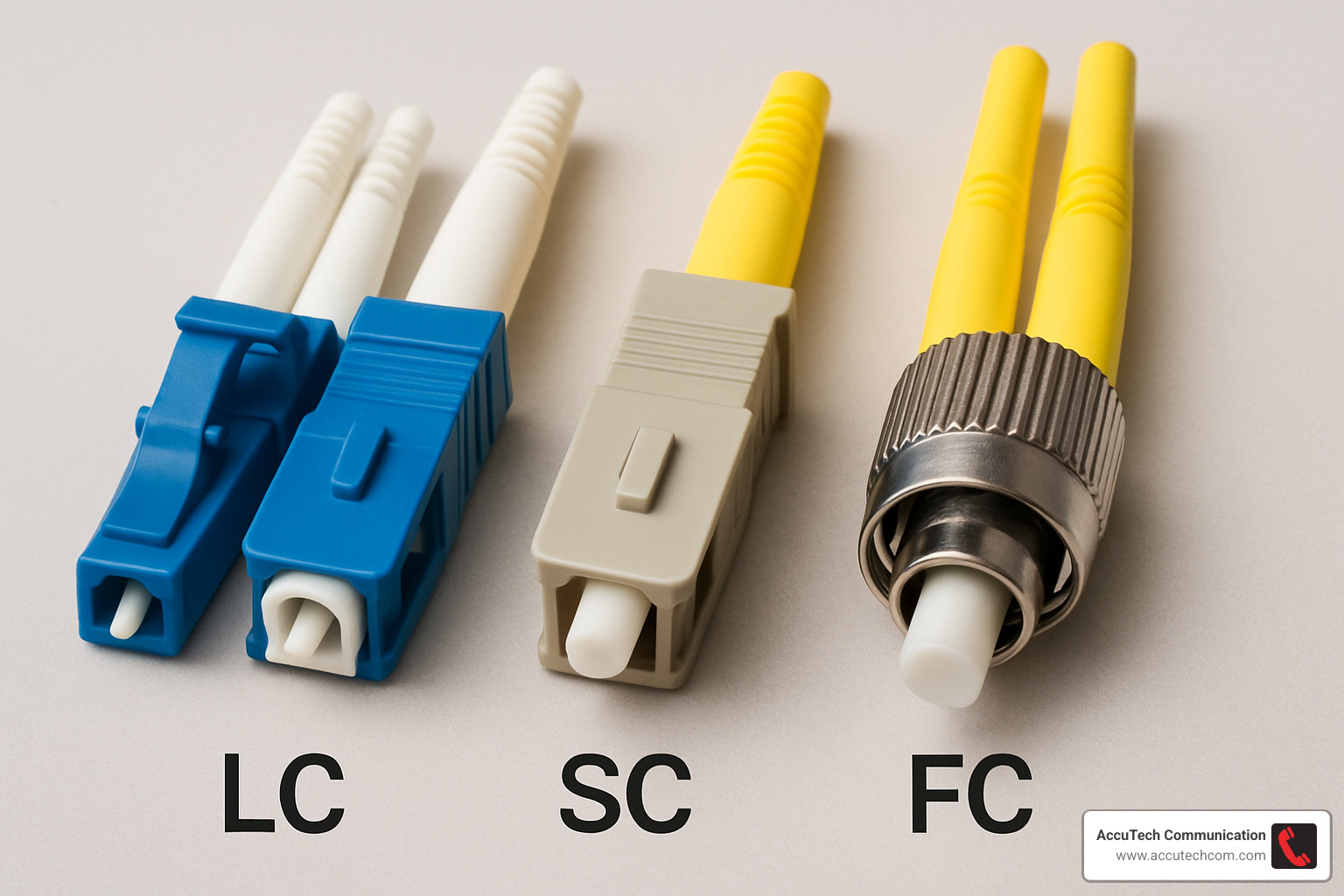
Common Connector Types
The small, clip-style LC (Lucent Connectors) have become the gold standard for today’s high-density applications. For more traditional setups, the square-shaped SC (Subscriber Connector) remains popular with their push-pull design that prevents rotation during installation.
In older buildings, you might still encounter the bayonet-style ST (Straight Tip) connectors. For industrial environments with heavy vibration, the threaded FC (Ferrule Connector) provides extra security. When connecting multiple fibers at once, MTP/MPO connectors handle 12, 24, or even 72 fibers in a single connection.
Installation Best Practices
Respecting the minimum bend radius is critical—bending fiber too sharply is like kinking a garden hose. For most cables, keep bends at least 10-30 times the cable diameter.
Proper pull tension is equally important. Excessive force can stretch and damage the delicate glass fibers inside.
Always clean before connecting. A speck of dust smaller than a human hair can cause significant signal loss.
After installation, thorough testing with an Optical Time Domain Reflectometer (OTDR) and power meter provides verification that everything is working properly.
Eye safety is essential. The infrared light used in many fiber systems is invisible but potentially harmful. Never look directly into fiber cables.
When joining fibers, fusion splicing provides the lowest loss (typically 0.1 dB) by actually melting the fibers together. For quick field repairs, mechanical splicing offers a faster solution with slightly higher loss.
More info about How to Terminate Fiber Optic Cable
Indoor vs Outdoor Deployment
For indoor installations, we typically use tight-buffer cables where individual fibers have thicker protective coatings. Building codes often require plenum-rated cables in air-handling spaces and riser-rated cables for runs between floors.
For outdoor applications, loose-tube cables with fibers floating in protective gel-filled tubes shield against moisture and temperature changes. In areas with rodent problems or where cables might face crushing forces, armored cables with metal protection layers are worth the extra investment.
For future expansion planning, micro-duct systems let you install empty pathways during initial construction—saving significant costs down the road.
More info about Fiber Optic Cable Installation
Repair & Troubleshooting Essentials
OTDR testing can pinpoint the exact location of a break by measuring the time it takes light to reflect back from the fault. For verifying connection quality, insertion loss testing with a light source and power meter confirms that connections meet specifications.
Visual fault locators shine bright red laser light through the fiber, making breaks or sharp bends visible even through some jacket materials. Before connecting any fiber, inspect connector end-faces with specialized microscopes to ensure they’re pristine.
More info about How to Repair Fiber Optic Cable
Future Trends & Hybrid Innovations
The world of fiber optic cable in computer network technology continues to evolve with innovations that expand what’s possible in our connected world.
Pushing the Bandwidth Envelope
- Petabit-Per-Second Transmission: NTT Japan demonstrated a single fiber cable transmitting 1 petabit (1,000,000 gigabits) per second over 50 kilometers. Researchers continue pushing these boundaries even further.
- Bend-Insensitive Fiber: Newer fiber designs maintain performance even when routed around tight corners, making installation in older buildings and cramped spaces much more practical.
- OM5 Wideband Multimode Fiber: This newer standard supports wavelength division multiplexing in multimode applications, significantly increasing capacity for shorter-distance links without requiring a complete infrastructure overhaul.
- Hollow-Core Fiber: Experimental fiber that guides light through air rather than glass could reduce latency by about 30% while potentially offering dramatic bandwidth increases.
5G and Beyond
5G/6G Backhaul networks rely heavily on fiber connections to cell towers and small cells. Without fiber’s massive capacity, the promise of ultra-fast wireless would remain just that—a promise.
The evolution of Fiber-to-the-Antenna (FTTA) brings direct fiber connections right to cellular antennas, dramatically reducing signal loss and increasing capacity.
As cellular architecture evolves, fronthaul networks require the kind of ultra-low latency connections between radio units and baseband processing that only fiber can provide.
Emergence of Hybrid Fiber-Copper Solutions
Hybrid Fiber-Coaxial (HFC) networks have allowed cable companies to deliver gigabit speeds over existing infrastructure.
Many multi-tenant buildings benefit from Fiber-to-the-Building + Copper approaches, which bring fiber to the building and then use existing copper for the final connection to individual units.
Hybrid Optical-Electrical Cables combine optical fibers with copper conductors in a single jacket, following Telcordia GR-3173 standards. They’re particularly valuable for powering remote equipment while simultaneously providing data connectivity.
Smart Buildings represent perhaps the most exciting integration, combining fiber backbones with various connection types to support everything from building automation to security systems and communications.
More info about Fiber Optic Construction Companies
Frequently Asked Questions about Fiber Optic Networking
In my years leading the AccuTech Communications team across Massachusetts and New Hampshire, I’ve heard these questions time and again when discussing fiber optic cable in computer network installations with clients.
How safe is laser light in network fibers?
The laser light in your fiber network is generally safe when everything’s intact because the light stays contained within the fiber itself. That said, we always emphasize some common-sense precautions:
Never look directly into fiber cables or connectors. The infrared light used in many systems is invisible to the human eye but can still damage your vision.
Most business fiber systems use Class 1 lasers, which are designed to be safe under normal conditions. We recommend keeping dust caps on unused connectors—not just for safety, but to keep your connections clean.
Can I mix single-mode and multimode in one link?
While technically possible with specialized mode-conditioning patch cords, mixing fiber types is something I generally steer clients away from.
When you mix single-mode and multimode fiber, you’ll experience significant signal loss at the transition point. Your entire link will be limited by the multimode segment’s capabilities, and troubleshooting becomes more difficult.
If you’re stuck with different fiber types that must connect, we recommend using media converters that properly transition between the two fiber types.
What’s the lifespan of installed fiber?
Properly installed fiber has an astonishingly long lifespan—the glass itself can last 100+ years under normal conditions.

In practice, most businesses upgrade their networks due to bandwidth needs long before the fiber itself fails. Outdoor cables typically have shorter lifespans (20-40 years) due to environmental exposure.
The connection points—connectors and splices—are usually the first points of failure, not the fiber itself. That’s why proper installation by certified technicians makes such a difference in long-term reliability.
How do I choose between single-mode and multimode fiber?
For links longer than 500 meters, single-mode fiber is typically the better choice. It also supports virtually unlimited bandwidth upgrades, making it more future-proof.
Multimode fiber (especially OM4 or OM5) works well for shorter distances and offers a good balance of performance and cost for many business applications.
For most business campuses, we recommend a hybrid approach: single-mode for building-to-building connections, OM4 or OM5 multimode for within-building backbone, and Category 6A copper for workstation connections.
What testing should be performed after installation?
At minimum, your new fiber installation should undergo:
Tier 1 Testing using a power meter and light source to measure end-to-end loss.
OTDR Testing to verify the quality of the fiber and identify any potential issues like microbends or splice points.
Connector End-Face Inspection to ensure proper cleaning and polishing.
Comprehensive Documentation of all test results should be provided as a baseline for future reference.
Conclusion
Fiber optic cable in computer network infrastructure has transformed from a luxury to a necessity for businesses that depend on reliable, high-speed connectivity. Fiber’s superior bandwidth, exceptional distance capabilities, and immunity to electromagnetic interference make it the ideal foundation for modern networks.
The evolution of fiber technology continues at a remarkable pace. From petabit-per-second transmission demonstrations to bend-insensitive designs and hybrid solutions, fiber optics will remain at the forefront of networking innovation for decades to come.
For businesses in Massachusetts, New Hampshire, and Rhode Island, implementing the right fiber infrastructure requires careful planning and expert execution. At AccuTech Communications, we’ve been designing and installing custom fiber solutions since 1993, providing our clients with:
- Certified technicians trained in the latest fiber installation techniques
- Comprehensive design services custom to specific business needs
- Future-proof infrastructure that grows with your organization
- Ongoing support and maintenance to ensure optimal performance
Whether you’re upgrading an existing network, expanding to new locations, or building from the ground up, fiber optic cabling provides the solid foundation your business needs for today’s demands and tomorrow’s innovations.
More info about our Fiber Optic Cable services
As data requirements continue to grow exponentially, the businesses that thrive will be those with the foresight to invest in scalable, reliable network infrastructure. Fiber optics—these thin strands of glass carrying pulses of light—truly are the unsung heroes of modern computer networks.
