
Network Cable Speeds: Top 3 Game-Changing Facts 2024
Network cable speeds are a crucial aspect of modern communication systems, influencing how effectively a business can operate. At their core, these speeds determine the data transmission rate over Ethernet cables or LAN cabling, pivotal for supporting robust and high-performance networks. For those eager to understand the essentials, here’s a quick breakdown:
- Ethernet cables like Cat5, Cat6, and Cat7 serve different speed needs.
- Transmission rates range from 10 Mbps for older standards to 10 Gbps and beyond for the latest specifications.
- LAN cabling forms the backbone of any reliable network infrastructure.
Understanding these elements ensures your network runs smoothly, meeting both current requirements and future demands.
I’m Corin Dolan, bringing years of experience as the owner of AccuTech Communications. My expertise in network cable speeds has helped many businesses improve their communication networks, ensuring they’re up-to-date with industry standards. In this introduction, we’ve scratched the surface of what network cable speeds entail.
Easy network cable speeds glossary:
– network cable categories
– network cable for gigabit ethernet
– ethernet cable wiring
Understanding Network Cable Categories
When it comes to selecting the right Ethernet cable for your network, understanding the different categories is key. Let’s break down the main categories: Cat5, Cat5e, Cat6, Cat6a, Cat7, and Cat8.
Cat5 and Cat5e
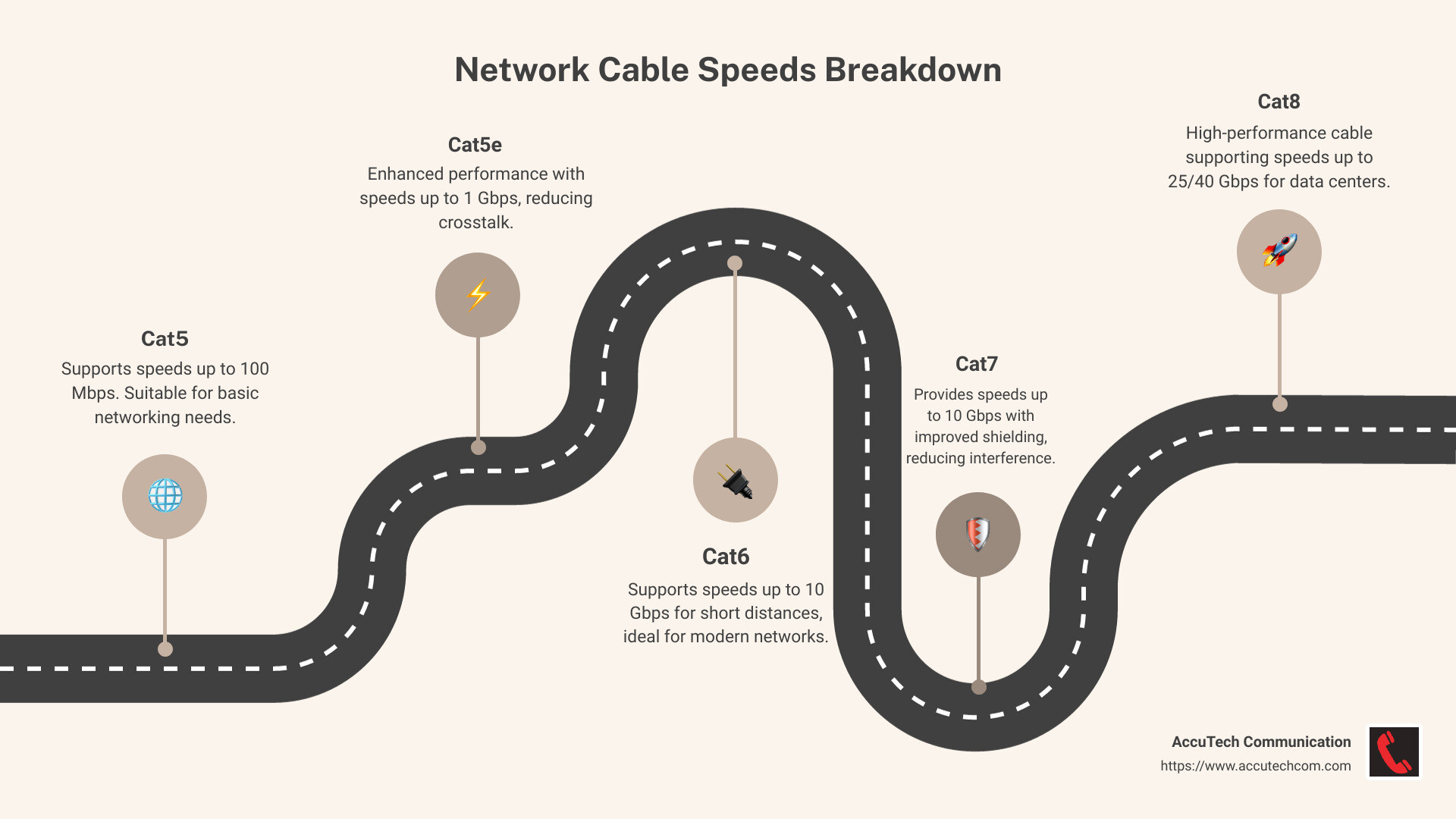
Cat5 cables were once the standard for Ethernet connections, supporting speeds up to 100 Mbps with a bandwidth of 100 MHz. They are made of four twisted pairs of copper wire and use an RJ45 connector. While they can sometimes achieve Gigabit speeds on short runs, they have largely been replaced by Cat5e cables.
Cat5e stands for “improved” and offers reduced crosstalk and improved performance, supporting speeds up to 1 Gbps. Both Cat5 and Cat5e operate at the same frequency, but Cat5e is far more common today due to its ability to handle Gigabit Ethernet reliably.
Cat6 and Cat6a
Cat6 cables support higher data transfer speeds of up to 10 Gbps, but only up to 55 meters. They operate at a frequency of 250 MHz, providing better performance with less interference. This makes them suitable for modern networks that demand faster speeds.
Cat6a, with the “a” meaning “augmented,” takes it a step further by maintaining 10 Gbps speeds over the full 100-meter length. Operating at 500 MHz, Cat6a cables offer improved shielding, reducing crosstalk and external interference even more effectively.
Cat7
Cat7 cables are designed for environments that require high-speed data transfer and minimal interference. They support 10 Gbps over 100 meters and can even achieve 40 Gbps at shorter distances. With shielding on individual wire pairs and the overall cable, they operate at frequencies up to 600 MHz, making them ideal for setups where external electromagnetic interference is a concern.
Cat8
Cat8 is the newest category, pushing the boundaries with speeds up to 25 or 40 Gbps. These cables are designed for data centers and other high-performance environments where short-distance, high-speed connections are essential. Operating at frequencies up to 2,000 MHz, Cat8 cables provide superior shielding to minimize interference.
By understanding these network cable categories, you can make informed decisions about which cable best suits your needs, whether it’s for a home setup or a demanding business environment. Each category offers unique benefits, and selecting the right one ensures your network is both efficient and future-proof.
Network Cable Speeds: A Detailed Comparison
When diving into network cable speeds, grasp the different technologies powering these connections. Let’s explore the key players: Ethernet speeds, Gigabit Ethernet, 1000BASE-T, and 100 Gigabit Ethernet.
Ethernet Speeds
Ethernet has come a long way since its inception. Initially, Ethernet cables like Cat5 supported speeds up to 100 Mbps. These speeds were sufficient for basic internet browsing and file sharing. However, as our need for speed increased, so did the capabilities of Ethernet cables.
Gigabit Ethernet
Enter Gigabit Ethernet. With the rise of Cat5e and Cat6 cables, networks could now achieve speeds of 1 Gbps. This leap was crucial for supporting data-intensive applications like video streaming and large file transfers. Gigabit Ethernet became the standard for most home and business networks, providing a noticeable improvement in performance.
1000BASE-T
The introduction of 1000BASE-T technology marked a significant milestone. This standard enabled Gigabit Ethernet over twisted-pair copper cabling, allowing for high-speed data transfer across existing infrastructures. Most Cat5e and Cat6 cables support 1000BASE-T, making it a versatile choice for upgrading networks without a complete overhaul.
100 Gigabit Ethernet
For environments that demand even more power, 100 Gigabit Ethernet is the answer. This technology is custom for data centers and enterprise networks requiring ultra-fast data transfer. While it typically relies on fiber optics, advancements in copper cabling, like Cat8, support these speeds over shorter distances.
Cat8 cables, in particular, excel in delivering speeds up to 40 Gbps, making them ideal for high-performance applications. They are designed to handle the demands of modern data centers, where every millisecond counts.
Understanding network cable speeds is crucial for optimizing your setup. Whether you’re upgrading a home network or managing a complex data center, selecting the right cable ensures seamless data flow and future-proof performance.
Factors Affecting Network Cable Performance
When it comes to network cable speeds, several factors play a crucial role in determining how well your setup performs. Let’s explore these key elements: bandwidth, shielding, crosstalk, and electromagnetic interference.
Bandwidth
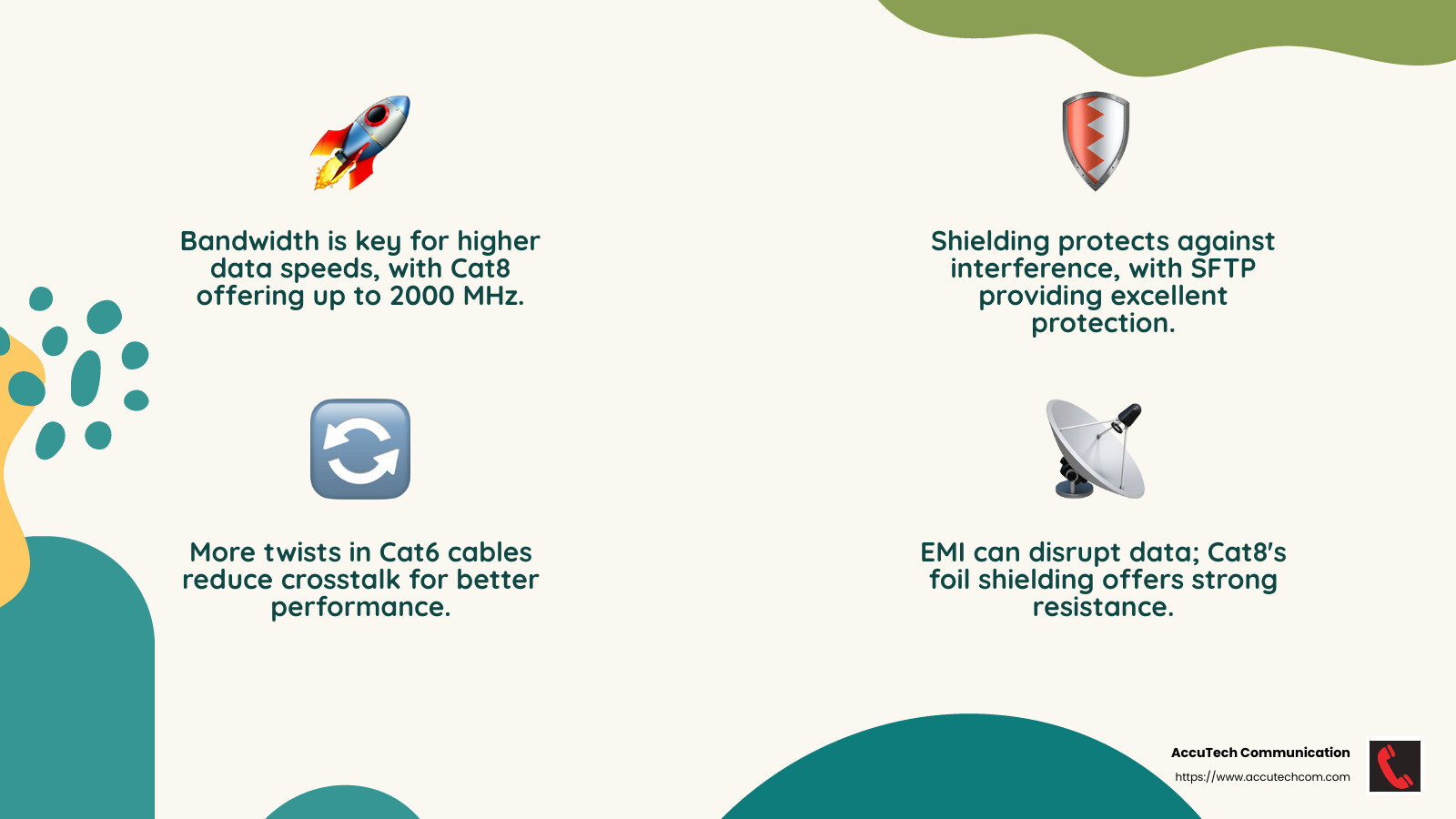
Bandwidth is like the highway for your data. It determines how much data can travel through the cable at any given time. Higher bandwidth means more data can flow, resulting in faster speeds. For instance, Cat5 cables offer up to 100 MHz, while Cat8 cables reach a whopping 2000 MHz, allowing them to handle much larger volumes of data.
Shielding
Shielding acts as a protective barrier around the cable, reducing interference from external sources. Different types of shielding, like STP (Shielded Twisted Pair) and SFTP (Shielded Foiled Twisted Pair), offer varying levels of protection. STP is great for high-speed networks needing secure data transmission, whereas SFTP excels in environments with potential signal interference.
Crosstalk
Crosstalk occurs when signals from one cable interfere with another, much like overhearing a conversation. This can slow down your network. To combat this, cables like Cat6 and above have more twists in their wires, which helps reduce crosstalk. Additionally, some cables include a physical separator, or “spline,” to further minimize interference.
Electromagnetic Interference (EMI)
EMI is the unwanted noise from external electronic devices that can disrupt the data traveling through your cables. Shielding is crucial in reducing EMI. For example, Cat8 cables are wrapped in foil, providing excellent protection against EMI, making them ideal for data centers and environments with heavy electronic usage.
By considering these factors—bandwidth, shielding, crosstalk, and electromagnetic interference—you can ensure your network cables deliver optimal performance. Whether you’re setting up a home network or a high-performance data center, understanding these elements is vital for a smooth and efficient connection.
Next, we’ll dive into how to choose the right Ethernet cable for your specific needs, considering factors like installation length and application environments.
Choosing the Right Ethernet Cable for Your Needs
Selecting the right Ethernet cable can feel overwhelming, but understanding a few key factors can make the decision much easier. Here, we’ll break down the essentials: installation length, shielding type, and application environments.
Installation Length
The length of your cable run is crucial in determining the best cable type. Ethernet cables have maximum lengths for optimal performance. For instance, Cat6 cables can support speeds of 1 Gbps over distances up to 100 meters, but for 10 Gbps, they are effective only up to 37-55 meters. Cat6a, on the other hand, can maintain 10 Gbps speeds over 100 meters. If your setup requires longer distances, consider fiber optic cabling or Cat6a for consistent high-speed performance.
Shielding Type
Shielding protects your data from interference. The type of shielding you need depends on your environment. Here’s a quick guide:
- UTP (Unshielded Twisted Pair): Best for standard environments with minimal interference. It’s cost-effective and easy to install.
- FTP (Foiled Twisted Pair): Adds a layer of foil around the pairs, providing basic protection against external interference. Ideal for environments with moderate EMI (Electromagnetic Interference).
- STP (Shielded Twisted Pair): Each pair is shielded, offering better protection than FTP. It’s suitable for high-speed networks needing secure data transmission.
- SFTP (Shielded Foiled Twisted Pair): Combines both foil and braided shielding for maximum protection. Perfect for environments with significant EMI and RFI (Radio Frequency Interference).
Application Environments
Consider where you’ll be using your Ethernet cable. For home use, Cat5e or Cat6 might suffice, providing adequate speed and performance for everyday tasks like streaming and gaming. For professional settings, especially data centers, Cat6a, Cat7, or even Cat8 cables are recommended due to their higher speeds and shielding capabilities.
For specific environments:
- Residential: Cat5e or Cat6 for cost-effective, reliable performance.
- Offices: Cat6a for higher speeds and future-proofing as network demands grow.
- Industrial/High-EMI Areas: SFTP cables to minimize interference and maintain data integrity.
By considering these factors—installation length, shielding type, and application environments—you can choose the right Ethernet cable that meets your needs and ensures a robust and efficient network setup.
In the next section, we’ll address some frequently asked questions about network cable speeds to further clarify any lingering doubts.
Frequently Asked Questions about Network Cable Speeds
How fast are network cables?
Ethernet cables are designed to support different transmission rates. The speed depends on the cable category:
- Cat5: Up to 100 Mbps
- Cat5e: Up to 1 Gbps
- Cat6: 1 Gbps at 100 meters, 10 Gbps up to 55 meters
- Cat6a: 10 Gbps at 100 meters
- Cat7: 10 Gbps, with improved shielding
- Cat8: Up to 25-40 Gbps over short distances (up to 30 meters)
For most home networks, Cat5e or Cat6 cables are sufficient, providing fast and reliable connections for streaming, gaming, and general internet use.
Is Cat7 overkill for home use?
Cat7 cables offer high-performance cabling with speeds up to 10 Gbps and improved shielding to reduce interference. While this might sound appealing, for most residential applications, it is indeed overkill.
The typical home setup doesn’t require such high speeds or extensive shielding. Cat6 or Cat6a cables are more than adequate for home use, offering excellent performance at a lower cost. If you’re future-proofing or planning a smart home with extensive networking needs, Cat6a might be a wise choice.
Is CAT8 better than Cat6?
Cat8 cables are the top-of-the-line choice, supporting speeds up to 25-40 Gbps over short distances (up to 30 meters). They’re ideal for data centers or professional environments requiring ultra-fast connections.
However, for most users, Cat6 or Cat6a is sufficient. These cables support 1 Gbps and 10 Gbps respectively, over longer distances. Unless you’re running a server room at home, Cat8 would be unnecessary and costly.
In summary, choose a cable based on your specific needs. For typical home use, Cat6 or Cat6a offers a great balance of speed, performance, and cost.
Conclusion
At AccuTech Communications, we pride ourselves on delivering top-notch network cabling services custom to meet the diverse needs of businesses across Massachusetts, New Hampshire, and Rhode Island. Since 1993, our commitment to quality and certified service has set us apart in the industry.
Our competitive pricing ensures that you get the best value for your investment. We understand that every business has unique requirements, so we offer solutions that are both reliable and cost-effective. Whether you’re setting up a small office network or a large corporate infrastructure, our team is equipped to provide the optimal cabling solution.
Our certified experts are dedicated to ensuring your network performs at its best. With AccuTech Communications, you can trust that your network will be robust, efficient, and ready to handle the demands of modern business operations.
Explore our network cable services to see how we can strengthen your network infrastructure today.
