
What Does CCTV Installation Cost for a Business in 2026?
CCTV installation cost for commercial properties in Massachusetts, New Hampshire, and Rhode Island varies widely depending on system size, building complexity, and equipment quality. Here is a quick snapshot of what businesses typically budget, based on publicly available industry averages:
| System Size | Typical Budget Range (Industry Average) |
|---|---|
| Small office (4 cameras) | $2,500 – $5,000+ |
| Mid-size business (8–16 cameras) | $5,000 – $15,000+ |
| Large facility (16–32+ cameras) | $15,000 – $50,000+ |
Prices above are industry averages sourced from publicly available online data. They are not the rates of AccuTech Communications. Actual project costs vary based on site conditions, equipment specifications, and scope.
Understanding the real cost of a commercial surveillance system is not straightforward. Unlike a simple consumer kit from a big-box store, a properly designed business CCTV system involves structured cabling, network integration, compliant installation practices, and ongoing support — all of which affect the final price.
There is no single number that fits every business. A small retail space in Boston has very different needs than a multi-floor warehouse in Manchester, NH. That is why knowing what drives cost matters more than any single average figure.
I’m Corin Dolan, owner of AccuTech Communications, and with over 30 years of experience designing and installing commercial communications infrastructure — including business CCTV systems — across Massachusetts, New Hampshire, and Rhode Island, I have seen how misunderstanding CCTV installation cost leads businesses to either overspend or under-protect their facilities. The sections below will give you a clear, honest breakdown so you can budget with confidence.
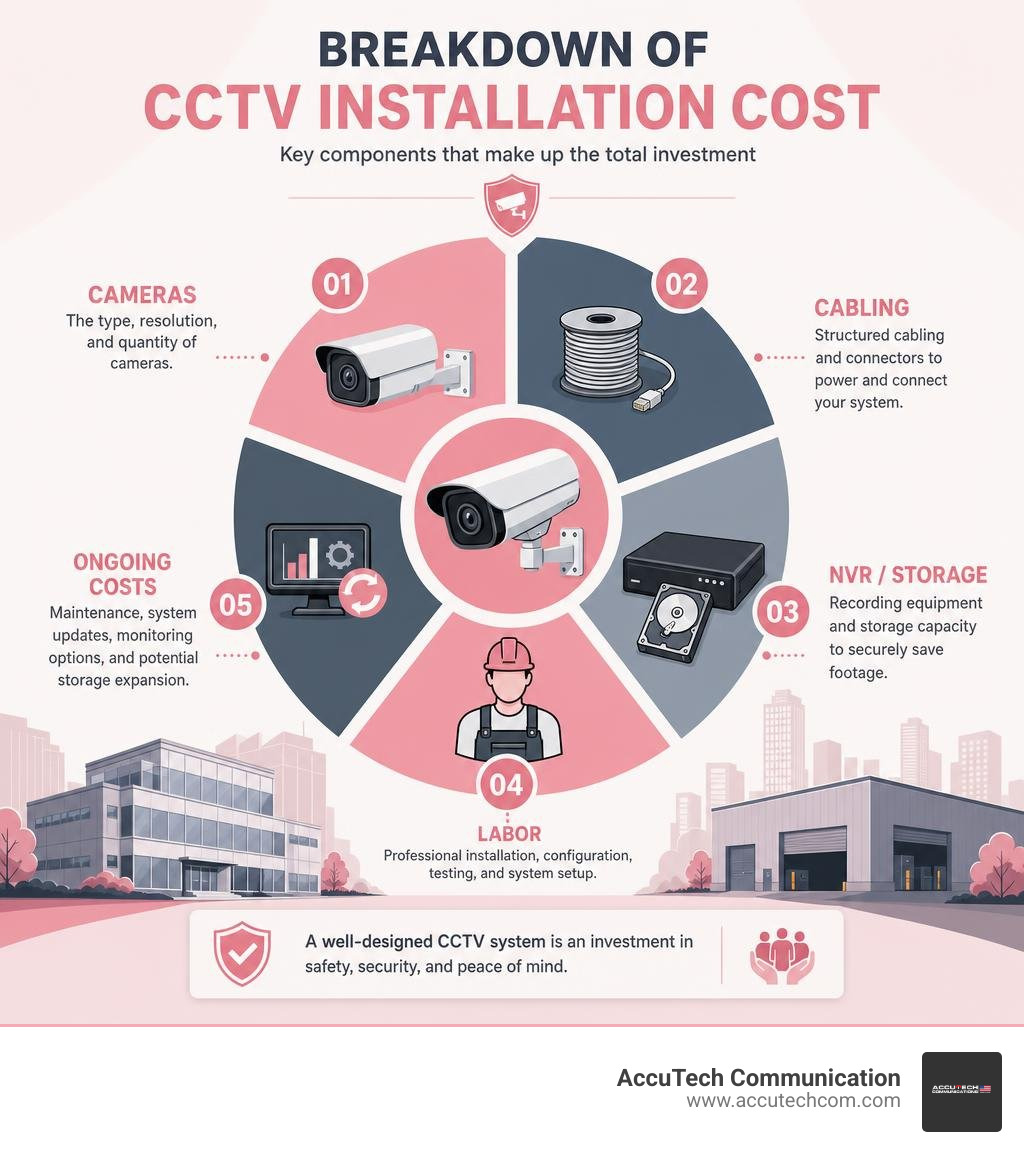
CCTV Installation Cost in 2026: Commercial Price Ranges Businesses Should Expect
Commercial CCTV budgets are shaped by more than the camera count. A business-grade system usually includes cameras, recording equipment, network switches, cabling, mounting hardware, configuration, testing, user permissions, remote access, documentation, and training.
Public online data shows that commercial systems generally fall into three broad budget categories:
| Commercial CCTV System Type | Common Use Case | Typical Public Industry Budget Range |
|---|---|---|
| Basic commercial system | Small office, storefront, reception area, limited entry coverage | $2,500-$5,000+ |
| Mid-range commercial system | Larger office, retail space, warehouse, multi-zone coverage | $5,000-$15,000+ |
| Enterprise or complex system | Multi-building facility, 16-32+ cameras, advanced storage, integrations | $15,000-$50,000+ |
Again, these are public industry averages, not AccuTech Communications rates. The best way to understand your actual budget is to compare system scope, infrastructure needs, and long-term support requirements. For a broader look at business security budgeting, see our guide to Business Security System Costs.
Average CCTV Installation Cost for a Small Commercial System
For a small commercial system, many businesses start with four to eight cameras. A four-camera system may cover:
- Main entrance
- Rear entrance
- Reception or lobby
- Inventory, cash handling, or equipment area
An eight-camera system may add:
- Parking lot coverage
- Loading dock views
- Hallways
- Secondary exits
- Server room or network closet
- Outdoor perimeter points
Public industry averages often place smaller commercial systems in the low-thousands to five-figure range depending on camera quality, cabling complexity, and storage requirements. A basic system might include an NVR or DVR, cameras, mounts, cabling, configuration, testing, remote access setup, and user training.
The biggest mistake we see is assuming that a four-camera commercial project is simply four cameras multiplied by a camera price. In reality, the infrastructure behind the cameras often determines the final budget.
Professional CCTV Installation Cost Per Camera
Per-camera installation costs vary because every camera location is different. One camera mounted on a drop ceiling near an existing network closet is one thing. A camera mounted outdoors, high on a warehouse wall, with conduit, lift access, and weatherproofing is a completely different animal.
Public online data often shows professional commercial labor ranging widely per camera, especially when the work includes:
- Cable pulls through ceilings or conduit
- Ladder or lift work
- Exterior mounting
- Weatherproof boxes and seals
- Network terminations
- Camera aiming and focus
- PoE switch configuration
- NVR setup
- Remote viewing setup
- Testing and documentation
A fair quote should explain what is included. If one proposal includes cabling, programming, training, and documentation while another only includes mounting cameras, they are not the same quote. Apples to apples, not apples to a suspiciously cheap banana.
Why Residential Internet Averages Do Not Equal Commercial Project Costs
Residential CCTV averages do not translate well to business projects. Commercial environments have higher expectations for reliability, data retention, security, and documentation.
Commercial CCTV systems may require:
- Work during business hours or after-hours scheduling
- Low-voltage cabling standards
- Network integration
- Multi-user access control
- Longer footage retention
- More durable equipment
- Exterior weatherproofing
- Access to ceilings, walls, racks, and telecom rooms
- Documentation for insurance or internal compliance
- Coordination with IT teams, landlords, or facility managers
That is why commercial budgeting should focus on business-grade systems, not consumer camera kits. If you are planning a broader security upgrade, our Business Security Systems page explains how surveillance fits into a complete protection strategy.
What Factors Influence Total CCTV Installation Cost?
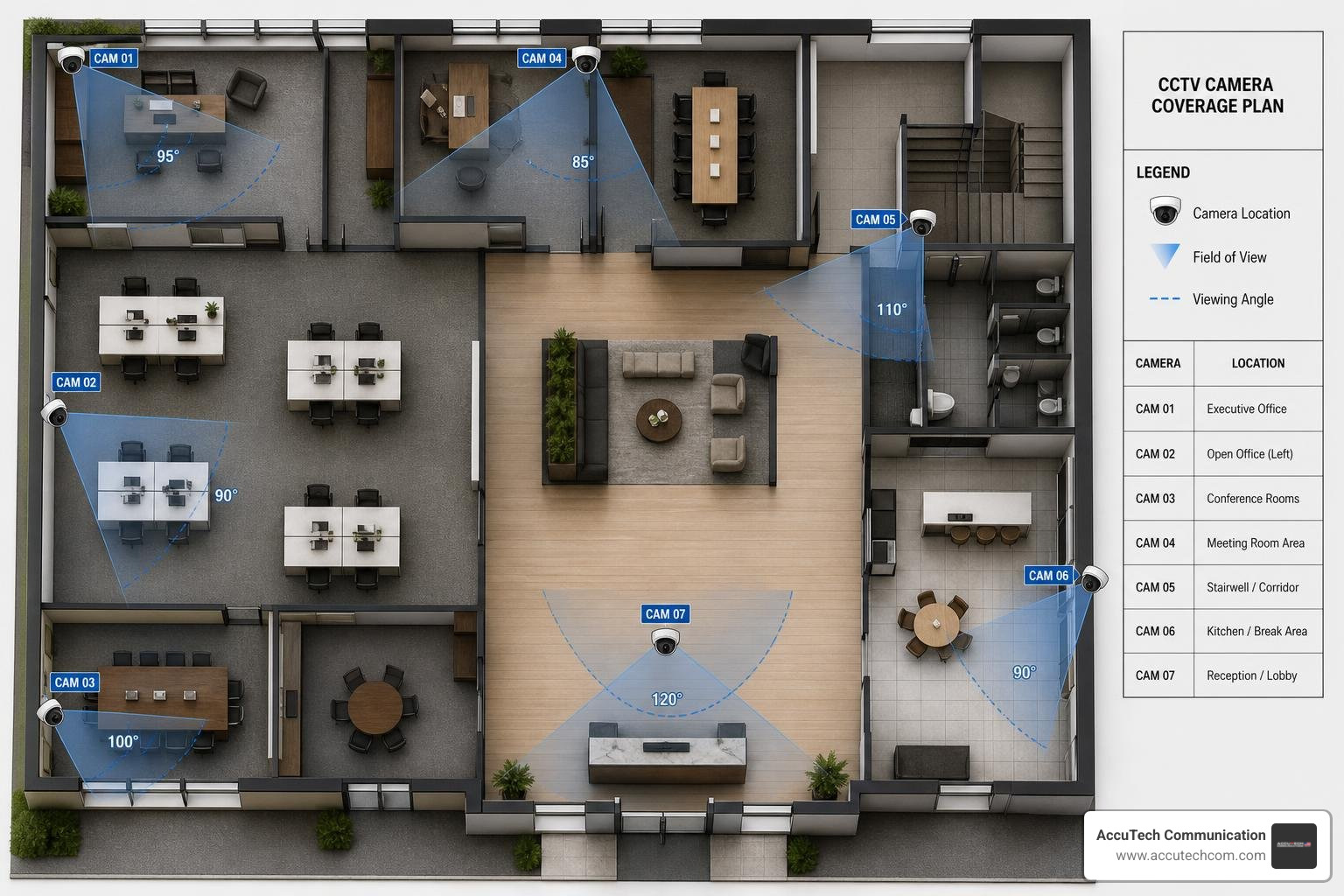
The total CCTV installation cost depends on a mix of equipment, labor, infrastructure, and ongoing service needs. The most important cost drivers are camera count, camera type, building layout, recording requirements, and network readiness.
Number of Cameras, Coverage Goals, and Blind Spots
The right camera count starts with coverage goals, not guesswork. For commercial properties, common surveillance zones include:
- Main entrances and exits
- Reception areas
- Corridors
- Loading docks
- Parking areas
- Inventory rooms
- Cash handling areas
- Server rooms
- Perimeter doors
- Warehouses and production areas
A good design balances visibility, evidence quality, and budget. Too few cameras can leave blind spots. Too many cameras can waste money and create unnecessary storage demand.
We recommend identifying choke points first. These are areas where people or vehicles must pass, such as entrances, gates, hallways, and loading docks. From there, cameras can be placed to create useful overlap without overbuilding the system.
For more on camera selection and business use cases, visit our page on Security Camera for Business.
Camera Features That Raise or Lower the Budget
Camera features affect both equipment cost and installation design. Common feature choices include:
- HD or 4K resolution
- Night vision or low-light capability
- Varifocal lenses
- PTZ, or pan-tilt-zoom, movement
- Panoramic or fisheye views
- License plate capture
- Motion detection
- AI-based alerts
- Audio capability
- Weather resistance
- Vandal-resistant housings
- Wide dynamic range for bright/dark scenes
Not every area needs the highest-end camera. A hallway may only need a fixed dome camera, while a parking lot entrance may need higher resolution, better low-light performance, or license plate capture.
The goal is to right-size camera specifications by location. Overspecifying every camera is one of the fastest ways to inflate a budget without improving security.
Recording, Storage, and Network Infrastructure
Recording and storage are major cost factors. A CCTV system may use:
- NVRs for IP camera systems
- DVRs for analog systems
- Local hard drive storage
- Cloud backup
- Offsite video storage
- PoE switches
- Cat6 cabling
- Fiber backbone connections
- VLANs or segmented camera networks
- UPS battery backup
Storage cost depends on resolution, frame rate, compression, number of cameras, and retention period. A business that needs a few days of footage has different requirements than one that needs several weeks or months.
Network readiness also matters. IP cameras need reliable cabling, switching, bandwidth, and cybersecurity planning. If your network closet is already organized and has available PoE capacity, the project may be more straightforward. If new cabling, switches, racks, or fiber are needed, the budget changes.
AccuTech Communications has provided commercial cabling and infrastructure services since 1993. That matters because modern CCTV is not just a camera project; it is also a network project. Learn more about our Network cabling installation and Structured cabling services.
Wired vs. Wireless CCTV Installation Cost for Businesses
For commercial properties, wired CCTV is usually the preferred long-term option. Wireless cameras can have a place in temporary or hard-to-wire areas, but they are rarely the best choice for business-critical surveillance.
Wired CCTV Installation Cost and Best Use Cases
Wired systems typically use Cat6 cabling and PoE, or Power over Ethernet, to send both power and data through one cable. This creates a stable connection and supports continuous recording.
Wired systems are commonly used for:
- Offices
- Warehouses
- Retail spaces
- Multi-floor buildings
- Exterior cameras
- Parking areas
- Campuses
- Facilities with long retention needs
The installation labor can be higher because cable must be routed properly. That may involve ceiling access, conduit, wall penetrations, cable management, labeling, testing, and rack work.
However, wired systems often reduce long-term reliability problems. Fewer signal issues. Fewer battery concerns. Fewer mysterious WiFi gremlins wandering around at 2 a.m.
For commercial surveillance planning, see our page on Business CCTV Systems.
Wireless CCTV Installation Cost and Limitations
Wireless cameras can reduce some wiring needs, but they still need power unless they are battery or solar powered. In commercial environments, wireless systems can face limitations such as:
- WiFi signal interference
- Bandwidth congestion
- Dead zones
- Cybersecurity exposure
- Cloud dependence
- Battery maintenance
- Scaling challenges
- Less predictable uptime
Wireless may be useful for temporary monitoring, construction trailers, outbuildings, or locations where cabling is impractical. But for core business security, wired systems are usually more reliable.
A lower upfront installation cost can become a higher operational burden if cameras drop offline, storage is inconsistent, or IT staff must constantly troubleshoot connectivity.
IP vs. Analog and Hybrid Systems
Commercial CCTV systems generally fall into three categories:
- IP systems
- Analog systems
- Hybrid systems
IP systems use network cameras and NVRs. They offer higher resolution, easier scalability, and better integration with modern networks.
Analog systems use coaxial cable and DVRs. They may still be present in older buildings.
Hybrid systems allow businesses to reuse some existing coax while upgrading parts of the system to IP. This can be useful when a company wants better image quality without replacing every cable immediately.
The best option depends on existing infrastructure, budget, required resolution, and expansion plans. If you are comparing system types, our Business Camera System page is a helpful next step.
Hidden and Ongoing CCTV System Costs to Include in the Budget
The installation quote is only part of the total cost. Businesses should also plan for storage, monitoring, software, maintenance, lifecycle replacement, and compliance considerations.
Storage, Monitoring, and Subscription Costs
Cloud storage and monitoring can add recurring costs. Public online averages commonly show cloud storage plans priced per camera per month, with costs increasing for longer retention, higher resolution, and advanced features.
Businesses may choose:
- Local recording only
- Cloud backup
- Hybrid local and cloud storage
- Motion-based recording
- Continuous recording
- Event-based alerts
- Live video monitoring
Local recording can reduce subscription dependency, but it still requires properly sized hard drives and backup planning. Cloud backup can improve resilience, especially if a recorder is damaged or stolen.
For businesses that need active oversight, Video Monitoring and Live Video Monitoring can add another layer of protection beyond simply recording footage.
Maintenance, Repairs, and System Lifecycle Costs
CCTV systems need maintenance. Cameras are not set-it-and-forget-it forever devices, despite what we all wish.
Ongoing costs may include:
- Lens cleaning
- Camera realignment
- Firmware updates
- NVR software updates
- Hard drive replacement
- UPS battery replacement
- Troubleshooting
- Service calls
- Warranty extensions
- Adding users or permissions
- Replacing damaged cameras
- Expanding storage
Public industry averages for annual maintenance vary widely depending on system size and service level. Smaller systems may need only periodic service, while larger commercial systems may benefit from scheduled maintenance plans.
Hard drives are especially important. Surveillance drives run continuously and eventually need replacement. Planning for lifecycle costs helps avoid surprise failures.
Permits, Privacy, and Compliance Considerations in MA, NH, and RI
Businesses in Massachusetts, New Hampshire, and Rhode Island should consider local code requirements, lease rules, employee privacy, signage, and audio recording laws before installing cameras.
Important considerations include:
- Avoiding cameras in private areas
- Using clear signage where appropriate
- Reviewing audio recording rules before enabling microphones
- Coordinating with property owners or landlords
- Following low-voltage installation standards
- Maintaining documentation for internal policies
- Protecting camera networks from unauthorized access
- Limiting user permissions to appropriate staff
Because requirements can vary by municipality, building type, and use case, businesses should review local rules and consult qualified professionals when needed.
How to Reduce CCTV Installation Cost Without Underspending on Security
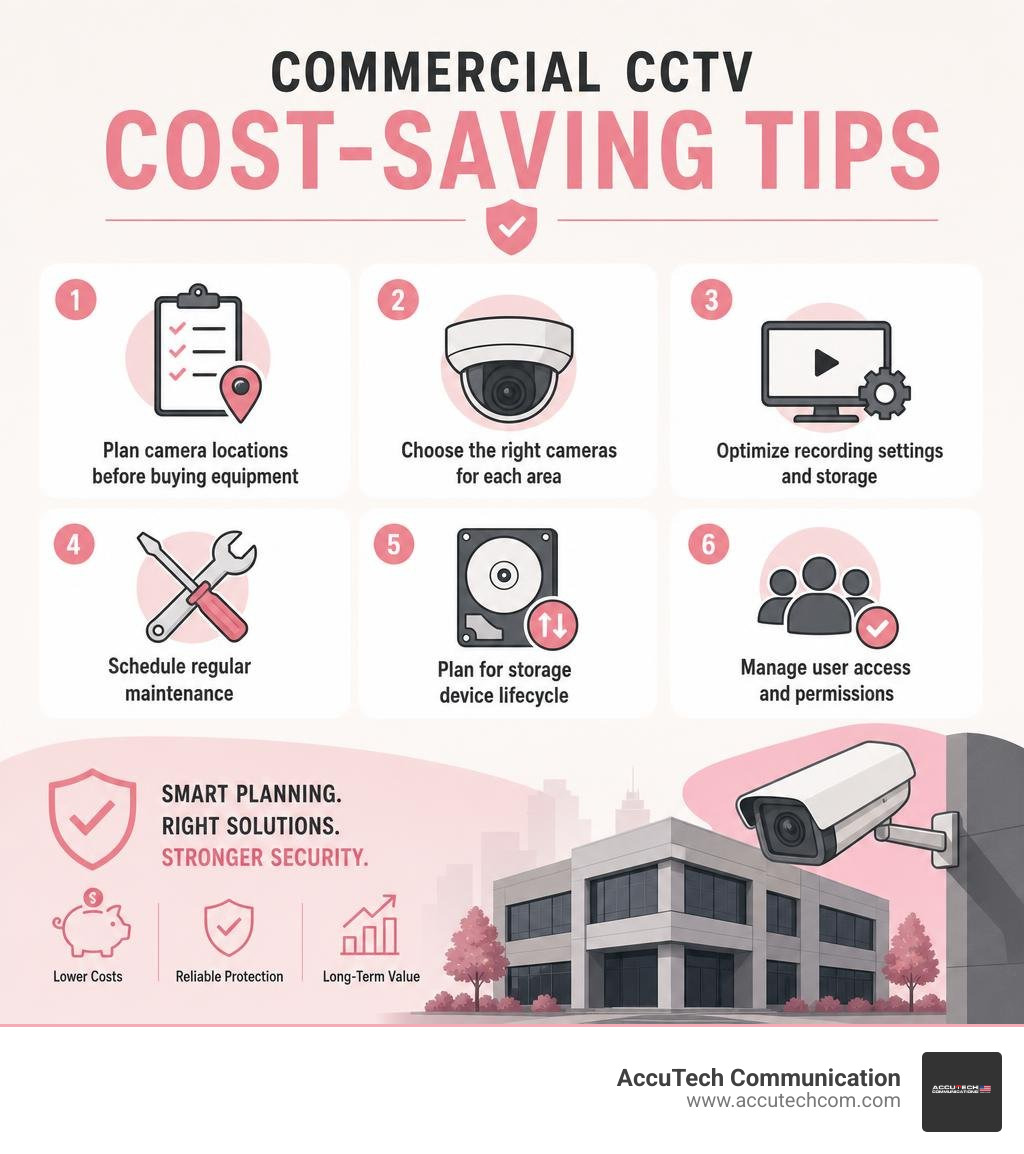
A lower CCTV budget is not automatically better. The real goal is to reduce waste while still protecting people, property, and operations.
Smart cost-saving strategies include:
- Plan camera locations before buying equipment
- Prioritize high-risk areas first
- Reuse existing cabling when it tests properly
- Avoid over-specifying every camera
- Use motion recording where appropriate
- Choose local storage when it fits the use case
- Build in expansion capacity
- Bundle cabling and camera work when possible
- Phase large projects over time
- Get a professional site survey
For a broader view of business protection planning, visit our Commercial Security Solutions page.
Plan Camera Locations Before Buying Equipment
A site survey is one of the best ways to control costs. Before equipment is selected, identify:
- Entry and exit points
- Blind spots
- High-value assets
- Cash handling areas
- Loading and delivery zones
- Lighting conditions
- Mounting heights
- Cable pathways
- Network closet locations
- Future expansion needs
Planning reduces change orders, extra cable runs, and unnecessary cameras. It also improves evidence quality. A camera pointed in the wrong direction is just an expensive wall decoration.
If you are preparing to compare proposals, read our Detailed Guide to Getting Commercial CCTV Installation Quotes.
Reuse Infrastructure Where It Makes Sense
Existing infrastructure can sometimes lower costs, but only if it is suitable. A professional installer may evaluate:
- Cat5e or Cat6 cabling
- Existing coax
- Conduit pathways
- Network racks
- Patch panels
- PoE switches
- Power availability
- Network closets
- Fiber connections
- Cable labeling and test results
Reusing old cabling without testing can create reliability problems. But when existing infrastructure is in good condition, it may reduce labor and speed up installation.
If you are searching locally, our Security Camera Installation Near Me page explains what businesses should look for in a qualified commercial installer.
Avoid DIY for Business-Critical CCTV Systems
DIY may look cheaper upfront, but business-critical CCTV is not the best place to experiment. Commercial systems require proper cable routing, cybersecurity, storage design, camera aiming, user permissions, and documentation.
DIY risks include:
- Missed coverage zones
- Poor image quality
- Unreliable recording
- Weak passwords or exposed devices
- Messy cabling
- No installation documentation
- Inadequate storage
- No long-term support
- Difficulty troubleshooting failures
Professional commissioning helps ensure the system is installed, tested, documented, and ready for daily use. For more on choosing qualified help, visit our page for Commercial CCTV Installers.
Frequently Asked Questions About CCTV Installation Cost
How long does a commercial CCTV installation usually take?
A small four-camera commercial installation may often be completed in about a day when cabling is straightforward and the site is ready. An eight-camera system may take one to two days. Larger systems with 16 or more cameras can take multiple days or longer.
Timeline factors include:
- Cable routing difficulty
- Ceiling access
- Lift requirements
- Outdoor mounting
- Network configuration
- NVR setup
- After-hours scheduling
- Testing and training
- Coordination with IT or facilities teams
The installation is not complete when the cameras are physically mounted. A proper project also includes aiming, recording verification, remote access setup, user permissions, and handoff training.
What is the cost difference between basic and commercial-grade CCTV?
Basic systems generally cost less because they use simpler equipment, shorter retention periods, and fewer integrations. Commercial-grade systems cost more because they are designed for reliability, scalability, documentation, and business use.
Public industry averages often place small commercial systems in the several-thousand-dollar range, while complex commercial systems can extend into much larger budgets depending on camera count, infrastructure, and storage needs.
Commercial-grade systems may include:
- Rugged cameras
- Better low-light performance
- Longer video retention
- More secure remote access
- Network segmentation
- Higher-quality cabling
- Expandable NVR capacity
- Integration with access control or alarms
- User management
- Professional support
For more information, see our page on Business Video Surveillance.
Can a CCTV system be expanded later?
Yes, a well-designed CCTV system can be expanded later. The key is planning for growth during the initial installation.
Expansion-friendly design may include:
- Extra NVR channels
- Additional PoE switch capacity
- Larger or expandable storage
- Open rack space
- Spare cable pathways
- Proper labeling
- Network capacity planning
- Multi-site remote access
- Scalable user permissions
Phased installation is often a smart budgeting strategy. A business might begin with entrances, exits, and high-risk areas, then add parking, warehouse, or perimeter cameras later.
For office-specific planning, visit our Office Security Camera System page.
Conclusion
The true CCTV installation cost for a business depends on camera count, building complexity, cabling, storage, network readiness, compliance needs, and long-term support. Public online averages can help with early budgeting, but they should not be treated as guaranteed pricing.
For commercial properties in Massachusetts, New Hampshire, and Rhode Island, the smartest approach is to start with a professional site review and a clear scope. That helps avoid overspending, under-protecting, or buying a system that cannot grow with your business.
At AccuTech Communications, we have supported commercial clients since 1993 with certified, reliable service, competitive pricing, and a strong commitment to quality. If your business is planning a CCTV, surveillance, cabling, or network infrastructure project, we can help you design a system that fits your facility and goals.
