
Types of cables in computer network: Top 3 Powerful Choices 2025
Why Understanding Network Cable Types Matters for Your Business
Types of cables in computer network infrastructure form the backbone of modern business communications, directly impacting everything from daily operations to long-term scalability. While wireless technology dominates headlines, wired connections remain essential for mission-critical applications that demand reliability, security, and consistent performance.
The three main types of cables in computer network systems are:
- Twisted Pair Cables – Most common for office networks (Cat5e, Cat6, Cat6a, Cat7, Cat8)
- Coaxial Cables – Used for broadband internet and specialized applications
- Fiber Optic Cables – Best for high-speed, long-distance connections
Each cable type serves specific purposes based on bandwidth requirements, transmission distance, and environmental factors. Understanding these differences helps businesses make informed decisions about their network infrastructure.
As Corin Dolan, owner of AccuTech Communications, I’ve spent over 30 years helping businesses steer the complexities of types of cables in computer network installations across Massachusetts, New Hampshire, and Rhode Island.
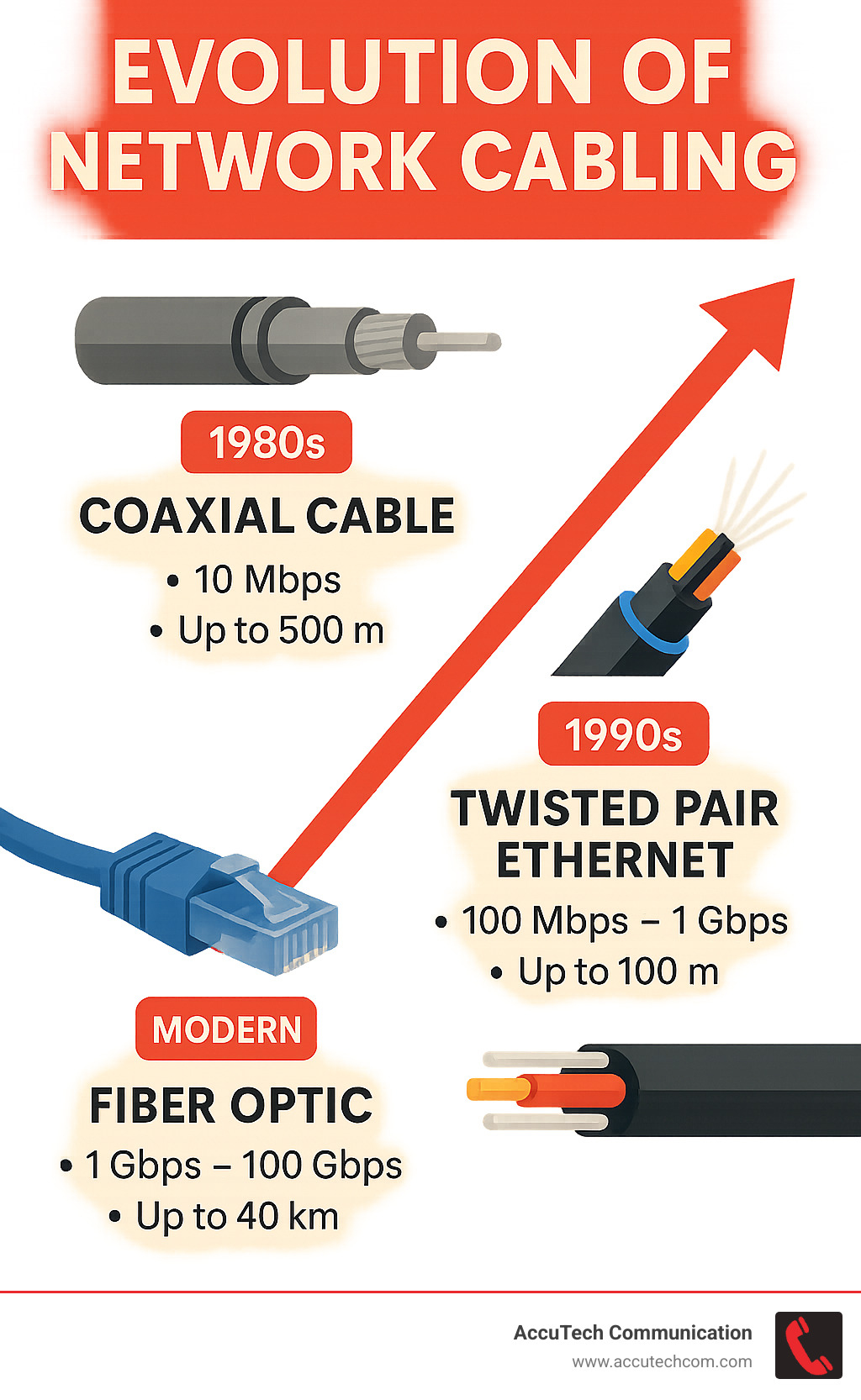
Quick types of cables in computer network definitions:
– commercial data network cabling
– commercial network cable installation pricing
Types of Cables in Computer Network: The Big Three
When it comes to types of cables in computer network installations, three main players have dominated the field for decades. For a broader historical perspective, the Wikipedia entry on networking cables offers a neutral technical overview that complements the details below.
Twisted pair cables build on Alexander Graham Bell’s 1881 finding—twisting pairs of wires together to cancel out electromagnetic interference (EMI). These copper-based cables handle frequencies from 100 MHz up to 2,000 MHz with Cat8 cables, with a practical limit of 100 meters for most applications.
Coaxial cables feature a central copper conductor wrapped in protective layers, making them ideal for high-frequency signals and harsh environments. While they’ve stepped aside for twisted pair in office networks, they remain essential for broadband internet and specialized applications requiring bulletproof signal quality.
Fiber optic cables use pulses of light racing through glass cores instead of electrical signals. They offer practically unlimited bandwidth and can transmit data over 40 kilometers without signal degradation, making them perfect for backbone connections and high-performance applications.
What Sets Twisted Pair Apart Among Types of Cables in Computer Network?
Twisted pair cables have earned their place as the most popular choice among types of cables in computer network installations due to their versatility, affordability, and sophisticated engineering.
Unshielded Twisted Pair (UTP) cables are the standard in most offices—four pairs of copper wires twisted together inside a simple jacket. The twisting patterns are carefully calculated to minimize crosstalk between pairs.
Shielded Twisted Pair (STP) cables add metallic shielding for protection in industrial settings or dense data centers where electromagnetic interference is a concern. The shielding must be properly grounded to function effectively.
RJ45 connectors provide the universal interface, with color-coded wiring standards (T568A and T568B) ensuring compatibility. Power over Ethernet (PoE) capability allows these cables to carry both data and electrical power simultaneously, revolutionizing how we power IP phones, wireless access points, and security cameras.
Why Coaxial Still Matters in Certain Types of Cables in Computer Network
RG-6 coaxial cable remains the backbone of cable internet delivery. Its 75-ohm impedance perfectly matches cable TV and broadband systems, while DOCSIS standards enable gigabit internet speeds through existing coaxial infrastructure.
BNC connectors provide twist-lock reliability for professional installations, while the robust shielding protects against electromagnetic interference in harsh industrial environments. CCTV security systems often rely on coaxial cables for proven video signal delivery.
Fiber Optic at a Glance
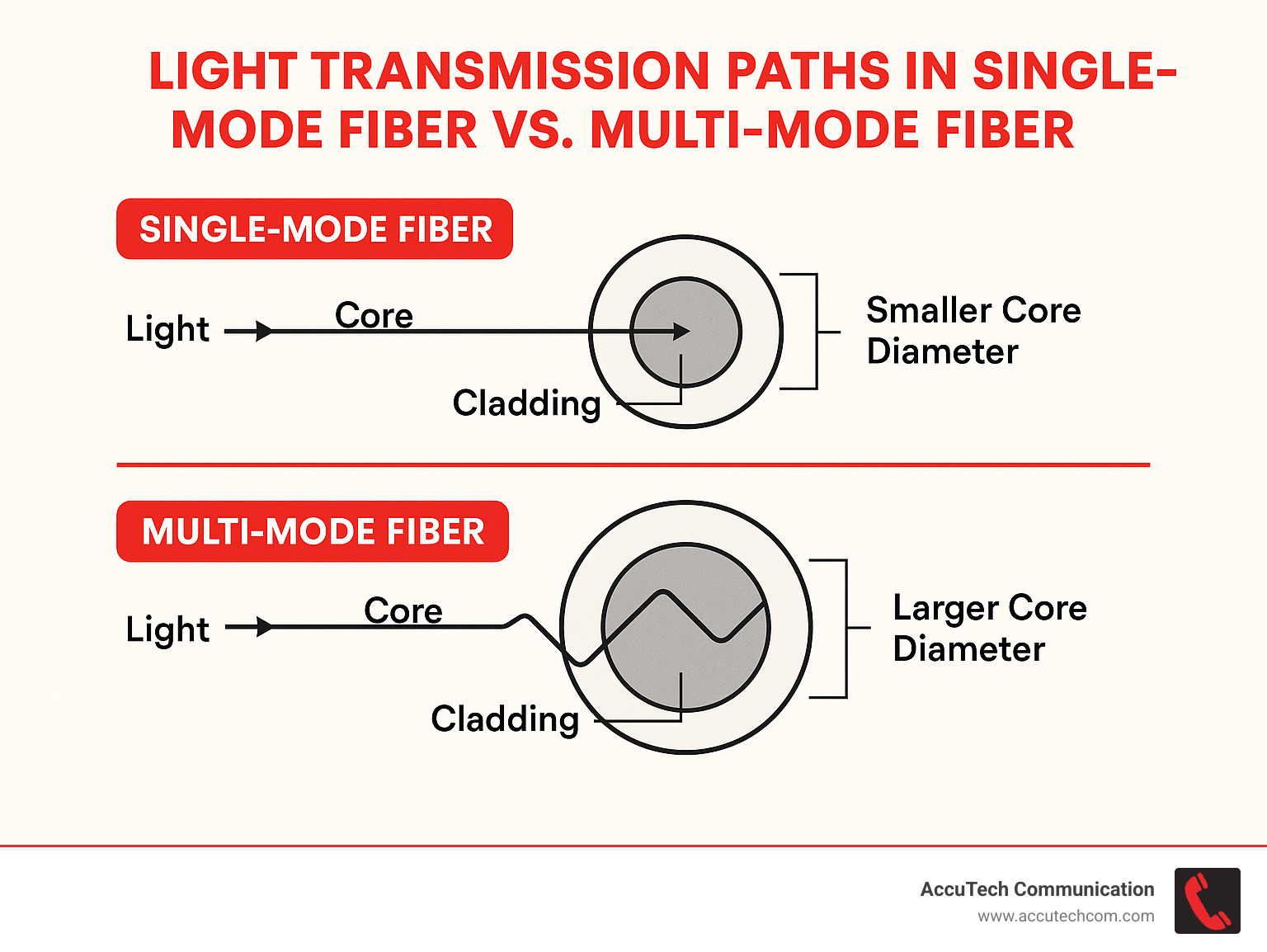
Single-mode fiber uses a 9-micron core allowing only one light beam, eliminating signal distortion and enabling 40+ kilometer transmissions at speeds exceeding 100 Gbps.
Multi-mode fiber features larger cores (50 or 62.5 microns) supporting multiple light paths, excelling in shorter runs where massive bandwidth is needed. Modern specifications—OM3, OM4, and OM5—support 10 Gbps transmissions from 300 to 400 meters.
Fiber’s immunity to EMI works both ways—it doesn’t generate electromagnetic fields either, making it perfect for sensitive environments like hospitals or research facilities.
Deep Dive: Twisted Pair Categories & Connectors
Understanding twisted pair categories helps you choose the right tool for each job. Each category represents engineering improvements building on previous standards.
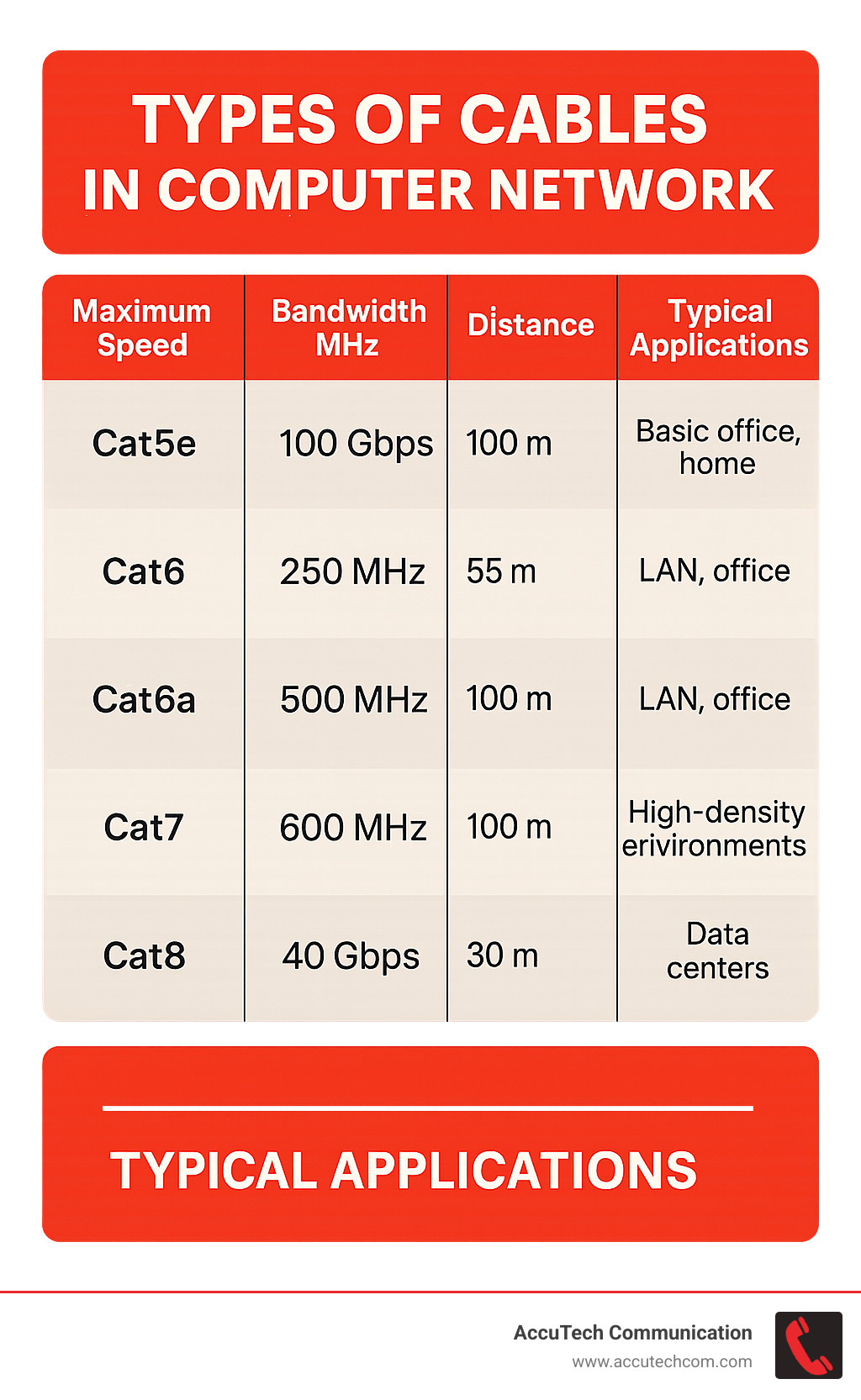
Cat5e cables deliver 1 Gbps with 100 MHz bandwidth – the reliable baseline for basic office installations. Cat6 cables provide 10 Gbps capability and 250 MHz bandwidth, though that speed only works up to 55 meters.
Cat6a cables maintain full 10 Gbps speeds over 100 meters with 500 MHz bandwidth, making them ideal for high-density installations. Cat7 cables offer 600 MHz bandwidth but require specialized connectors beyond standard RJ45.
Cat8 cables deliver 40 Gbps speeds with 2,000 MHz frequencies, but maximum distance drops to 30 meters, limiting use to short data center connections.
More info about Ethernet Cable Types
UTP vs STP: Shielding Showdown
Foil shielding provides basic electromagnetic interference protection, while braid shielding offers superior protection and mechanical durability. Modern commercial buildings present interference from fluorescent lighting, electric motors, and electrical equipment.
Industrial installations often require shielded cables due to harsh electromagnetic environments from manufacturing equipment and welding operations. Proper grounding at the equipment end provides an escape route for interference currents.
Straight-Through, Crossover & PoE Cables
Straight-through cables use identical pinouts for connecting different device types. Crossover cables swap transmit/receive pairs for direct device-to-device connections, though Auto-MDIX capability in modern equipment has largely eliminated this need.
Power over Ethernet (PoE) delivers increasing power levels: Standard PoE (15.4W), PoE+ (30W), PoE++ (60W), and High Power PoE (100W), enabling everything from IP phones to LED lighting systems.
More info about What Are Ethernet Cables?
Coaxial Cable Characteristics & Real-World Uses
Coaxial cables continue playing important roles in specific types of cables in computer network applications through their reliable, proven design.
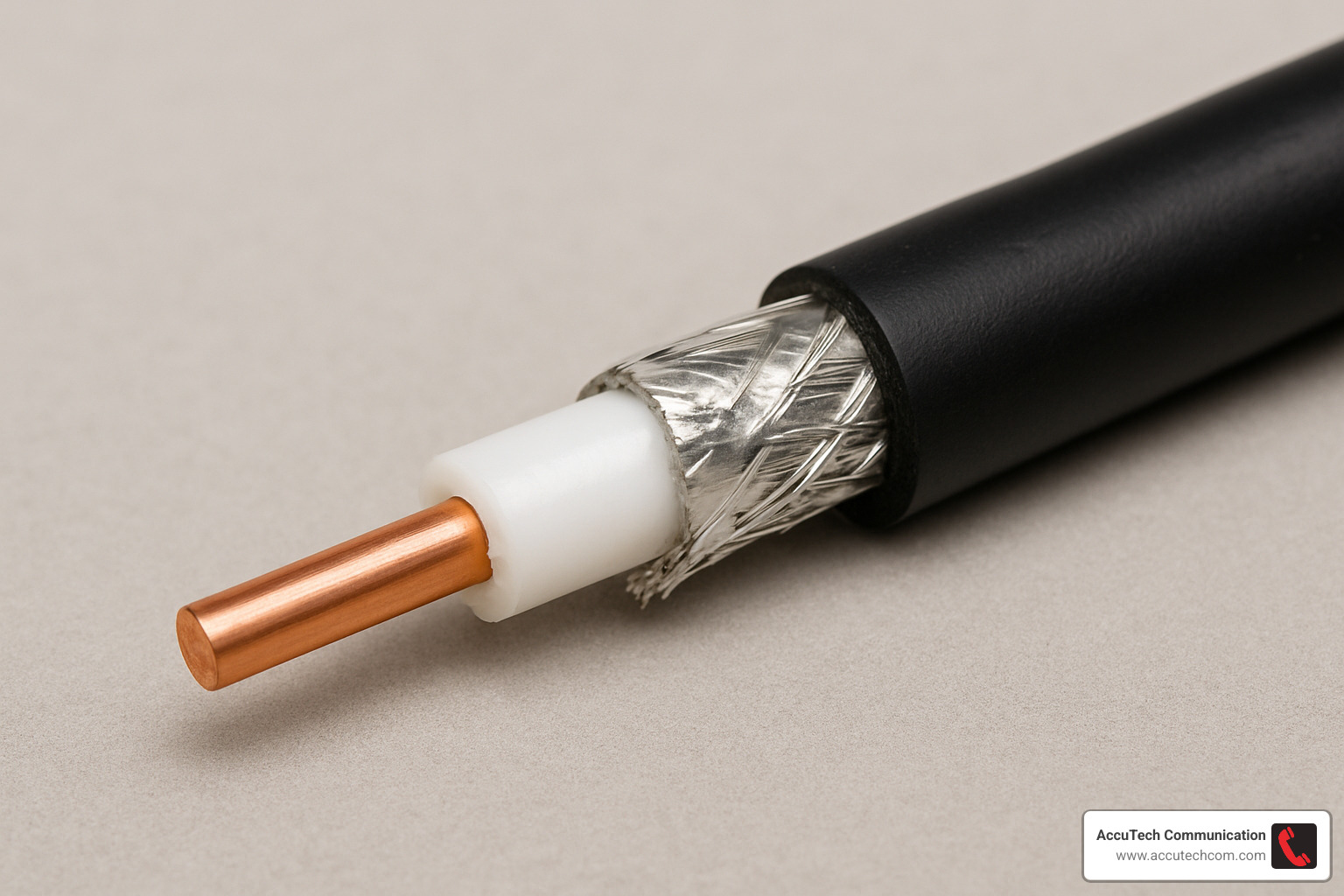
The coaxial design features a center conductor surrounded by dielectric insulation, metallic shielding, and outer jacket. This maintains consistent impedance while blocking interference effectively.
DOCSIS standards enable cable internet providers to deliver gigabit speeds over existing coaxial infrastructure. Impedance matching at 50 or 75 ohms prevents signal reflections that degrade performance.
Advantages, Limits & Connector Types
Noise immunity and durability make coaxial cables perfect for challenging installations and harsh environments. However, limited speed capabilities restrict them in high-performance applications compared to modern alternatives.
F-type connectors provide secure threaded connections for cable TV and broadband, while BNC connectors offer twist-lock convenience for professional applications requiring frequent connection changes.
Fiber Optic Fundamentals: Single-Mode vs Multi-Mode
Fiber optic technology represents the premium choice among types of cables in computer network systems, delivering performance through light pulses traveling through glass cores.
Core size determines functionality: Single-mode fiber uses a 9-micron core allowing one light path, while multi-mode fiber uses 50 or 62.5-micron cores supporting multiple light paths.
Single-mode systems operate at 1310 nm or 1550 nm wavelengths with minimal signal loss. Multi-mode systems use 850 nm or 1300 nm wavelengths with less expensive LED or VCSEL light sources.
OM3, OM4, and OM5 specifications represent multi-mode improvements: OM3 supports 10 Gbps to 300 meters, OM4 extends to 400 meters, and OM5 adds wideband capability for multiple data streams.
When to Choose Single-Mode
Single-mode fiber excels in long-distance applications where signals travel 40+ kilometers without regeneration. DWDM systems enable hundreds of channels at 10+ Gbps each through wavelength division multiplexing.
Campus networks and backbone links benefit from single-mode’s upgrade capability – speed improvements require only changing electronics at each end.
More info about How Do Fiber Optic Cables Work?
Multimode for Shorter High-Bandwidth Runs
Data center applications represent multi-mode fiber’s sweet spot, with shorter distances under 400 meters and cost-effective LED and VCSEL light sources.
Modern multi-mode systems support 10 to 100 Gbps speeds over typical data center distances, providing excellent performance while controlling costs through lower cable and electronics expenses.
Choosing the Right Cable: Key Factors & Best Practices
Selecting the right types of cables in computer network installations requires balancing current needs with future growth potential.
Speed requirements should consider future needs, not just current demands. Cat6a cables cost slightly more than Cat5e but deliver 10 Gbps performance that prevents costly upgrades.
Distance limitations are absolute: twisted pair cables max out at 100 meters, while fiber optic cables handle kilometers. Environmental factors like temperature, moisture, and electromagnetic interference demand specialized solutions.
Budget considerations require balancing upfront costs against total ownership expenses. Quality cables with proper installation provide better long-term value despite higher initial costs.
Plenum versus riser ratings address fire safety requirements. Plenum-rated cables produce less smoke and toxic fumes, making them mandatory in air handling spaces.
Installation & Quality Tips
Proper installation techniques ensure reliable performance for decades. Proper bend radius requirements prevent internal damage, while pulling tension limits protect cables during installation.
Testing with professional equipment verifies performance and provides documentation for troubleshooting. Cable management systems organize installations while protecting cables from damage.
Labeling everything saves hours during maintenance and upgrades by turning troubleshooting from detective work into straightforward problem-solving.
Wired vs Wireless: Pros & Cons Snapshot

Latency differences favor wired connections for consistent performance. Wired systems deliver sub-millisecond latency, while wireless adds variable delays.
Security advantages of wired networks include physical access control, while mobility benefits obviously favor wireless for moving users. Interference issues affect wireless more than wired systems.
The smartest approach combines both technologies strategically – wired infrastructure for backbone capacity and stationary equipment, wireless for mobile users and areas where cables are impractical.
Frequently Asked Questions about Computer Network Cables
What is the maximum length for each cable type?
Twisted pair cables limit at 100 meters total link length for Cat5e through Cat6a. Cat8 cables provide 40 Gbps speeds but only to 30 meters.
Coaxial cables handle hundreds of meters for cable TV systems, with specific distances varying by application.
Fiber optic cables are distance champions: single-mode fiber spans 40+ kilometers at high speeds, while multi-mode fiber reaches 300-400 meters depending on specification.
Do I need shielded cable in an office environment?
Most office environments with standard equipment rarely generate enough interference to require shielded cables. High-interference situations with manufacturing equipment, large motors, or welding operations benefit from shielding.
Data centers often use shielded cables for improved crosstalk performance in high-density installations rather than interference protection.
Are Cat8 cables worth it for home networks?
Cat8 cables are overkill for residential use. They support 40 Gbps speeds when most home internet tops out at 1 Gbps, plus they cost significantly more with a 30-meter distance limitation.
For homes, Cat6 cables provide excellent performance and value, while Cat6a offers future-proofing with 10 Gbps capability at reasonable cost.
Conclusion
Making smart choices about types of cables in computer network installations sets your business up for success both today and tomorrow. After three decades helping businesses across Massachusetts, New Hampshire, and Rhode Island, I’ve seen how the right cabling decisions transform operations.
The three main cable families each have their purpose: Twisted pair cables handle most office needs, coaxial cables serve specialized applications, and fiber optic systems deliver premium performance for demanding requirements.
Distance, bandwidth, environment, and budget guide every good cabling decision. Your cable choice today affects your business for years to come – companies that plan ahead cruise through expansions while others struggle with inadequate networks.
Installation quality matters as much as cable choice. Proper techniques, quality components, and thorough testing aren’t luxuries – they’re necessities that prevent expensive problems.
At AccuTech Communications, we treat every installation like our own business depends on it. When your network runs smoothly, your business thrives.
The beauty of modern types of cables in computer network technology is matching your exact needs with the right solution, whether that’s a simple Cat6 upgrade or full fiber optic backbone.
More info about Structured Cabling Services
Ready to build a network that grows with your business? Let’s talk about your types of cables in computer network needs and create a solution that works today and adapts for tomorrow.
