
How network lan cable tester works: Perfect 2025
Why Understanding Network Cable Testing is Critical for Your Business
Understanding how network lan cable tester works is vital for maintaining a reliable business network. These tools quickly verify cable connections and identify faults, preventing costly downtime.
Quick Answer: How Network LAN Cable Testers Work
- A master unit sends electrical pulses.
- A remote unit receives signals at the other end.
- LED indicators show status for each wire and ground.
- The pattern of lights reveals faults (opens, shorts, crossed pairs).
- Results guide repairs.
For mission-critical operations, a single faulty cable can halt everything. Network cable testers are essential for troubleshooting and verifying new installations, proactively identifying problems before they cause outages.
Corin Dolan, owner of AccuTech Communications, has helped businesses across Massachusetts, New Hampshire, and Rhode Island build dependable networks since 1993. Knowing how network lan cable tester works is a simple yet powerful way to save time and money on critical communication systems.
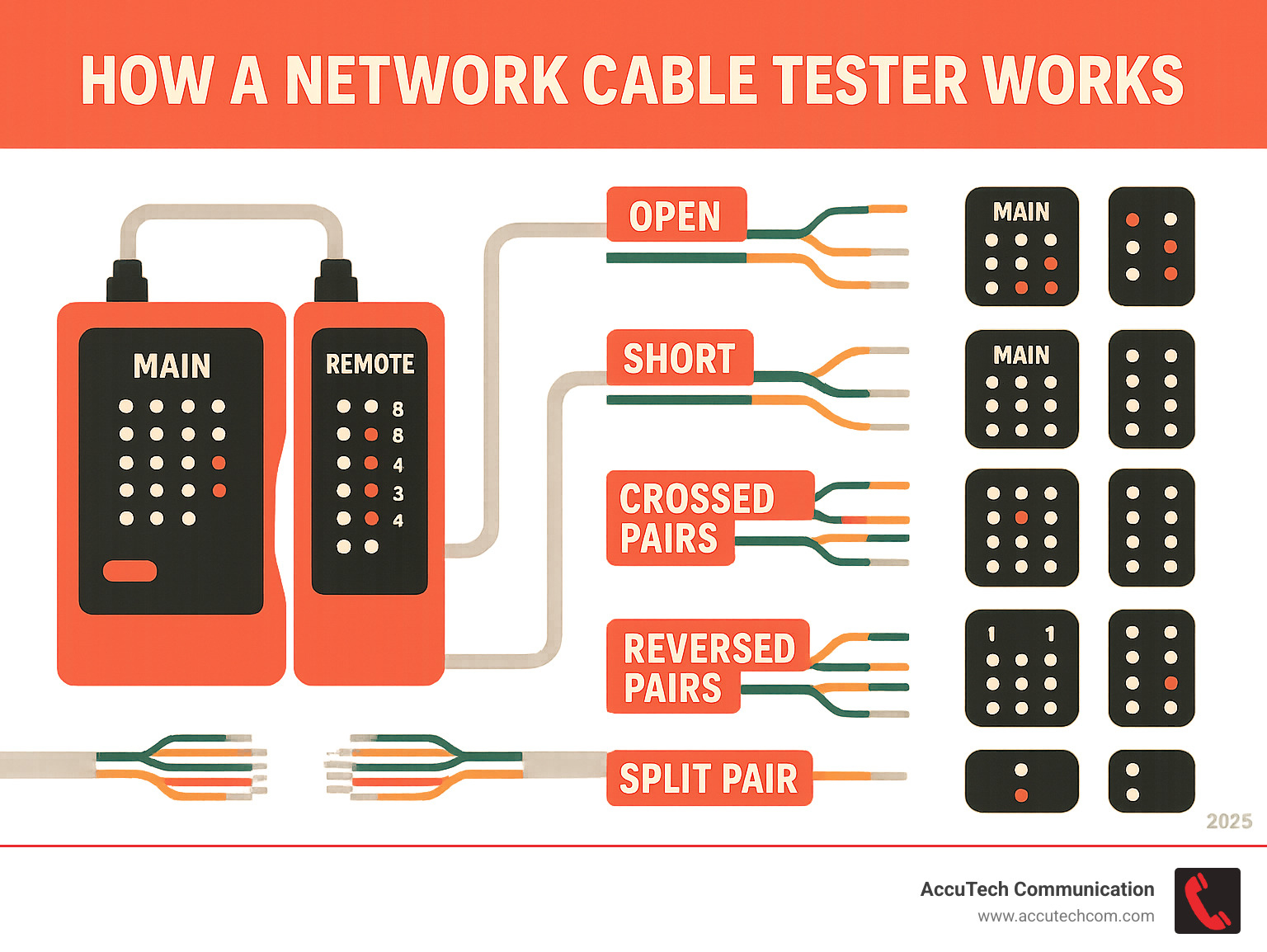
How network lan cable tester works terms explained:
The Core Mechanics: How Network LAN Cable Tester Works
A network LAN cable tester is a crucial tool for verifying cable wiring and data readiness. It’s essential for new setups and troubleshooting.
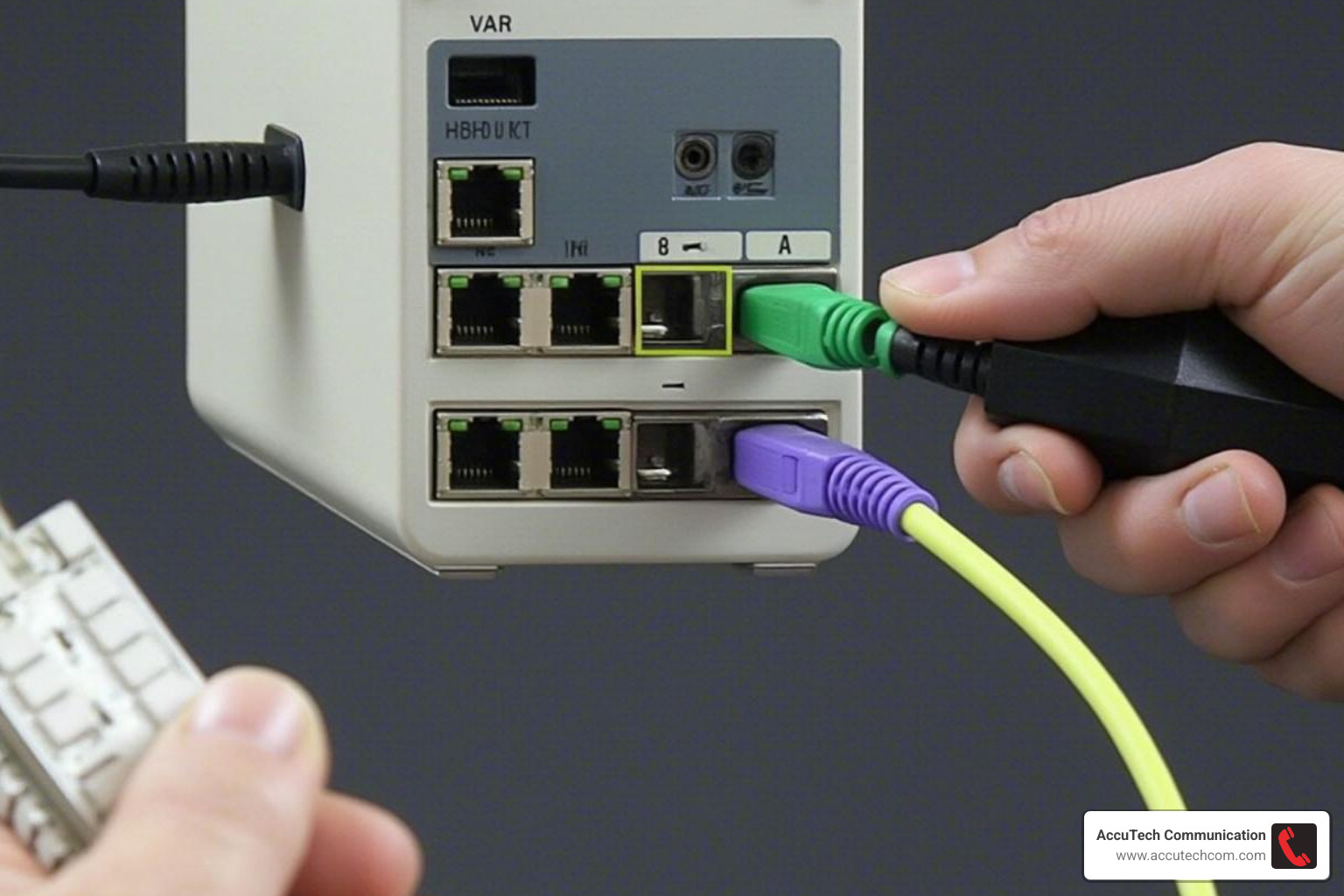
Most basic testers use a master unit and a remote unit. You connect each end of the RJ45 cable. The master unit sends sequential electrical signals through each wire, and the remote unit confirms their correct arrival and order. This pin-to-pin verification is fundamental to how network lan cable tester works.
Sending the Signal: The Basic Principle of Continuity Testing
Testers first check for continuity, ensuring an unbroken electrical path. The master unit sends pulses down each of the eight (and sometimes ground) wires. If a wire is intact, it forms a closed circuit, allowing the signal to reach the remote. Lack of continuity means data cannot flow. For more details on proper cabling, see our guide on network cabling installation.
Decoding the Lights: Identifying Common Cable Faults
Basic testers use LED lights (1-8, plus ground) to display results. Interpreting these patterns helps diagnose problems:
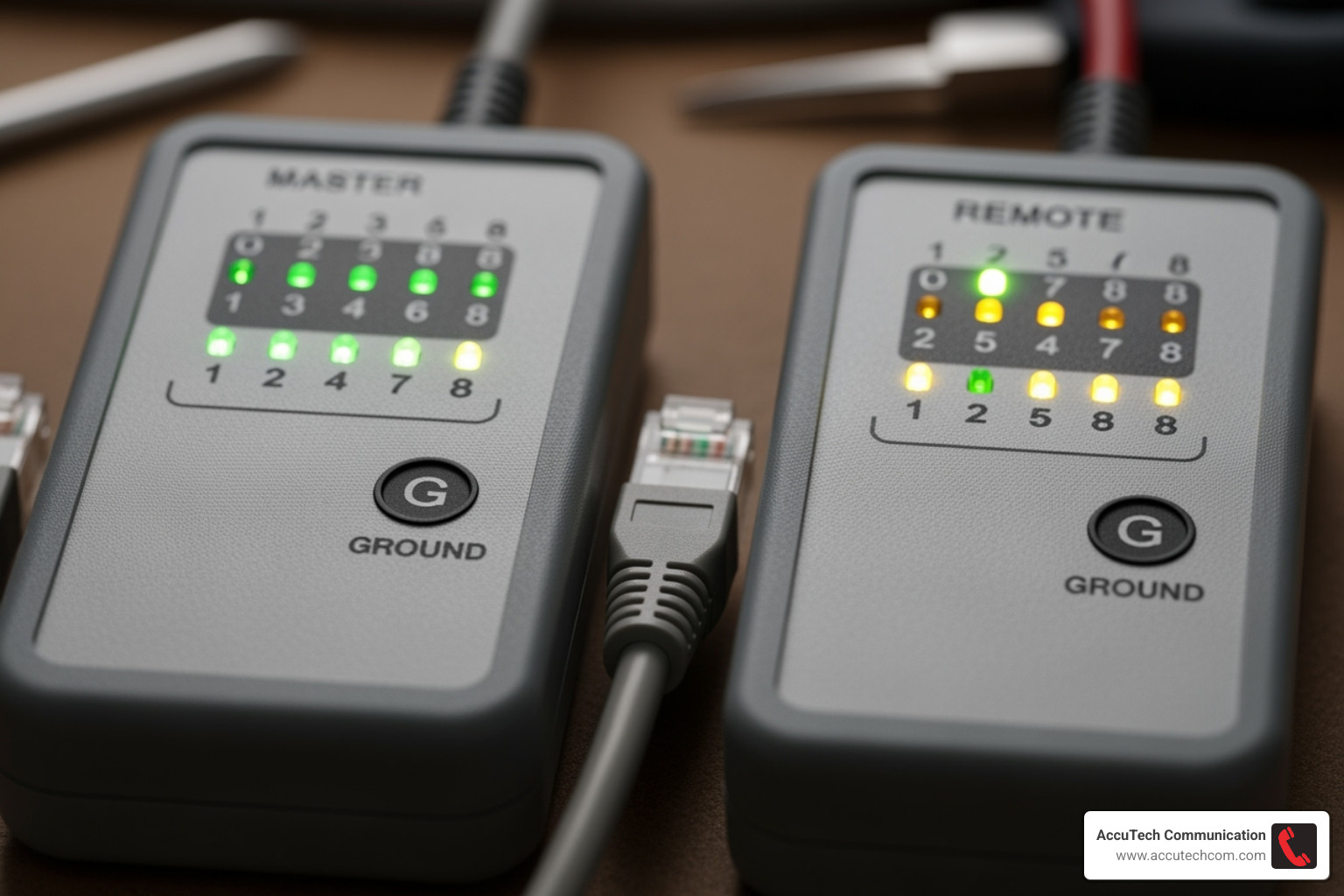
- Opens (Breaks): An LED fails to light, indicating a broken wire.
- Shorts (Unintended Connections): Multiple LEDs light simultaneously, showing wires are touching.
- Crossed Pairs / Miswiring: Lights on master and remote flash in a different order (e.g., master 1-2-3-4, remote 1-4-3-2).
- Split Pairs: A subtle fault compromising twisted-pair integrity, often requiring advanced testers.
Understanding these cues is vital for cable readiness or repair.
Inside a Basic Tester: The Electronics Behind the Pulses
Basic testers often use the NE555 timer IC and CD4017 decimal counter/pulse distributor IC. The NE555 generates electrical pulses, while the CD4017 directs each pulse sequentially to different Ethernet cable wires. On the remote unit, diodes complete the circuit, lighting the corresponding LED upon pulse arrival. This sequential flashing confirms correct pin-to-pin connection, enabling efficient detection of opens, shorts, and miswires. For a deeper technical dive, review Wikipedia’s technical overview.
A Spectrum of Tools: Types of Network Cable Testers
Choosing the right network cable tester depends on your specific needs, ranging from simple LED devices to advanced certification instruments.
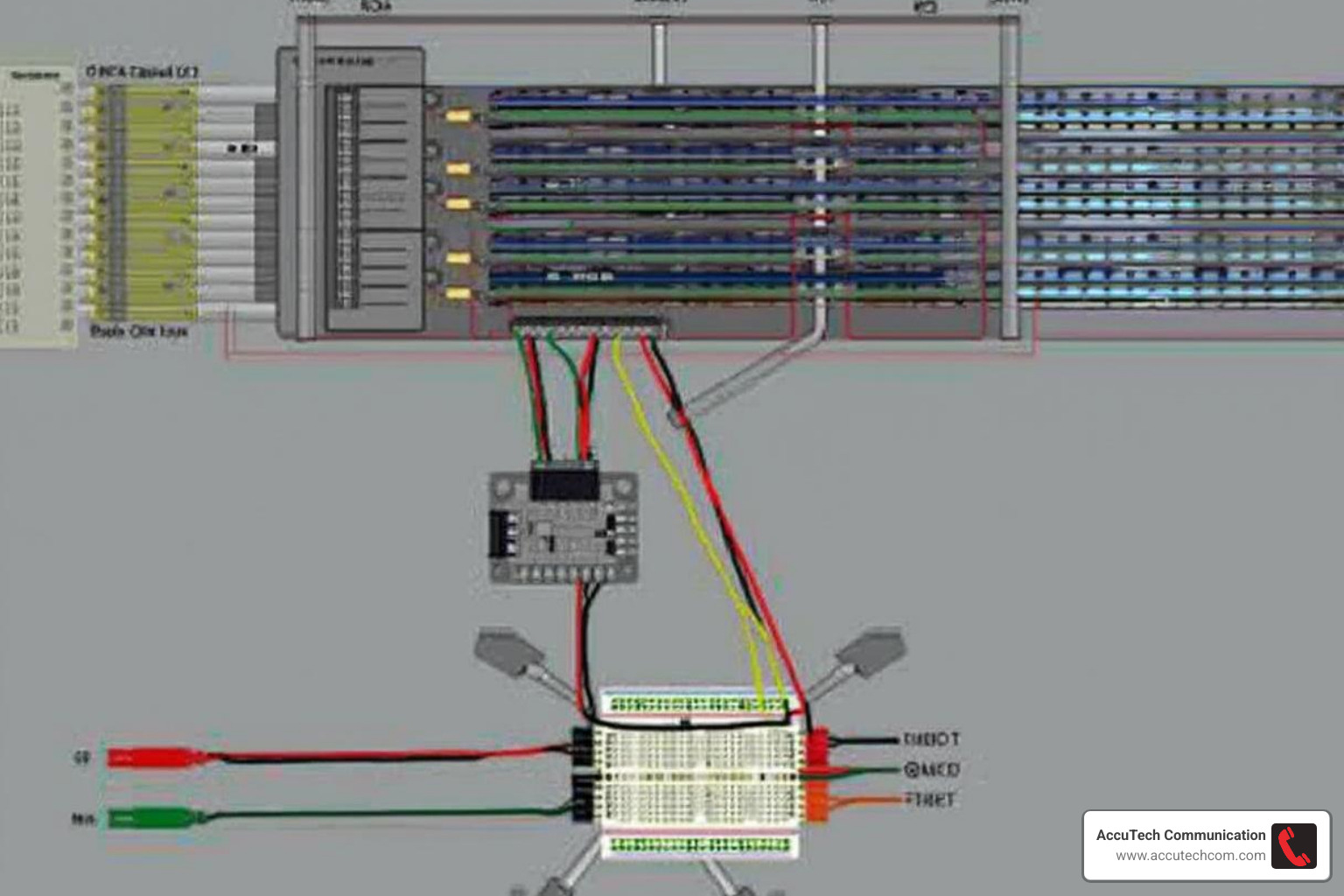
Testers generally fall into passive (send signals without live network connection) and active (evaluate live network performance) categories. While basic testers check continuity for Cat5e, Cat6, or Cat6A, advanced tools are needed for Gigabit speed verification.
Validation, Qualification, and Certification: The Three Tiers of Testing
Understanding how network lan cable tester works involves recognizing these three levels of testing, each providing increasing confidence in your cabling:
| Tier of Testing | Function | Tests Performed | Best Use Case |
|---|---|---|---|
| Validation | Basic continuity and wiring verification | Wire mapping, opens, shorts, crossed pairs | Patch cables, basic troubleshooting, DIY installations |
| Qualification | Performance capability assessment | Bandwidth support, basic performance metrics, length measurement | Determining if existing cables can support new equipment speeds |
| Certification | Full compliance verification to industry standards | Complete TIA/ISO standard compliance testing, detailed performance analysis, comprehensive reporting | New installations, warranty requirements, mission-critical environments |
Validation testers confirm correct wiring. Qualification testers assess if a cable can support speed upgrades. Certification testers are the gold standard, verifying full compliance with TIA/ISO industry standards and providing required reports.
How to choose a network LAN cable tester for your needs
For everyday troubleshooting, basic continuity checkers and wiremappers are sufficient. Upgrade to a more advanced qualification or certification tool for performance questions, warranty requirements, or troubleshooting intermittent issues. For professional-grade equipment, our network cable testers offer reliability and accuracy.
Cable Tester vs. Ethernet Network Tester: What’s the Difference?
Cable testers focus on the physical layer (wiring integrity, shorts, breaks). Ethernet network testers evaluate network performance within a live network, performing active link tests, DHCP/DNS validation, and ping tests. A cable tester checks the road; an Ethernet network tester drives on it.
ARTICLE SPECIFICATIONS
- Topic: how network lan cable tester works
- Format: Extensive Guide
KEY QUESTIONS TO ANSWER
- What is the primary function of a network cable tester?
- How do network cable testers work to identify faults?
- What are the different types of network cable testers (e.g., active vs. passive)?
- What specific cable faults can network cable testers detect (e.g., shorts, opens, crossovers)?
- How does a network cable tester use signals or pulses to diagnose cable issues?
- What is the role of components like NE555 timers and CD4017 ICs in basic network cable testers?
- How do testers differentiate between different types of network cables (Cat5e, Cat6, etc.)?
- What is Time Domain Reflectometry (TDR) and how is it used in cable testing?
- What is the difference between cable validation, qualification, and certification?
- How do network cable testers help in troubleshooting network connectivity problems?
- What additional features might advanced network cable testers offer (e.g., PoE testing, port identification)?
- How can the results from a network cable tester be interpreted to fix issues?
- What are the limitations of basic network cable testers?
- How does a network cable tester differ from an Ethernet network tester?
- What are common network cable problems that testers help identify?
Advanced Diagnostics: Opening Up Deeper Insights
Beyond basic checks, advanced network testers provide critical data for network reliability and fault localization.
A key feature is Time Domain Reflectometry (TDR), which sends a signal to pinpoint the exact distance to faults like shorts or opens, invaluable for locating hidden breaks. Modern testers also offer Power over Ethernet (PoE) load testing to ensure adequate power, act as a ‘port finder’ to identify switch connections, and run ping stress tests to evaluate network performance. Some models support dozens of remote units for large-scale testing.
KEY SOURCES AND SEO INSIGHTS
Source Type: Blog Post / Advertorial
SEO Insights:
Key Headings:
Unique Angle:
The unique angle is presenting financial ‘secrets’ as easy-to-implement tips, often with a focus on quick sign-ups and immediate financial benefits, framed as a way to save or earn money effortlessly.
What Why:
The article aims to provide readers with ‘money secrets’ to save and earn money, encouraging them to take immediate action by signing up for various financial services and platforms.
Cta:
Sign up for [service name] and start earning now!
Tone:
Promotional, encouraging, informal
Hook:
Here’s the thing: I wish I had known these money secrets sooner. They’ve helped so many people save hundreds, secure their family’s future, and grow their bank accounts—myself included.
Examples Anecdotes:
- The author mentions personal experience with these money secrets.
- Examples of how people save money on car insurance, get debt forgiven, invest in real estate, reduce internet bills, borrow money, and earn extra income are provided.
Topics Covered:
Real estate:
- Real estate investment
Insurance: - Car insurance comparison
Personal finance: - Saving money
- Earning money
- Debt management
- Investing
- Banking
Telecommunications: - Home internet services
Online platforms: - Survey sites
- Gaming platforms
Loans: - Personal loans
Article Type:
Listicle / Advertorial
Topic Gaps:
- How network LAN cable testers work
- Network cabling best practices
- Troubleshooting network issues
- Types of network cables
- Benefits of certified network cabling
Bias:
The content is heavily biased towards promoting specific financial products and services through affiliate marketing. It presents these as universally beneficial without exploring potential downsides or alternative options.
Stats And Data:
- People save up to $996 per year on car insurance.
- Debt can be forgiven within 24 to 48 months.
- Real estate investment can start for as little as $10.
- Fundrise Flagship Fund owns over $1 billion worth of real estate.
- Home internet can be as low as $35/month with T-Mobile.
- T-Mobile will pay up to $750 in termination fees.
- Switching to T-Mobile can get you $300 back.
- AmONE can help borrow up to $50,000 with fixed rates starting at 6.40%.
- AmONE offers loan terms from 6 to 144 months.
- InboxDollars users can earn up to $225 a month.
- InboxDollars has paid its users more than $56 million.
- InboxDollars offers a $5 bonus for signing up.
- KashKick users can earn over $1,000 a month.
- KashKick allows instant PayPal cash-outs with a $10 minimum.
- Traditional banks offer around 0.40% APY on savings.
- SoFi Checking and Savings offers up to 3.80% APY on savings.
- SoFi Checking and Savings offers 0.50% APY on checking balances.
- SoFi offers up to a $300 welcome bonus.
- SoFi provides up to $3M of additional FDIC insurance.
Title:
Money Secrets
All Questions:
- How can I save money?
- How can I make money?
- How can I reduce my car insurance costs?
- How can I get my debt forgiven?
- How can I become a real estate investor?
- How can I lower my home internet bill?
- How can I borrow money?
- How can I earn money by watching videos?
- How can I earn money by playing games?
- How can I grow my money faster?
Actionable Steps:
- Cancel car insurance and compare options using Insurify.
- Contact National Debt Relief to get debt forgiven.
- Invest in the Fundrise Flagship Fund for real estate investment.
- Switch to T-Mobile for home internet to save money.
- Check online with AmONE to borrow money.
- Sign up for InboxDollars to earn money by watching videos.
- Sign up for KashKick to earn money by playing games.
- Open an account with SoFi Checking and Savings to grow money faster.
Source Type: blog post
SEO Insights:
Key Headings:
H2: Understanding the Network Cable Testers, How to Use LCD Cable Testers, How to Operate: Noyafa NF-858C Multifunction Cable Tester
Unique Angle:
The article focuses on explaining network cable testers for IT professionals and maintenance workers, explaining their internal workings and operational steps with a specific product example.
What Why:
The article explains what network cable testers are, why they are crucial for IT professionals, and how they function to diagnose network cabling issues, aiming to educate readers on their effective use.
Tone:
technical and informative
Questions Answers:
Q: What is the function of a network cable tester?
A: The main purpose of network testers is to verify that there is a continuous signal flow through Ethernet cables when necessary, ensuring they are correctly connected and working properly by supplying current through them and checking for connectivity at their endpoints.
Q: How do active testers work?
A: Active testers are usually handheld devices with both sending and receiving capabilities. They send out a signal from one end of a connected cable and check for its return at the other end. If no response is received within certain parameters, it indicates a potential issue.
Q: What are some tests a network cable tester can perform?
A: Testers can perform continuity, distance, tone/no tone, and speed tests. LCD testers with tone generator capabilities can send test signals through cables to identify issues like short circuits or open ports.
Q: How does the Noyafa NF-858C Multifunction Cable Tester operate?
A: The process involves connecting the tester, turning it on, reading the report from the tester, and then addressing the identified problem. It can test, find, and test the length of network and BNC cables automatically.
Hook:
Network Cable Testers can be a lifesaver when it comes to troubleshooting or repair your broken network connection.
Examples Anecdotes:
- A network technician using a cable tester to identify a problem before it causes a full outage.
- The scenario of plugging a tester into an RJ45 jack on a computer’s wall port as a common misconception.
Unique Insights:
- Network cable testers verify continuous signal flow through Ethernet cables.
- Testing procedures are performed according to standards set by entities like IEC, ANSI, and IEEE.
- Active testers have both sending and receiving capabilities, sending a signal and checking for its return.
- Fiber optic testers are exclusively for fiber optic cables, not copper-based ones.
- LCD testers with tone generator capabilities send test signals to identify issues like short circuits or open ports.
Topics Covered:
Network cable testers:
- Function
- Importance
- Types (active, passive)
- Testing procedures
- Standards (IEC, ANSI, IEEE)
- Copper vs. Fiber optic testers
- LCD testers
- Tone generators
- Operation (Noyafa NF-858C)
Network troubleshooting: - Identifying faulty cables
- Diagnosing connection problems
- Minimizing downtime
Cable types: - Cat5e
- Cat6
- Cat7
- Coaxial cables
- Twisted pair wiring
Industry Facts:
- Network cables transmit all data for a network’s function.
- Different types of network cables exist for various applications (Cat5e/6/7).
- Network testers verify continuous signal flow through Ethernet cables.
- Testing procedures adhere to standards from IEC, ANSI, and IEEE.
- Network cable testers can test both copper-based (UTP/RJ45) and fiber optic cables.
- Fiber optic testers are only for fiber optic cables.
- Common tests include continuity, distance, tone/no tone, and speed tests.
Article Type:
how-to guide
Topic Gaps:
- Detailed explanation of active vs. passive tester differences beyond basic functionality.
- In-depth explanation of how specific tests (continuity, distance, tone, speed) are performed by the testers.
- Comparison of different types of network cable testers available on the market.
- Discussion of common cable faults beyond shorts and opens.
- More on the ‘report format’ mentioned for loopback testers.
- Information on the accuracy and limitations of network cable testers.
Bias:
The source heavily features and links to Noyafa products, suggesting a promotional bias towards the brand.
Title:
Understanding Network Cable Testers: How They Work and How to Use Them
All Questions:
- What exactly do you need to know about using a network cable tester?
- Do you really know what they are and how they work?
- How do they determine which cables are faulty and how accurate are they?
- What is the function of a network cable tester?
- How to use LCD cable testers?
- How to make your cable tester work for you?
- How to operate Noyafa NF-858C Multifunction Cable Tester?
Actionable Steps:
- Connect the tester to the cable.
- Turn on the tester.
- Read the report from the tester.
- Identify and address the problem indicated by the tester.
- Ensure the tone generator is turned on if the LCD is equipped with it.
Real World Use Cases:
- Troubleshooting broken network connections.
- Repairing faulty network connections.
- Ensuring continuous signal flow through Ethernet cables.
- Diagnosing problems on LAN/WAN networks.
- Troubleshooting VoIP communications.
- Testing coaxial cables and twisted pair wiring.
- Identifying issues like short circuits or open ports.
Best Practices:
- Keep network cables in top shape to ensure important data transmission.
- Use network cable testers to identify problem cables before they cause outages.
- Understand how to properly test cables to avoid potential issues.
- Use testers with tone generator capabilities to identify short circuits or open ports.
Source Type: blog post
SEO Insights:
Key Headings:
H2: Understanding the Basics, Working principle
Unique Angle:
The article provides a detailed, circuit-level explanation of how a network cable tester works by guiding the reader through building a DIY version, rather than just describing the function of commercial testers.
What Why:
The article explains the fundamental role of network cable testers in maintaining network infrastructure and provides a detailed, technical guide on how to build a basic network cable tester using common electronic components, illustrating the underlying principles.
Tone:
technical
Questions Answers:
Q: What is the basic function of a network cable tester?
A: A network cable tester is designed to examine and verify the integrity of network cables, identifying issues such as continuity, miswiring, and cable length.
Q: What electronic components are used in the described DIY network test tool?
A: The DIY tool uses the NE555 timer IC for generating a square wave and the CD4017 decimal counter/pulse distributor IC for sequential pulse distribution, along with LEDs and diodes.
Q: How does the circuit test for continuity and wiring sequence?
A: The circuit uses a main and secondary unit connected by the network cable. LEDs in the main unit correspond to LEDs in the secondary unit via the cable’s wires. If corresponding LEDs light up, continuity is confirmed, and sequential lighting indicates correct wiring order.
Q: What are the EIA/TIA wiring standards mentioned?
A: The EIA/TIA wiring standards, specifically 568A and 568B, are crucial for correctly mapping the pins of the RJ45 connectors to the terminals of the tester circuit, ensuring accurate testing.
Hook:
In the vast landscape of networking, ensuring a seamless and reliable connection is paramount.
Examples Anecdotes:
- If LED1 in the main circuit is lit, and LED10 in the secondary circuit is also lit, it indicates that the first wire of the tested network cable is ‘connected’.
- Any unlit LED1-LED8 signifies a non-functional path.
- If LED10-LED17 are not sequentially lit, it indicates a wiring sequence error.
Unique Insights:
- The CD4017 is a decimal counter/pulse distributor that can be used to create sequential pulse outputs for testing.
- A network cable tester circuit can be divided into a main and secondary circuit to test continuity and wiring sequence.
- The intensity of LED emissions from a tester can indicate the quality of a network cable.
- The EIA/TIA wiring standards (568A and 568B) are crucial for correct pin-to-terminal mapping in network cable testers.
- The maximum transmission distance for twisted pair cables is generally 100m.
Topics Covered:
Electronic components:
- CD4017 (decimal counter/pulse distributor)
- NE555 (timer IC)
- LEDs
- Diodes
Network cable testers: - Basic function
- Purpose
- Components
- Working principle
- DIY construction
Circuit design: - Main circuit
- Secondary circuit
- Square wave generation
- Sequential pulse generation
Network cabling: - Unshielded Twisted Pair (UTP)
- Ethernet cables
- RJ45 connectors
- Wiring sequence
- Continuity testing
- EIA/TIA standards (568A, 568B)
- BNC coaxial cables
Industry Facts:
- Most local area networks use Unshielded Twisted Pair (UTP) as the transmission medium.
- UTP cables consist of 8 wires of different colors, grouped into 4 pairs.
- The maximum transmission distance of twisted pair cables is generally 100m.
- EIA/TIA wiring standards (568A and 568B) define the pinout for network cables.
Article Type:
how-to guide
Topic Gaps:
- Comparison of different types of network cable testers (e.g., simple continuity testers vs. advanced cable certifiers).
- Discussion of common cable faults beyond miswiring and continuity (e.g., crosstalk, attenuation, impedance).
- Explanation of how commercial network cable testers achieve more advanced measurements like cable length or performance metrics.
- Troubleshooting common issues with DIY testers.
- The role of network cable testers in network performance optimization.
- Geographic relevance to Massachusetts, New Hampshire, and Rhode Island.
Stats And Data:
- CD4017 is a decimal counter/pulse distributor.
- CD4017 has two clock pulse input terminals: CP (rising edge) and INH (falling edge).
- CR is the asynchronous clear enable terminal.
- One CD4017 chip can constitute a sequential pulse generator with 10 beats.
- A network cable has 8 wires, grouped into 4 pairs.
- The tester circuit uses LEDs (LED10-LED17) and regular diodes (VD10-VD17).
- The circuit uses NE555 for generating a square wave.
- The tester uses a 9V stacked battery for power.
Title:
How Network LAN Cable Testers Work: A Technical Deep Dive
All Questions:
- How do network cable testers work?
- What is the purpose of a network cable tester?
- What are the key mechanisms that make network cable testers essential?
- How can one create a network test tool using CD4017?
- What are the wiring standards for network cables?
Actionable Steps:
- Construct a network test tool using NE555 and CD4017 ICs.
- Prepare two RJ45 jack boxes for connecting the network cable.
- Drill holes on the RJ45 jack box casings for LEDs.
- Insert LEDs into the drilled holes and solder components according to the circuit diagram.
- Connect the RJ45 jack pins to the main and secondary unit wiring terminals following either the 568A or 568B standard.
- Test the constructed tool using a network cable of approximately 100m.
Real World Use Cases:
- Testing the continuity of each wire in an Ethernet cable.
- Identifying miswiring in network cables.
- Verifying the wiring sequence of network cables.
- Detecting issues in BNC coaxial cables.
Best Practices:
- Ensure correct wiring sequence according to EIA/TIA standards (568A and 568B).
- Use a network cable of approximately 100m for testing, as this is the general maximum transmission distance for twisted pair cables.
Source Type: blog post
SEO Insights:
Key Headings:
H2: What is a Network Tester?, Common Network Cable Problems, How Does A Network Cable Tester Work?, A Step-by-Step Guide: How to Test Ethernet Cable?, Summary
H3: Step One: Connect the Network Tester to Ethernet Cables., Step Two: Turn on the RJ45 Tester Switch., Step Three: Read the Test Report.
Unique Angle:
The article breaks down the functionality of network cable testers by explaining the underlying electrical principles and providing a clear, step-by-step guide to interpreting test results, making it accessible for both beginners and those with some IT experience.
What Why:
The article explains what network cable testers are, why they are important for network installation and troubleshooting, and how they function to identify common cable problems, providing a practical guide for users.
Cta:
For more information on this topic, you can keep up on our blogs. While VCELINK offers general and basic information for our customers and other visitors to the website, it’s not professional advice.
Tone:
technical and informative
Questions Answers:
Q: What is a Network Tester?
A: A network cable tester is a device, often battery-operated and portable, that checks if an Ethernet cable can successfully carry a signal and helps identify if cable wires are terminated correctly, detecting issues like short circuits, crossovers, or open circuits.
Q: How does a network cable tester work?
A: A typical tester has a transmitter (master) and receiver (remote). The master unit sends a current sequence through each conductor of the cable. The remote tester receives this signal and sends it back. Diodes indicate successful transmission, and LED lights on both units show the status of each wire pair.
Q: How to test an Ethernet cable?
A: Connect the master tester to one end of the cable and the remote tester to the other. Ensure connectors are secure. Turn on the master tester. Observe the LED lights on both units to interpret the test report, which indicates successful termination, crossovers, open circuits, or short circuits.
Q: What are common network cable problems?
A: Common issues include crosstalk (interference between adjacent wires), cable termination issues (improper crimping, wrong wiring), interference from external sources (EMI/RFI), and connector problems (damaged or improperly attached connectors).
Hook:
When terminating Ethernet cables, will you test if the Ethernet cable works well or not? A network tester plays an important role in installing a new cable and troubleshooting the existing Ethernet cable.
Examples Anecdotes:
- If the NO.3 wire has an open circuit, NO.3 lights on both testers will not be on.
- If less than two wires are connected, all LED lights won’t shine.
- Example of a crossover test report: Master Tester: 1-2-3-4-5-6-7-8-G, Remote Tester: 1-4-3-2-5-6-7-8-G.
Unique Insights:
- A basic network cable tester uses a source of electrical current to check if a cable can carry a signal and if wires are terminated correctly.
- Professional-level testers can provide more detailed information like performance, connectivity, and PoE testing.
- Network testers typically consist of a master and a remote unit, with the master unit housing the battery and initiating the signal.
- The tester works by sending a current sequence through each conductor, and the remote tester sends the signal back, with diodes indicating successful transmission.
- LED indicators on both the master and remote testers provide a visual report of the cable’s status, including successful termination, crossovers, open circuits, and short circuits.
Topics Covered:
Ethernet cables:
- Importance of testing Ethernet cables
- Common network cable problems
- Crosstalk
- Cable termination issues
- Interference (EMI/RFI)
- Connector issues
Cable testing procedure: - Step-by-step guide to testing
- Connecting the tester
- Turning on the tester
- Reading test reports
Network cable testers: - What is a network tester?
- Types of network testers (basic vs. professional)
- Components of a network tester (master, remote)
- How network testers work (electrical current, signal transmission)
- Interpreting test results (LED indicators)
Wiring standards: - T568A
- T568B
Industry Facts:
- Network cable testers are essential for ensuring stable and reliable networks.
- Common network cable problems include crosstalk, cable termination issues, interference (EMI/RFI), and connector issues.
- Crosstalk occurs when adjacent wires interfere with each other, often due to cables being bundled too tightly.
- Improper termination, such as inadequate crimping or wrong wiring diagrams, causes connectivity problems.
- External factors like electromagnetic interference (EMI) or radio frequency interference (RFI) can affect cable performance.
- Improperly crimped or damaged RJ45 connectors lead to poor Ethernet connections.
- Standard wiring standards for Ethernet cables are T568A or T568B.
- Shielded Ethernet cables require correct grounding for proper testing.
Article Type:
how-to guide
Topic Gaps:
- Detailed explanation of professional-level tester features (e.g., specific performance metrics, PoE testing details).
- Comparison of different brands or models of network cable testers.
- Advanced troubleshooting techniques beyond basic continuity and crossover checks.
- Information on testing different types of network cables (e.g., Cat5e, Cat6, Cat6a, Cat7) and their specific testing requirements.
- Discussion on the impact of cable length on testing results.
- Explanation of what ‘G’ signifies in the context of shielded cable testing.
Stats And Data:
- Successful Termination (Unshielded): Lights shine from 1 to 8.
- Successful Termination (Shielded): Lights turn on from 1 to G for correctly grounded shielded cables.
- Open Circuit: The light corresponding to the open wire will not shine on both master and remote testers.
- Short Circuit: Lights only shine on the main tester.
- Example: If NO.3 wire has an open circuit, NO.3 lights on both testers will not be on.
- Example: If less than two wires are connected, all LED lights won’t shine.
- Example Crossover: Master Tester: 1-2-3-4-5-6-7-8-G, Remote Tester: 1-4-3-2-5-6-7-8-G
Title:
How Does a Network Cable Tester Work?
All Questions:
- Will you test if the Ethernet cable works well or not when terminating Ethernet cables?
- What do you need to know about network cable testers?
- What is a Network Tester?
- Do you know what they are?
- How does a network cable tester work?
- How to use this handheld equipment to test your Ethernet cable?
- How to identify your network cable problems?
Actionable Steps:
- Connect the master tester to one end of the Ethernet cable and the remote tester to the other end.
- Ensure RJ45 connectors are plugged in correctly and tightly.
- Turn on the switch on the master tester.
- Observe the LED lights on both testers to read the test report.
- Follow tutorial videos and correct wiring standards (T568A or T568B) when installing new cables.
Real World Use Cases:
- Troubleshooting a broken network connection.
- Installing a new Ethernet cable and ensuring it functions correctly.
- Identifying if cable wires are terminated in the correct way.
- Diagnosing issues like short circuits, crossovers, or open circuits in Ethernet cables.
- Verifying correct grounding for shielded Ethernet cables.
Best Practices:
- Always follow the tutorial video and use the correct wiring standards (T568A or T568B) for proper termination.
- Never connect a network cable tester to a live circuit.
- Ensure RJ45 connectors are plugged in correctly and tightly when testing.
Source Type: blog post
SEO Insights:
Key Headings:
H3: 1 How does a network tester basically work?, 2 Which cable faults can be detected?, 3 Which measurements are additionally useful?, Summary
Unique Angle:
The article provides a detailed technical explanation of how network testers function, including the underlying principles of signal transmission and reception, and digs into specific types of cable faults and advanced testing capabilities like TDR and active network analysis.
What Why:
The article aims to inform readers about the functionality and applications of network testers, explaining how they work, what types of faults they can detect, and what additional measurements they can perform to ensure network integrity.
Cta:
The article concludes with a summary and then displays logos of various brands associated with GMC Instruments, implying a call to explore their offerings or related products.
Tone:
technical
Questions Answers:
Q: How does a network tester basically work?
A: Network testers typically use a transmitter and a receiver. The transmitter sends specific signal sequences over the wires, and the receiver checks if these signals arrive correctly. Discrepancies in signal sequences help identify errors in the cabling.
Q: Which cables can be tested with a network tester?
A: Network testers can test Ethernet cables (commonly 8-wire, using RJ45), telecommunication cables for telephone systems (4-wire, using RJ11/RJ12), and some can also test coax cables for continuity.
Q: What is a Bridge Tab?
A: A bridge tap is a branching of a line where signals are not directed in a specific direction. Historically used to distribute telephone lines, they can cause interference with modern DSL connections due to signal reflections.
Q: What does Split Pair mean?
A: A split pair occurs when the twisting of a pair of wires is reversed, overriding the intended twist. This increases crosstalk and can lead to mutual interference of signals, an error not always detected by simple testers.
Q: How can PoE++ be measured?
A: PoE++ allows for up to 90 watts of power. To measure it, a network tester should determine the available power of the port by measuring the actual incoming power, not just the theoretical capacity.
Q: Is active logging into the network possible?
A: Yes, some network testers can connect to active networks to check transmission rates, list network participants (with IP, MAC, name), and perform configurable ping stress tests.
Hook:
Both privately and within a company, the networking of computers and peripherals is an important component. Ideally, communication must be possible at all times. In the event of faulty communication, quick help is often necessary.
Examples Anecdotes:
- A scenario where wires 1 and 2 are swapped, visualized on a wiremap.
- An example of a bridge tap at 128.4 meters detected by a KE7200.
- Using a network tester to check if a switch’s PoE power is sufficient for multiple devices.
Unique Insights:
- Network testers can use a database of cable variants for specific testing.
- Some testers work with two equivalent main devices that dynamically act as transmitter/receiver.
- Remote units can be distributed to test multiple ports efficiently.
- TDR function allows displaying the distance to a fault.
- Split pair errors, where wire twisting is reversed, are not always detected by simple testers.
- Bridge taps, used for distributing telephone lines, can cause interference with DSL connections.
- Modern testers measure actual incoming PoE power rather than just theoretical availability.
- Active network analysis can reveal link speed, network participants (IP, MAC, name), and perform ping stress tests.
Topics Covered:
Cable faults:
- Split Pair
- Bridge Tap
Cable testing: - Types of cables (Ethernet, telephone, coax)
- Connectors (RJ45, RJ11/RJ12)
- Fault detection (continuity, interruption, short circuit, interchange, split pair, bridge tap)
- Fault localization (TDR)
Advanced measurements: - Power over Ethernet (PoE, PoE+, PoE++)
- Active network analysis (link speed, participant detection, ping stress test)
- Port finder function
Network testers: - Basic working principle (transmitter/receiver)
- Types of devices (dual units, measuring device + remote units)
- Cable database functionality
- Result presentation (LEDs, wiremap, TDR)
Industry Facts:
- Network cables are often 8-wire, using RJ45 plugs/sockets.
- Telecommunication cables for telephone systems can be 4-wire and use RJ11/RJ12 plugs.
- PoE standards include PoE (14.5W), PoE+ (30W), and PoE++ (90W).
- Split pair errors negatively influence signal quality due to increased crosstalk.
- Bridge taps can cause interference with DSL connections by reflecting signals.
Article Type:
how-to/guide
Topic Gaps:
- Detailed explanation of how specific signal sequences are interpreted by the receiver.
- Comparison of different network tester classes and their capabilities beyond basic fault detection.
- Information on the calibration and maintenance of network testers.
- Discussion on the impact of cable quality (e.g., Cat5e, Cat6, Cat6a) on testing results.
- More on the practical application of ping stress tests and their interpretation.
Bias:
The article heavily features and promotes specific products from Kurth Electronic, using them as primary examples throughout the text. While it explains general principles, the focus on specific models suggests a potential bias towards these products.
Stats And Data:
- PoE (802.3af-2003) provides up to 14.5 W.
- PoE+ (802.3at-2009) provides up to 30 W.
- PoE++ (4-pair PoE, 802.3bt-2018) provides up to 90 W.
- Network testers can test link speeds in 10/100/1000 Mbit networks.
- Some testers can manage up to 32 remote units.
Title:
What is a Network Tester and What is it Used For?
All Questions:
- How does a network tester basically work?
- Which cables can be tested with a network tester?
- How does a network tester work?
- How are the results presented?
- Which cable faults can be detected?
- Which wiring errors are displayed?
- What is a Bridge Tab?
- What does Split Pair mean?
- How can the fault be localized?
- Which measurements are additionally useful?
- How can PoE++ be measured?
- Is active logging into the network possible?
Actionable Steps:
- When choosing a network tester, consider the scope of cabling faults it can display.
- For efficient testing of multiple ports, consider testers with remote units.
- To ensure accurate PoE power delivery, use testers that measure actual incoming power.
- For troubleshooting critical infrastructure, use testers that can analyze active networks.
Real World Use Cases:
- Testing 8-wire network cables with RJ45 plugs for continuity, shorts, and swapped pairs.
- Diagnosing interference on DSL connections caused by bridge taps in older telephone line installations.
- Identifying split pair errors that reduce crosstalk reduction and increase signal interference.
- Verifying sufficient power delivery from PoE++ ports (up to 90W) for devices.
- Troubleshooting active networks by identifying link speed, connected devices (IP, MAC, name), and performing ping tests.
Best Practices:
- Use a network tester to check network cables and connections in Ethernet.
- Ensure the network tester can test the specific types of cables used (e.g., RJ45, RJ11/RJ12, coax).
- Use testers with wiremap displays for easier interpretation of errors like swapped wires.
- Employ TDR function for fault localization and distance measurement.
- When testing PoE, measure the actual incoming power to verify port capacity.
- For comprehensive documentation, save and print measurement results in a protocol.
Source Type: blog post
SEO Insights:
Key Headings:
H1: How Do Network Cable Testers Work: NetAlly’s Complete Guide
H2: Tech Tips, What is a Network Cable Tester?, Detecting and Localizing Faults with a Network Cable Tester, The Difference between a Network Cable Tester and an Ethernet Network Tester, Conclusion
H3: Topics, Resources, Subscribe to Tech Tips, Three Types of Network Cable Testing – Validation, Qualification, Certification, How to use a network cable tester, Features of Network Cable Testers, NetAlly’s LinkRunner AT: An Advanced Solution for Ethernet Network Testing
Unique Angle:
The article differentiates between basic network cable testers and more advanced ethernet network testers, highlighting the specific functionalities and use cases of each, and emphasizing the value of active linking and service validation.
What Why:
The article explains how network cable testers work, detailing their purpose, types of testing, fault detection capabilities, and the distinction from ethernet network testers, to educate network professionals on maintaining wired network infrastructure.
Cta:
Request a free virtual demo to learn more.
Tone:
technical
Questions Answers:
Q: What is a network cable tester?
A: A network cable tester is a specialized tool that network technicians rely on to assess the functionality and integrity of network cabling, verifying physical connections and wiring for optimal data transmission.
Q: What are the three types of network cable testing?
A: The three types are Validation (basic connectivity testing), Qualification (assessing ability to carry data at a particular speed error-free), and Certification (ensuring compliance with industry standards).
Q: How does Time Domain Reflectometry (TDR) work?
A: TDR injects an electrical pulse into cabling and measures the timing and nature of electrical reflections returning to the tester to determine faults and their distance.
Q: What is the difference between network cable testing and ethernet network testing?
A: Network cable testers focus on the physical layer (wiring integrity), while ethernet network testers evaluate operational performance, diagnose higher-level network issues, and test network services like DHCP and DNS.
Q: What is PoE load testing?
A: PoE load testing measures the actual power (in watts) that the Power Sourcing Equipment (PSE) is delivering to ensure a Powered Device (PD) will operate successfully and that the switch’s PoE budget is not exceeded.
Q: What is the purpose of toning in cable testers?
A: Toning involves injecting an analog or digital ‘tone’ onto a wire, which is then detected by a probe to locate cable runs and identify individual cables within bundles.
Hook:
Network cable testers are essential tools for engineers or technicians to ensure the connectivity and reliability of wired ethernet networks.
Examples Anecdotes:
- A scenario where network owners spent thousands on re-cabling that was not necessary because the old cabling could still support high speeds.
- The example of Category 3 cabling potentially supporting 1 Gbps under certain conditions.
Unique Insights:
- Distinction between ‘link detection’ and actively linking to a network at a specific speed.
- The nuance that a cable not meeting a standard doesn’t always mean it can’t support high speeds.
- PoE load testing is the only way to ensure a powered device will operate successfully and that a switch’s PoE budget isn’t maxed out.
Topics Covered:
Ethernet network testers:
- Functionality and performance evaluation
- Data transmission measurement
- Error rate checking
- Switch and router diagnostics
- Key service validation (DHCP, DNS)
- Active linking at specific speeds
- Ping testing
- TCP/IP connectivity testing
- Packet capture
- Network findy
- Path analysis
- Performance testing
- Remote control
Network cable tester features: - Connectivity Testing
- Cable Locating (Toning)
- Power over Ethernet (PoE) Measurement (Presence, Voltage, Load Testing)
- Network Link Testing (Link Pulse Detection)
- Signal Strength Analysis (SNR, Delay Skew)
Network cable testers: - What is a Network Cable Tester?
- Purpose of Network Cable Testers
- Focus on twisted-pair copper cabling
Types of network cable testing: - Validation (Basic Cable Testing)
- Qualification (Bandwidth Support)
- Certification (Compliance with Standards)
Product examples: - NetAlly LinkRunner AT
Comparison: - Network Cable Tester vs. Ethernet Network Tester
Cable testing technologies: - Time Domain Reflectometry (TDR)
- Nominal Velocity of Propagation (NVP)
- Electrical signal parametric measurements (insertion loss, return loss, crosstalk)
- Line rate Ethernet frame transmission
- Toning for cable locating
Fault detection and localization: - Detecting opens, shorts, improper continuity, miswiring
- Measuring cable length and distance to faults
- Identifying intermittent issues and noise events
Industry Facts:
- Network cable testers are essential tools for engineers or technicians to ensure the connectivity and reliability of wired ethernet networks.
- Twisted-pair copper cabling is the focus of this article.
- Time Domain Reflectometry (TDR) is a technology used to determine faults and their distance by measuring electrical reflections.
- Nominal Velocity of Propagation (NVP) is the ‘speed’ of the cable, crucial for accurate length and distance measurements.
- Bandwidth demands are growing, requiring confidence in network cabling to support increasing speeds (Wi-Fi APs, 1Gbps to 10Gbps upgrades).
- Downtime or intermittent loss and errors are not an option in modern networks.
- Cabling standards like TIA-568-C.2 or ISO/IEC 11801 provide specifications for cable performance.
- Even Category 3 cabling can support 1 Gbps or better under certain conditions.
- Power over Ethernet (PoE) involves Power Sourcing Equipment (PSE) and Powered Devices (PD).
- Link pulse detection is the ‘decoding’ and reporting of the type of link pulse seen on a wire.
- Key network services like DHCP and DNS are crucial for clients to get IP addresses and resolve network addresses.
- Julio Petrovitch is a Product Manager at NetAlly and a certified CWNA/CWAP/CWDP/CWSP with 20 years of experience in network design, testing, and validation.
Article Type:
guide
Topic Gaps:
- Detailed explanation of specific TDR parameters and their interpretation.
- In-depth discussion on the impact of different cable categories (Cat5e, Cat6, Cat6a, etc.) on performance.
- More on the practical application of certification testing and its cost-benefit analysis for different user types.
- Specific troubleshooting scenarios and how different testers would be used to resolve them.
- Fiber optic cable testing, which is mentioned as a separate subject but not elaborated upon.
Unique Opinions:
- Many network owners have spent thousands in re-cabling links that did not meet the standard, but which could still carry multiple gigabits of network traffic.
- Depending on the quality of installation and other parameters (such as lengths <100 meters), even Category 3 cabling can support 1 Gbps or better!
Bias:
The article is published by NetAlly, a manufacturer of network testing equipment, and promotes their products like the LinkRunner AT. While informative, it naturally highlights the benefits of their advanced solutions.
Stats And Data:
- 1Gbps to 10Gbps infrastructure upgrades.
- Multi-Gig 2.5/5Gbps backhauls for Wi-Fi APs.
- 100M/1G/2.5G/5G/10G speeds on copper links.
- Tests can run up to 24 hours for ‘soak tests’.
- Category 3 cabling can support 1 Gbps or better.
- Active linking at 1Gbps.
- 20 years of experience for the author.
Title:
How Do Network Cable Testers Work: NetAlly’s Complete Guide
All Questions:
- How do network cable testers work?
- What is a network cable tester?
- What are the types of network cable testing?
- How to detect and localize faults with a network cable tester?
- What is the difference between a network cable tester and an ethernet network tester?
- What bandwidth will the cabling support?
- Does the cabling meet the requirements of a particular standard?
- How to use a network cable tester?
- What are the features of network cable testers?
- What is the presence and voltage of PoE supplied by a PSE?
- What is the actual power (in watts) that the PSE is actually delivering?
- Can the cabling detect ethernet link pulse?
- Can the tester actively link to the network?
- What is the strength of the link pulse signal?
- What are signal-to-noise ratio (SNR) and delay skew between pairs?
- Can network cable testers detect opens, shorts, incorrect wiring, and incorrect cable lengths?
- Can the tester identify the exact location and nature of a fault?
- What is the distinction between link detection and actively linking to the network?
- Can the tester actively link at 10Gbps?
- Can the tester validate the availability and function of key network services like DHCP and DNS?
- Can the tester ping other devices on the local network or at remote sites?
- Can the tester conduct TCP/IP connectivity testing?
- What are additional functions of more sophisticated network testers?
- How can NetAlly’s LinkRunner AT make testing processes faster and more efficient?
- How can test results be uploaded for collaboration and management?
Actionable Steps:
- Connect the tester to the end of the cable being tested (and terminate at the far end if required).
- Analyze the responses received by the tester to identify faults.
- Use wire mapping, length measurement, and signal quality analysis to identify the exact location and nature of a fault.
- Consider using actual packet transmission for cable qualification to potentially save on unnecessary upgrades.
- Use advanced testers for PoE load testing to ensure sufficient power delivery.
- Upload test results to platforms like Link-Live for better collaboration and management.
Real World Use Cases:
- Verifying the physical connections and wiring within a network infrastructure to ensure proper installation.
- Detecting and localizing common faults like breaks (opens), shorts, and improper continuity in twisted-pair copper cabling.
- Assessing a cable plant’s ability to carry data at a particular speed (e.g., 1Gbps, 10Gbps) error-free.
- Identifying intermittent issues and noise events that can corrupt network traffic through long-duration ‘soak tests’.
- Locating cable runs and identifying individual cables within bundles using a tone probe.
- Validating Power over Ethernet (PoE) supply and load testing to ensure sufficient power for devices.
- Diagnosing higher-level network issues and ensuring operational performance beyond physical layer integrity.
Best Practices:
- Ensure proper installation of network cabling for optimal performance.
- Use network cable testers to validate installations and changes (adds, moves, changes).
- Minimize network downtime by promptly identifying and resolving cable faults.
- Understand the difference between basic cable testing and more advanced ethernet network testing.
- For accurate length and distance measurements, enter the correct cable type and its Nominal Velocity of Propagation (NVP).
Source Type: forum thread
SEO Insights:
Key Headings:
H1: Trying to figure out how ethernet cable tester works
H3: Welcome to our site!, High Quality NOYAFA NF-8108M NetWork Lan Cable Tester Wire length tester 8 remote units NF_8108M – AliExpress Computer & Office, Noyafa Cable Length Tester NF8108 M Network Cable Continuity Testing Cat5E/ 6E UTP STP CAT5 RJ45 With 8 Remote| | – AliExpress, Similar threads, Latest threads, New Articles From Microcontroller Tips
Unique Angle:
The thread offers a deep dive into the internal workings and circuit design of basic LAN cable testers from the perspective of electronics hobbyists and professionals, rather than a user manual or marketing description.
What Why:
The article explains the internal workings and circuit design of basic LAN cable testers, addressing user curiosity about how these devices detect cable faults.
Tone:
technical, conversational
Questions Answers:
Q: How does a cheap LAN cable tester work?
A: It pulses through each conductor, and lights the relevant LED on the sender and receiver to spot crossed or broken connections. Simple testers often use a NE555 timer and CD4017 IC, with diodes in the receiver providing a return path.
Q: How is the ‘any’ return path implemented in a LAN tester?
A: The ‘any’ return path is typically implemented by connecting the cathodes of LEDs in the receiver unit to a common point, with each conductor being tested connected via a diode to this common point. This allows any conductor to provide a return path.
Q: What components are typically found in a basic LAN cable tester?
A: Basic LAN cable testers often use a NE555 timer for pulsing signals and a CD4017 decade counter to sequence through the conductors. The receiver unit usually contains diodes and LEDs.
Q: Can a LAN tester detect sequential wiring errors like 1->2, 2->3?
A: Basic testers might not detect sequential wiring errors where each pin is shifted to the next, as the lights may still illuminate in the correct order. However, testers with more than 8 states or specific logic might detect such shifts.
Q: How can a LAN tester be protected from PoE cables?
A: To protect a tester from PoE cables, it’s recommended to add resistors in series with each terminal and clamp diodes to prevent voltage from exceeding supply rails. A Zener diode can also prevent the supply voltage from being driven too high by PoE.
Hook:
So, I have a cheap LAN cable tester for work, and I’m intrigued by it. It has a sender unit, with battery and some LEDs, and a receiver, which just has LEDs. Haven’t had chance to have a proper look inside it, but It has what I’m guessing is a micro inside.
Examples Anecdotes:
- A user describes a tester with a sender unit, a receiver unit with LEDs, and a suspected micro-controller.
- A user shares a schematic showing 9 LEDs and 9 diodes in a remote pod.
- A user explains how a sequential wiring error (1->2, 2->3, etc.) might not be detected by a tester.
- A user mentions a tester with bi-color LEDs that indicate straight, crossed, or bad pairs.
- A user describes a tester with eight remote units and TDR functionality.
- A user recounts a personal experience of a tester being damaged by a PoE cable.
- A user describes a tester with a black glob of epoxy (COB) instead of visible components.
Unique Insights:
- The use of a NE555 timer and CD4017 IC in simple LAN testers.
- The implementation of a ‘any’ return path using diodes in the receiver unit.
- How specific wiring errors (e.g., sequential shifts) might not be detected by basic testers.
- The difference in functionality between testers with a single return path versus those with an ‘any’ return path.
- The potential for damage to testers from PoE cables and methods for protection.
- The existence of more advanced testers with TDR functionality for length measurement and fault location.
- The use of bi-color LEDs in some testers to indicate straight-through, crossed, or bad pairs.
Topics Covered:
Electronics:
- Integrated circuits (ICs)
- Timers
- Diodes
- LEDs
- Circuit diagrams
- Component testing
- Soldering
- COB (Chip On Board) technology
Networking: - Ethernet cables
- Cable wiring standards
- Network troubleshooting
Lan cable testers: - How they work
- Components (NE555, CD4017, diodes, LEDs)
- Circuit design
- Fault detection (broken wires, crossed wires)
- Return path implementation
- Limitations of basic testers
- Advanced features (TDR, bi-color LEDs)
- Protection against PoE
- Repair and modification
Fun Facts Jokes:
- Lock-down cabin fever is a terrible thing.
Industry Facts:
- Ethernet cables typically have 8 conductors.
- Common cable faults include broken connections, swapped connections, and incorrect wiring.
- Some advanced testers use Time Domain Reflectometry (TDR) to measure cable length and locate faults.
- PoE (Power over Ethernet) can potentially damage sensitive electronic testing equipment.
Article Type:
how-to/technical explanation
Topic Gaps:
- Detailed explanation of how the specific UUZ 468CH BA32 SP1407AM chip works.
- A comprehensive comparison of different types of LAN testers beyond the basic ones discussed.
- In-depth analysis of the TDR functionality mentioned.
- Specific guidance on calibrating or ensuring the accuracy of testers.
- Discussion on the impact of cable quality (e.g., CAT5e vs. CAT6) on tester results.
Unique Opinions:
- The ‘World’s laziest circuit diagram’ comment regarding the attached schematic.
- The observation that some schematics provided might not directly answer the original question.
- The sentiment that lockdown cabin fever can lead to detailed technical explorations.
- The opinion that some wiring errors are so unlikely they are almost impossible to happen by accident.
- The preference for a specific type of cable tester due to its bi-color LEDs and instantaneous feedback.
- The frustration with testers that use COB (Chip On Board) technology, making repairs difficult.
Stats And Data:
- The forum has over 170,000 members.
- The thread was started on April 20, 2021.
- One user mentions a tester with 8 remote units.
- A specific tester model (NOYAFA NF-8108M) is mentioned with a price of US $84.28 on AliExpress.
- One user describes a class A IP address assignment and a network upgrade to VoIP phones.
Title:
Trying to figure out how ethernet cable tester works
All Questions:
- How does a cheap LAN cable tester work?
- How is the ‘any’ return path implemented in a LAN tester?
- Are there passive components in the receiver unit?
- What components are used in a typical LAN tester (e.g., NE555, CD4017)?
- How do diodes in the receiver provide an earth path?
- Can sequential wiring errors be detected by a tester?
- What are the common faults detected by a LAN tester?
- How can a tester be protected from PoE cables?
- What are the advantages of testers with bi-color LEDs?
- What is TDR functionality in cable testers?
- How do testers with multiple remote units work?
- What causes a tester to fail or break?
- Can a damaged tester be repaired?
Actionable Steps:
- To understand how a LAN cable tester works, examine the sender and receiver units.
- Consider that simple testers often use a NE555 timer and CD4017 IC.
- Recognize that diodes in the receiver unit provide a return path for testing continuity.
- If a tester is damaged by PoE, consider adding series resistors and clamp/Zener diodes for protection.
- For more advanced testing, look for testers with TDR functionality or bi-color LEDs.
Real World Use Cases:
- Testing Ethernet cables to ensure all conductors are connected correctly.
- Identifying cables with swapped wire pairs (e.g., pin 1 connected to pin 2 instead of pin 1).
- Detecting cables with broken wires where a connection is intermittent or completely absent.
- Verifying that the correct cable is connected to the correct port at both ends.
- Troubleshooting network connectivity issues by ruling out faulty cabling.
- Using testers with multiple remote units for testing multiple cables simultaneously in installations.
Best Practices:
- When diagnosing cable issues, a LAN tester is a useful tool to identify breaks or crossed connections.
- Be aware that some wiring faults, like sequential shifts (1->2, 2->3, etc.), may not be detected by basic testers.
- When working with PoE, consider the potential for damage to testing equipment and implement protective measures.
- For more comprehensive cable analysis, consider testers with TDR capabilities or those that indicate pair status with bi-color LEDs.
Source Type: Reddit Thread
SEO Insights:
Key Headings:
H2: How do you test your ethernet cables?
H3: Comments
Unique Angle:
The thread offers a practical, user-driven perspective on testing ethernet cables, contrasting the necessity and cost of professional tools with more accessible DIY and software-based methods, particularly for home networking scenarios.
What Why:
The thread aims to answer the question of how to test ethernet cables, providing practical advice and tool recommendations for users building home networks, explaining the functionality and limitations of different testing methods and devices.
Tone:
Informal, Technical, Conversational
Questions Answers:
Q: How do you test your ethernet cables?
A: Use a cable tester, or two laptops with a traffic generator and check NIC stats for errors. For more advanced testing, use iperf to check actual speeds and packet statistics.
Q: What are the differences between basic and advanced cable testers?
A: Basic testers check for continuity (all wires connected), while advanced testers check actual quality, speed, PoE, and can identify port details. Advanced testers are more expensive.
Q: What are alternative methods to using expensive cable testers?
A: Use two laptops with a traffic generator and check NIC stats for errors. Running a speed test and using iperf are also recommended for home use.
Q: How do you test wall jacks?
A: Use two patch cables. Connect one end of the first patch cable to the wall jack and the other to the tester’s local RJ45 jack. Connect the remote unit’s RJ45 jack to the remote wall jack using the second patch cable.
Q: What are common issues with ethernet installations?
A: Bad terminations in wall jacks or punchdown panels are common. Also, issues like too many twists in pairs, interference, or melted insulation can cause problems.
Q: What type of cable should be used for in-wall installations?
A: Use bulk CAT6 solid-wire cable for walls, ceilings, and floors, and terminate with punch-down keystone jacks. Avoid using patch cables in walls.
Hook:
Hello there! I’m trying to build my first home network. Any recommendations on units to test ethernet cables and wall sockets particularly the quality of the cable and if possible the type and quality, etc.? I never been into cabling and any advice and/or feedback would be helpful. Thank you!
Examples Anecdotes:
- A user found unterminated Cat5 in their house wall.
- A user tested cables after terminating them and verified gigabit speed.
- A user experienced reduced speeds and suspected mislabeled Cat6 cables.
- A user had intermittent issues traced to bad backhaul from bad wall jack terminations.
- A user found defects in DIY-crimped cables but not store-bought ones.
- A user’s Ethernet cables had inner insulation melted by foam insulation applied to their roof.
Unique Insights:
- Basic cable testers only check for continuity, while testers that check actual quality are significantly more expensive.
- Using two laptops with a traffic generator and checking NIC stats for errors is a viable alternative to expensive testers for home use.
- For terminating cables, a simple continuity tester is useful to ensure basic connections are correct.
- iperf is a tool recommended for testing actual speeds across a network line after basic continuity is confirmed.
- Checking packet statistics (bad packets, dropped packets) can provide further insight into cable performance.
- It’s beneficial to test with a known good cable first to understand what successful results look like.
- Some testers can identify VoIP and PoE ports, measure port voltage, and identify speed/duplex modes.
- Advanced network analyzers can identify which port on a switch a connection is on.
- DIY-crimped cables are more likely to have defects than store-bought ones, but wall jacks and punchdown panels are common failure points.
- Patch cables are made with stranded wires, which are harder to install RJ45 plugs onto and have softer insulation that can melt.
- Using bulk CAT6 solid-wire cable in walls requires punch-down keystone jacks and avoids the need for RJ45 plugs on the cable itself.
- Some testers can draw diagrams showing how wires are mispaired or miswired and can trace wires within walls.
- A tracer unit can help find the other end of a cable run.
Topics Covered:
Testing tools:
- Basic continuity testers
- Advanced network testers (e.g., Fluke, Lanmaster LM26)
- DIY testers
- Software tools (iperf, traffic generators)
- NIC stats
Ethernet cable testing: - Continuity testing
- Quality testing
- Speed testing
- Identifying cable types
- Testing wall sockets/jacks
- Testing patch cables
- PoE testing
- Voltage measurement
Troubleshooting: - Diagnosing intermittent issues
- Identifying miswiring
- Checking for interference
- Analyzing packet statistics
Cable installation: - Punching down cables
- Terminating cables
- Common failure points (jacks, panels)
- Cable types (Cat5, Cat5e, Cat6)
- Stranded vs. solid wire
- Cable insulation
Fun Facts Jokes:
- Someone humorously suggests just plugging cables in and seeing if they work.
- A user mentions finding unterminated Cat5 in their house wall.
Industry Facts:
- Fluke testers are considered professional-grade and expensive, often used for certifying Cat 6.
- Basic continuity testers are inexpensive and useful for simple connection checks.
- More advanced testers can verify connectivity for 10/100/1000BaseTX links, identify VoIP and PoE ports, measure port voltage, and identify speed/duplex modes.
- Patch cables are made with stranded wires, while bulk cable for in-wall runs is typically solid-wire.
Article Type:
Discussion/Advice Thread
Topic Gaps:
- Detailed explanation of how specific advanced testers (like Fluke analyzers) work internally.
- In-depth comparison of different brands or models of cable testers beyond general categories.
- Specific guidance on interpreting NIC error messages.
- More on the technical aspects of what ‘quality’ means in cable testing (e.g., crosstalk, return loss).
- Geographic relevance to Massachusetts, New Hampshire, and Rhode Island, as per client info.
Unique Opinions:
- A cheap cable tester will only check for continuity.
- Testers that check the actual quality are fairly expensive.
- A real Fluke tester to certify cat 6 is expensive and not worth it unless you work full time doing LV cabling work.
- Running a speed test from a laptop should be good enough for most home use cases.
- The Lanmaster LM26 is indispensable and well worth the cost for those with a lot of testing to do.
- Basic connectivity testers are valuable in their own right, but well below the cost of Fluke network analyzers.
- 99% of problems in a building are bad terminations in wall jacks or at the termination panel, not in the cables themselves.
- DIY Klein pair testers are sufficient for home use, but businesses should use a Fluke tester.
Stats And Data:
- Klein tools tester available for $24.
- A Lanmaster LM26 tester is mentioned.
- A Klein Tools VDV526-100 LAN Explorer Data Cable Tester is linked.
- A tester with eight remote units for sorting cable identity and testing RG6 coax cable is linked.
- A user mentions having 9 RJ45 and 9 RG6 patch cables.
Title:
How do you test your ethernet cables?
All Questions:
- How do you test your ethernet cables?
- Any recommendations on units to test ethernet cables and wall sockets?
- Can testers check the quality of the cable and if possible the type and quality?
- Is there any specific brand that I should look for?
- How do you test ‘female’ jacks? As in making sure that the wall jacks were punched down and wired properly?
- How do you test a wall jack?
Actionable Steps:
- Use two laptops with a traffic generator and check NIC stats for errors.
- Use iperf to test actual speeds across a network line.
- Use a simple continuity tester to check punch-down or termination work.
- Test with a known good cable first to test newly made cables.
- When testing wall jacks, use two patch cables: one from the wall jack to the tester’s local RJ45 jack, and another from the remote unit’s RJ45 jack to the remote wall jack.
- For testing patch cables, connect each end to the tester and its remote unit.
- Explore tools like the Klein Tools LAN Explorer or Lanmaster LM26 for more advanced testing.
- Consider testers with remote units for identifying multiple cables.
- When installing new wall jacks, test them immediately.
- If dealing with many cables, consider a tester with multiple remote units.
- For business use, invest in a Fluke tester.
Real World Use Cases:
- Testing newly terminated ethernet cables after punching them down into wall jacks.
- Diagnosing intermittent network issues that might be caused by faulty cable terminations.
- Verifying that newly installed in-wall ethernet runs are properly wired and perform at expected speeds.
- Identifying miswired or open connections in existing ethernet cabling.
- Checking for interference or signal degradation in long cable runs.
- Testing patch cables before deployment.
- Identifying PoE ports and voltage levels on network switches.
Best Practices:
- Test cables with a known good cable first to establish a baseline.
- When terminating cables, use a continuity tester to verify connections.
- For home networks, using software tools like iperf and checking NIC stats is often sufficient.
- Thoroughly test wall jacks and punchdown panels, as these are common points of failure.
- Use bulk CAT6 solid-wire cable for installations within walls, ceilings, and floors, and terminate with keystone jacks.
- Avoid using patch cables within walls due to their softer insulation and stranded wires.
- For business environments, using professional-grade testers like Fluke is recommended.
Source Type: information page
SEO Insights:
Key Headings:
H1: What is a network cable tester?
H2: What does a network cable tester do?, What does a network cable tester look like?, Video Demonstration
H3: What is the impact of voltage fluctuations on ev charger performance?, What is the purpose of thermal imaging cameras in environmental studies?
Unique Angle:
The article focuses on the fundamental function and purpose of network cable testers, explaining the ‘why’ behind their use in ensuring proper network communication.
What Why:
The article explains the function and purpose of network cable testers, detailing how they ensure proper connectivity and signal integrity in Local Area Networks (LANs) by verifying the correct wiring and condition of Ethernet cables.
Tone:
technical
Questions Answers:
Q: What is a network cable tester?
A: A network cable tester is an electrical device that measures and tests existing or new LAN connections, typically Ethernet cables, to ensure they enable network components to communicate effectively.
Q: What does a network cable tester do?
A: It checks if Ethernet cable wires are paired correctly, identifies breaks in insulation, measures resistance, and verifies the cable’s ability to carry an Ethernet signal by ensuring circuits are closed and current flows unimpeded.
Q: What does a network cable tester look like?
A: They are usually small handheld devices with a source of electrical current, a measuring device, and a connection point, often the cable itself. More professional models can identify open circuits, breaks, wire gauges, and test for interference.
Hook:
Network testers ordinarily measure and test an existing or new LAN (local area network) connection.
Examples Anecdotes:
- A tester identifying that a cable pair has a specific wiring fault, allowing for de-bugging.
Unique Insights:
- Network cable testers provide different levels of operational assurance: qualification, verification, and certification.
- Installation errors are more common causes of network cable faults than faults within the cable itself.
Topics Covered:
Lan connections:
- Testing
- Installation
Ethernet cables: - Wiring
- Pairing
- Signal integrity
Network cable testers: - Definition
- Functionality
- Purpose
- Components
- Types of cables tested
- Troubleshooting
Industry Facts:
- An Ethernet cable consists of eight wires installed in four pairs.
- Current will only flow through Ethernet cable wires if they are paired in the correct order.
- Network cable testers measure conductance between two ends of a cable and check signal for correct wiring pairing.
- Testers can identify open circuits and locate breaks in cables.
- Some units can identify wire gauges and test signals for interference.
- Common cable types tested include Coaxial, UTP (unshielded twisted pairs), and STP (shielded twisted pairs).
Article Type:
how-to
Topic Gaps:
- Detailed explanation of how different types of testers (e.g., simple continuity testers vs. advanced certification testers) work.
- Specific metrics or standards that testers check for (e.g., Cat5e, Cat6, etc.).
- Troubleshooting common installation errors identified by testers.
- The role of network cable testers in network performance optimization.
- Comparison of different network cable tester brands or models (beyond the single example).
Bias:
The article mentions a specific product (TIS 880) and links to it, which could be seen as a slight bias towards promoting that product.
Title:
What is a network cable tester?
Real World Use Cases:
- Testing existing LAN connections in offices, schools, laboratories, or universities.
- Verifying the installation of new cable connections.
- Debugging wiring faults in specific cable pairs.
Best Practices:
- Ensure network cable connections are correctly paired.
- Verify signal quality and identify potential faults in new and existing cable connections.
- Consult a qualified electrician or engineer and read instruction booklets before using testing equipment if in doubt.
Source Type: information page
SEO Insights:
Key Headings:
Unique Angle:
The source focuses on the practical, step-by-step usage of a cable tester, including specific details about port types and light indicators, with a brief mention of performance implications for different Ethernet standards.
What Why:
The article explains how to use a network LAN cable tester to ensure cable continuity and diagnose connectivity issues by detailing the testing process and interpreting the results.
Cta:
Good luck on your next project!
Tone:
technical
Questions Answers:
Q: How does a network LAN cable tester work?
A: A network LAN cable tester works by sending a signal through each wire of the cable and checking for continuity and correct mapping. It typically uses a series of lights to indicate if each wire is connected properly in sequence.
Q: What are the steps to test an Ethernet cable with a tester?
A: Connect one end of the cable to one part of the tester. If testing jacks, use a known good patch cable. If the other end is connected to a device, connect only the master unit. Switch on the tester and observe the lights.
Q: What do the lights on a cable tester indicate?
A: The lights indicate the sequence of wire connections. If the sequence of blinking lights does not match the expected order, it suggests swapped wires. If some lights do not illuminate, it indicates a break in the cable or a faulty connector crimp.
Q: What are the requirements for Fast Ethernet testing?
A: For Fast Ethernet (100 Mbit/s), only pins 1, 2, 3, and 6 are required. Some cables may only contain these four wires.
Hook:
Ethernet cables are widely used to connect devices to networks, and ensuring their continuity is essential for maintaining a reliable connection.
Examples Anecdotes:
- If the sequence of the green lights blinking does not line up you might have swapped some wires when wiring the connector.
- If some lights do not light up there might be a break in the cable or you made a mistake when crimping the connector.
Unique Insights:
- The tester has two modes: ‘ON’ and ‘S’, with ‘S’ having a more drawn-out testing interval.
- For Fast Ethernet (100 Mbit/s), only pins 1, 2, 3, and 6 are necessary, and some cheap cables may only include these four wires.
- The ‘G’ light indicates ground, which may be acceptable if not properly connected for most consumer applications up to 1GbE.
Topics Covered:
Ethernet cables:
- Functionality
- Connectivity issues
Network cable testing: - Continuity testing
- Fault detection
- Cable tester operation
- Port types (RJ11, RJ45)
- Tester modes (ON, S)
- Interpreting test results (lights)
- Wiring errors
- Cable breaks
- Fast Ethernet requirements
- Ground connection
Industry Facts:
- Ethernet cables are widely used to connect devices to networks.
- Fast Ethernet (100 Mbit/s) uses pins 1, 2, 3, and 6.
- Ground connection might be acceptable if not properly connected for most consumer applications up to 1GbE.
Article Type:
how-to
Topic Gaps:
- Detailed explanation of different types of cable testers (e.g., simple continuity testers vs. advanced network testers).
- Information on what specific light patterns indicate different types of faults (e.g., shorts, opens, crossed pairs).
- Guidance on testing different cable categories (Cat5e, Cat6, etc.).
- Troubleshooting steps beyond basic cable testing.
- The role of cable testers in network certification.
- Comparison of tester features and capabilities.
Unique Opinions:
- Crappy cable testers might not limit the current they send through the data lines, implying a caution against using unreliable equipment.
Stats And Data:
- RJ11 (6P2C) port type.
- RJ45 (8P8C) port type.
- Fast Ethernet speed: 100 Mbit/s.
- Up to 1GbE for consumer applications.
Title:
How Network LAN Cable Testers Work
All Questions:
- How does a network LAN cable tester work?
- What are the steps to test an Ethernet cable with a tester?
- What do the lights on a cable tester indicate?
- What causes connectivity issues in Ethernet cables?
- What are the requirements for Fast Ethernet testing?
- Is a ground connection always necessary?
Actionable Steps:
- Connect one end of the cable to one half of the tester.
- If testing jacks, connect them with a known good patch cable.
- If the other end of the cable is connected to a switch or device, connect only the MASTER device.
- Switch on the tester.
- Observe the sequence of lights to identify issues like swapped wires or breaks.
Real World Use Cases:
- Testing Ethernet cables for continuity to detect faults or breaks.
- Diagnosing connectivity issues caused by faulty cables.
- Verifying correct wire mapping in newly terminated Ethernet cables.
Best Practices:
- Use trusted cable testers to avoid potential current issues.
- Ensure proper wiring of connectors when crimping.
Source Type: Information Page
SEO Insights:
Key Headings:
H2: Basic tester[edit], Signal testers[edit], Optical cable testers[edit], See also[edit], References[edit], External links[edit]
Unique Angle:
The article breaks down cable testers into basic and signal testers, and also includes optical cable testers, providing a structured understanding of different types and their functionalities.
What Why:
The article explains what cable testers are, why they are used (to verify electrical connections and identify faults like opens and shorts), and how different types of testers (basic, signal, optical) function.
Tone:
Technical and Informational
Questions Answers:
Q: What is a cable tester?
A: A cable tester is an electronic device used to verify the electrical connections in a signal cable or other wired assembly.
Q: How does a basic cable tester work?
A: A basic cable tester checks for continuity by passing current down a conductor and verifying the existence of a conductive path, and checks for shorts by measuring current between conductors that should not be connected.
Q: What are the common ways to test a connection for continuity?
A: Continuity can be tested by passing current down the connection and checking if current flows, or by measuring the resistance of the connection.
Q: What are the common ways to test for a short?
A: Shorts can be tested using a low voltage test to measure current between conductors that should be isolated, or a high voltage test that can break down insulation on nearly shorted wires.
Q: What properties can more advanced cable testers measure?
A: More advanced testers can measure DC resistance, signal attenuation, and crosstalk.
Q: Why are advanced measurements required for cable certification?
A: Advanced measurements like attenuation and crosstalk may be required to certify that a cable installation meets technical standards for its intended use, such as in local area network cabling.
Q: How does an optical cable tester work?
A: An optical cable tester contains a visible light source and a connector compatible with the optical cable, allowing detection by eye and verification of signal loss properties.
Hook:
Electronic device used to verify electrical connections
Examples Anecdotes:
- A basic tester might use a series combination of a battery and a light bulb to check for continuity.
- A tester might have connectors compatible with Ethernet local area network cables, such as modular connectors.
Unique Insights:
- Basic cable testers can be as simple as a battery and a light bulb for continuity testing.
- Advanced testers measure signal transmission properties like attenuation and crosstalk, which are crucial for certifying cable installations for specific standards.
- Optical cable testers use visible light sources for detection and can also verify signal loss properties.
Topics Covered:
Optical cable testers:
- Functionality
- Components (visible light source)
- Testing capabilities (signal loss)
Basic testers: - Functionality
- Components (battery, light bulb, microcontroller, display)
- Testing phases (opens test, shorts test)
- Testing methods (continuity test, resistance test)
- Short detection methods (low voltage test, high voltage test)
Cable faults: - Open
- Short
- Miswired
Cable testers: - Definition
- Purpose
- Types
Signal testers: - Functionality
- Measured properties (DC resistance, attenuation, crosstalk)
- Certification requirements
Industry Facts:
- Cable testers are electronic devices used to verify electrical connections.
- Basic cable testers are continuity testers.
- More advanced cable testers measure signal transmission properties like resistance, attenuation, and noise.
- Optical cable testers use visible light sources for detection.
Article Type:
Information Page
Topic Gaps:
- Specific types of network LAN cable testers (e.g., Ethernet cable testers, RJ45 testers).
- Detailed explanation of how specific advanced tests like Time-Domain Reflectometry (TDR) work in the context of cable testing.
- Comparison of different brands or models of cable testers.
- Troubleshooting common network cable issues using testers.
- The role of cable testers in network installation and maintenance for businesses.
- Geographic relevance to Massachusetts, New Hampshire, and Rhode Island.
Bias:
The article is factual and aims for neutrality, but as a Wikipedia entry, it relies on citations and may reflect the availability of published information rather than a comprehensive, unbiased view of all possible testing methods or devices.
Title:
Cable tester
All Questions:
- What is a cable tester?
- How does a basic cable tester work?
- What are the common ways to test a connection for continuity?
- What are the common ways to test for a short?
- What properties can more advanced cable testers measure?
- Why are advanced measurements required for cable certification?
- How does an optical cable tester work?
Real World Use Cases:
- Verifying electrical connections in signal cables.
- Checking for continuity in wired assemblies.
- Testing for ‘opens’ (missing connections) and ‘shorts’ (unintended connections) in cables.
- Measuring signal transmission properties like resistance, attenuation, and crosstalk for network cables.
- Testing optical cables for signal loss.
Best Practices:
- When testing for shorts, a low voltage test is used to measure current between conductors that should not be connected.
- A high voltage test can identify nearly shorted wires by causing insulation breakdown.
- For network cabling certification, measurements of attenuation and crosstalk are often required.
Source Type: How-to Article
SEO Insights:
Key Headings:
H1: How to Test an Ethernet Cable
H2: Steps, Community Q&A, Tips, You Might Also Like, References, About This Article, Is this article up to date?
H3: Quizzes, You Might Also Like, Featured Articles, Trending Articles, Featured Articles, Featured Articles, Watch Articles, Trending Articles, Quizzes
Unique Angle:
The article focuses on the practical, step-by-step process of using a common tool (Ethernet cable tester) to diagnose network cable issues, presented in a clear, accessible format typical of wikiHow.
What Why:
The article explains how to use an Ethernet cable tester to verify the functionality and integrity of an Ethernet cable, which is essential for ensuring reliable network connectivity.
Cta:
Support wikiHow
Tone:
Informative and instructional
Questions Answers:
Q: If no lights are showing, is my cable tester broken?
A: Yes. Most likely, your tester isn’t working.
Q: Is it possible that when using a tester, the cable checks as good, yet it does not work?
A: Maybe. It is a possibility. The ethernet cable could work, but you never know until you try.
Q: I have 8 lights showing but my laptop says “cable not connected”, so no signal. What is the issue?
A: Try to reconnect the cable again. Doing this may resolve your issue.
Hook:
This wikiHow teaches you how to test an Ethernet cable. To test an Ethernet cable, you need a cable tester. There are different models of cable testers you can purchase. Some have a detachable receiver unit that you can use to test a cable across two rooms.
Examples Anecdotes:
- A user’s laptop saying ‘cable not connected’ even when 8 lights show on the tester, suggesting a potential issue with reconnection or the port itself.
Unique Insights:
- Some cable testers have a detachable receiver unit for testing cables across different rooms.
- The G light on a tester is for the ground and may not always light up.
- Lights flashing out of order on a tester indicate a crossover cable, but it’s still considered good if all 8 lights flash.
Topics Covered:
Network cabling:
- Basic troubleshooting
Ethernet cable testing: - Purchasing a cable tester
- Connecting the cable to the tester
- Interpreting tester lights
- Identifying cable faults (shorts, incorrect wiring)
- Understanding crossover cables
Industry Facts:
- Ethernet cables typically have 8 pins.
- A ‘short’ in a cable means one or more pins are not connecting correctly.
- Crossover cables have a specific wiring configuration that differs from standard Ethernet cables.
Article Type:
How-to Guide
Topic Gaps:
- Detailed explanation of different types of Ethernet cable testers (e.g., simple continuity testers vs. advanced network mapping capabilities).
- Information on testing shielded vs. unshielded twisted pair cables.
- Guidance on interpreting more complex light patterns or error codes on advanced testers.
- Discussion of cable length limitations and their impact on testing.
- Troubleshooting steps when a cable passes the test but still doesn’t work (e.g., faulty connectors, port issues).
Stats And Data:
- The article has been viewed 167,478 times.
- The last update was March 29, 2019.
Title:
How to Test an Ethernet Cable
All Questions:
- How to test an Ethernet cable?
- What do I need to test an Ethernet cable?
- What do the lights on an Ethernet cable tester mean?
- What does it mean if lights flash out of order?
- What if no lights are showing on my cable tester?
- Can a cable test as good but still not work?
- What if my laptop says ‘cable not connected’ even after testing the cable?
Actionable Steps:
- Purchase an Ethernet cable tester.
- Ensure the tester has a battery and is powered on.
- Plug one end of the Ethernet cable into the transmit (TX) jack on the tester.
- Plug the other end of the cable into the receiver jack (RX) on the tester.
- Observe the LED lights on the tester to check the cable’s condition.
- Verify that all 8 pin lights and the ground light (if applicable) illuminate correctly.
- If lights flash out of order, it indicates a crossover cable, which is still functional if all lights illuminate.
Real World Use Cases:
- Testing a newly installed Ethernet cable to ensure proper connectivity.
- Troubleshooting network connectivity issues by verifying the integrity of the Ethernet cable.
- Identifying faulty Ethernet cables that may have internal shorts or breaks.
- Confirming if an Ethernet cable is a standard or crossover cable based on light patterns.
Best Practices:
- Ensure the cable tester has a battery before use.
- Connect one end of the cable to the transmit jack and the other to the receiver jack.
- Interpret the LED lights to diagnose cable faults like shorts or incorrect wiring.
- Understand that out-of-order lights can indicate a crossover cable, not necessarily a faulty one.
Source Type: How-to Article
SEO Insights:
Key Headings:
H1: How to Test a LAN Cable
H2: Checking a LAN Cable, Steps, Expert Q&A, Video, Tips, Things You’ll Need, You Might Also Like, References, About This Article, Is this article up to date?
H3: Using a Cable Tester, Troubleshooting Without a Tester, Quizzes, You Might Also Like, Featured Articles, Trending Articles, Featured Articles, Featured Articles, Watch Articles, Trending Articles, Quizzes
Unique Angle:
The article provides a dual approach to testing LAN cables: one using specialized equipment (cable tester) and another using basic troubleshooting steps without a tester, making it accessible to a wider audience.
What Why:
The article explains how to test a LAN cable to diagnose and resolve internet connection problems, aiming to help users identify and fix issues related to faulty network cables.
Cta:
Support wikiHow
Tone:
Informative and instructional
Questions Answers:
Q: How do I know if my LAN cable is not working?
A: You can check your LAN cable with a testing kit. This kit tests each individual copper line within the cable via a series of lights. If any of these lights stay dark, the cable isn’t working.
Hook:
A LAN cable is a type of ethernet cable that brings an internet connection to TVs and computers. If you’re having connection problems on your devices, then the problem may be a faulty LAN cable.
Examples Anecdotes:
- A computer’s connection bar on the taskbar being low or showing no connection.
- A TV displaying a ‘No Signal’ message.
- A cable not moving when pushed into a port, indicating it was fully inserted.
- A cable clicking into a port, signifying it was not plugged in entirely.
Unique Insights:
- Ethernet cable testers typically come in two pieces: a main testing port and a receiver port.
- Some testers have both TX and RX inputs on a single unit, while others offer separate pieces for testing over longer distances.
- A common requirement for cable testers is a 9V battery.
- The ground position on a cable tester will not light up as the cable itself is not grounded.
- A green light on the back of a modem at the LAN cable connection indicates a good signal, while yellow or red lights suggest problems.
- A flashing green light on a modem also signifies a good connection.
- Sharp folds or kinks in a LAN cable can cause internal damage, even if the outer sheath appears intact.
Topics Covered:
Troubleshooting network connectivity:
- Checking connection status on devices (computer taskbar, TV ‘No Signal’ message)
- Ensuring physical connection of the cable
- Observing modem indicator lights (green, yellow, red)
- Inspecting cables for physical damage (kinks, bends)
- Testing with a new LAN cable
- Differentiating between cable and modem issues
Lan cable testing: - Using an ethernet cable tester
- Connecting the cable to the tester (TX and RX plugs)
- Interpreting tester lights (successful transmission vs. faulty cable)
- Replacing faulty cables
Network components: - LAN cable (Ethernet cable)
- Modem
- Computer
- TV
Industry Facts:
- A LAN cable is a type of Ethernet cable that connects devices like TVs and computers to an internet connection.
- LAN cables transmit signals through copper lines, with each line needing to function for a successful connection.
- Modems typically have indicator lights at the LAN cable connection point to show signal strength.
Article Type:
How-to Guide
Topic Gaps:
- Detailed explanation of different types of LAN cable testers (e.g., basic continuity testers vs. advanced testers with certification capabilities).
- Information on interpreting specific light patterns on more complex testers.
- Guidance on what to do if a modem’s lights indicate a problem, beyond just checking the cable.
- Discussion of common LAN cable standards (e.g., Cat5e, Cat6) and how they might affect testing or performance.
- Troubleshooting steps for issues beyond the cable itself, such as router problems or ISP outages.
Stats And Data:
- The article has been viewed 262,172 times.
- The article was last updated on April 10, 2024.
- There are 7 references cited in the article.
- Cable testers cycle through 8 positions and a ground connection.
- Most cable testers take a 9V battery.
Title:
How to Test a LAN Cable
All Questions:
- How do I know if my LAN cable is not working?
- How to test a LAN cable?
- How to troubleshoot network connection problems?
- What are the signs of a faulty LAN cable?
- How to check if a cable is fully plugged in?
- What does a green light on a modem indicate?
- What causes LAN cable damage?
- How to differentiate between a faulty cable and a faulty modem?
Actionable Steps:
- Get an ethernet cable tester, which usually comes in two pieces (main testing port and receiver port).
- Plug one end of the LAN cable into the TX plug (insertion port) on the tester until it clicks.
- Plug the other end of the cable into the RX receiver jack on the tester until it clicks.
- Turn the tester on and observe the lights; all lights except the ground position should illuminate if the cable is good.
- Replace the cable if any lights besides the ground position do not illuminate.
- Check the connection signal on your computer or TV for indicators of a poor connection.
- Ensure the LAN cable is fully plugged into the computer and modem, listening for a click.
- Look for a green light on the back of your modem at the LAN cable plug.
- Inspect the LAN cable for physical damage such as rips, kinks, or sharp bends.
- Use a new LAN cable to test if the connection improves, helping to differentiate between a cable or modem issue.
Real World Use Cases:
- Diagnosing why a computer or TV is not receiving an internet connection.
- Troubleshooting weak or absent internet signals.
- Identifying if a network connection issue is due to a faulty LAN cable or another component like the modem.
- Verifying the integrity of a LAN cable after it has been run through walls or across rooms.
Best Practices:
- Read the instructions for any cable tester product you use, as specific models may have different operating procedures.
- Ensure the cable tester has a battery (typically a 9V) before use.
- When detaching a cable from a tester, press down on the notch near the plug to avoid damaging the machine and cable.
- Confirm that your computer is signed onto the network if troubleshooting Wi-Fi issues.
- Allow up to two minutes for a device to establish a connection after plugging in a new cable.
Source Type: blog post
SEO Insights:
Key Headings:
H2: Top 6 Best Network Cable Testers, Buying guide, Conclusion, Footer
H3: 1. Klein Tools Network Cable Tester Kit, 2. Fluke Networks MS2-100 Ethernet Cable Tester, 3. TRENDnet Network Cable Tester, 4. Southwire Tools Network Cable Tester Meter, 5. DataShark Network Cable Tester Kit (formally Greenlee), 6. Fluke Networks MT-8200-49A Ethernet Cable Tester, What is an Ethernet cable tester?, What are some common reasons for the Ethernet cable failing to perform?, How will you use an Ethernet cable tester?, What are the types of Ethernet cable testers?
Unique Angle:
The article positions network cable testers as essential tools for electricians and network technicians, bridging the gap between electrical work and network infrastructure maintenance. It emphasizes practical application and value for money.
What Why:
The article explains what network cable testers are, why they are important, and reviews specific models to help readers choose the best one for their needs. It aims to provide practical guidance for selecting and using these tools.
Cta:
The article concludes by recommending the TRENDnet Network Cable Tester as the best overall choice and encourages readers to consider their needs and budget.
Tone:
informative and review-oriented
Questions Answers:
Q: What is an Ethernet cable tester?
A: A device that ensures whether electronic connections are working correctly. It is a vital tool, with multifunctions such as assisting in the installation and finding the accuracy of an Ethernet cable. Moreover, it helps in the set-up processes, in having the proper maintenance of electronic wires, and with data communication equipment.
Q: What are some common reasons for the Ethernet cable failing to perform?
A: Specific factors impact the functionality of Ethernet cables, such as wear and tear after time due to damage to the insulation shield; the wires will often get faulty when they are exposed to water or extreme heat, or due to improper installation and handling.
Q: How will you use an Ethernet cable tester?
A: To begin the process, the person will connect the Ethernet cable tester to the required cables; the Ethernet cable tester will take some tests to initiate the process. After being properly tested, the device will let the person know if their cables are working as they should be, or if they have some faults.
Q: What are the types of Ethernet cable testers?
A: There are various types of Ethernet cable testers currently available in the market; you can pick the one that you feel is the most convenient and useful for your tasks. The testers can be categorized according to their primary function, such as the qualification cable tester, certification cable tester, verification cable tester, and audio cable tester.
Hook:
A quality network cable tester is an absolute gem to work with.
Examples Anecdotes:
- The Klein Tools tester kit is versatile, equipped with a variety of tools to tackle diverse tasks.
- The Fluke Networks MS2-100 stands out as an efficient, feature-rich tool that justifies its premium price.
- TRENDnet’s TC-NT2 is an all-in-one, comprehensive Ethernet cable tester that has been built with great features.
- The Southwire Tools cable tester operates within a 0-60°C temperature range, offering calibration accuracy around 3%.
- The DataShark Network Cable Tester offers an economical solution without compromising on efficiency or durability.
- The Fluke Networks MT-8200-49A gives technicians all the necessary functions he might require for daily work.
Unique Insights:
- The article highlights that cheap network cable testers can be a waste of time, emphasizing the importance of balancing price and quality.
- It differentiates between various types of Ethernet cable testers based on their primary function: qualification, certification, verification, and audio cable testers.
- The review of specific products details features like voltage warning, shield detection, auto power off, low battery indicator, and self-storing remotes.
- It mentions that some testers can trace cables, wire pairs, and individual conductor wires with a separate tone generator accessory.
- The article notes that some advanced testers can detect 10/100/1000 Ethernet, POTS, and PoE.
Topics Covered:
Ethernet cables:
- Common reasons for failure
- Installation and maintenance
Network cable testers: - Introduction to network cable testers
- Importance of quality testers
- Product reviews (Klein Tools, Fluke Networks, TRENDnet, Southwire, DataShark)
- Features of different testers
- Pros and Cons of testers
- Buying guide
- Types of Ethernet cable testers
- Reasons for Ethernet cable failure
- How to use an Ethernet cable tester
Industry Facts:
- Ethernet cables can get faulty when exposed to water or extreme heat.
- Improper installation and handling can lead to Ethernet cable failures.
- Network cable testers can test over cable lengths of up to 300 meters (984 ft.).
- Some testers can detect 10/100/1000 Ethernet, POTS, and PoE.
Article Type:
product review / guide
Topic Gaps:
- Detailed explanation of how different types of testers (qualification, certification, verification) work.
- In-depth technical specifications of each tester beyond basic features.
- Comparison of testers based on specific industry standards (e.g., TIA/EIA).
- Discussion on the accuracy and limitations of TDR (Time Domain Reflectometry) in cable testers.
- Information on the calibration and maintenance of cable testers themselves.
- Geographic relevance for the client’s service areas (MA, NH, RI).
Unique Opinions:
- A quality network cable tester is an absolute gem to work with.
- Cheap network cable testers try to sucker you in with a low-cost, only to be a complete waste of time.
- The Fluke Networks MS2-100 justifies its premium price with advanced functionalities.
- The TRENDnet Network Cable Tester is the best Ethernet cable tester for those on a budget.
- The DataShark Network Cable Tester may not be suitable for professionals.
Bias:
The article is heavily biased towards recommending specific products, as it is structured as a product review with affiliate links to Amazon. While it lists pros and cons, the overall tone leans towards promoting these testers.
Stats And Data:
- Tests over cables lengths of up to 300 meters (984 ft.) for the TRENDnet tester.
- Southwire M300P operates within a 0-60°C temperature range with calibration accuracy around 3%.
- The article reviews the ‘Top 6 Network Cable Testers of 2024’.
Title:
The Honest Ethernet Cable Tester Guide for Electricians
All Questions:
- What is an Ethernet cable tester?
- What are some common reasons for the Ethernet cable failing to perform?
- How will you use an Ethernet cable tester?
- What are the types of Ethernet cable testers?
Actionable Steps:
- Consider both price and quality when selecting a network cable tester.
- Evaluate the specific features needed for your tasks, such as fault detection, cable tracing, or multimedia support.
- Choose a tester that matches your budget and professional needs.
- Read reviews and compare different models before making a purchase.
Real World Use Cases:
- Diagnosing faulty Ethernet connections.
- Detecting damaged fibers or splices.
- Identifying issues with data transfer.
- Testing voice, data, and video cabling for common wiring faults.
- Tracing cables, wire pairs, and individual conductor wires.
- Mapping multiple cable runs.
- Identifying open circuits, shorts, crossed pairs, reversed pairs, and split pairs.
- Testing USB and BNC cables in addition to Ethernet cables.
Best Practices:
- Ensure network cables are properly installed and handled to prevent damage.
- Regularly test network cables to identify and resolve issues promptly.
- Use a tester with features like voltage warning and shield detection for safer and more accurate testing.
- Consider testers with clear displays and intuitive icons for ease of use.
Source Type: blog post
SEO Insights:
Key Headings:
H3: What do Cat5e, Cat6, and Cat6a have in common?, So what’s the difference?, So which cable should I use again?, What if I might use the cabling for something OTHER than Ethernet?
Unique Angle:
The article provides a practical, hands-on demonstration of various cable testing tools, focusing on their specific functions and how to use them in real-world scenarios, framed within a CompTIA Network+ certification context.
What Why:
The article explains how various network cable testers work and how to use them to ensure proper wiring, connectivity, and identify faults in network cables.
Cta:
Start training today!
Tone:
technical and instructional
Questions Answers:
Q: How do simple cable testers work?
A: Simple cable testers check for correct wiring by verifying that each pin on one end is connected to the corresponding pin on the other end, and they also check for overall connectivity.
Q: What are attenuation and crosstalk in network cables?
A: Attenuation is the signal drop over a cable’s length, which can cause inconsistent data transfer if the cable exceeds specifications. Crosstalk is interference between wires, often caused by untwisted pairs, bad connectors, or improper cable routing.
Q: How does a loopback adapter verify end-to-end connectivity?
A: A loopback adapter connects specific pins together (e.g., 1 to 3, 2 to 6) at one end of a cable or network port, allowing a device to send data and receive it back, confirming the path is complete.
Q: How can a multimeter check for shorts in a cable?
A: By using the diode mode, a multimeter can detect a short if it registers continuity (a tone or low resistance) between conductors that should be isolated, such as the center conductor and the outer shield.
Q: How does a tone generator and probe help locate cables?
A: A tone generator sends a signal through a cable, and a probe (hound) can detect this signal by emitting a buzz when brought near the correct cable, making it easy to identify a specific cable within a bundle.
Q: How do TDRs and OTDRs determine the distance to a cable break?
A: TDRs (for copper) and OTDRs (for fiber) send a pulse down the cable and measure the time it takes for an echo to return from the end or a break. Using the known speed of the signal in the cable type, they calculate the distance to the fault.
Hook:
In this post, CompTIA Network + instructor Rick Trader demonstrates common cable tester and how to use them in network configurations.
Examples Anecdotes:
- A personal story about using a Tone Generator and Probe to find an unconnected cable in a home garage.
- An example of a crossover cable being identified as ‘bad’ by a simple tester due to swapped pins.
- An example of a miswired cable where pins 4 and 5 were not wired, and pins 1/3 and 2/6 were swapped.
- An example of a multimeter being used to test a coaxial cable for shorts and opens.
- An example of using a multimeter to check the ohms of a terminator, noting that a 50-ohm terminator is incorrect for RG6/RG59 cable.
Unique Insights:
- Simple cable testers check for correct wiring (T568-A/B) and end-to-end connectivity.
- Wire mappers (certifiers) test connectivity, attenuation, and crosstalk, providing more detailed analysis than simple testers.
- Loopback adapters verify end-to-end connectivity by looping back specific pins.
- Multimeters can check for shorts (conductor touching ground) and opens (breaks in the wire) in cables, as well as verify terminator resistance (ohms).
- Tone generators (fox and hound) are used to trace specific cables within a bundle.
- TDRs/OTDRs determine the distance to a cable break or fault by measuring the time it takes for a signal to travel down the cable and back.
Topics Covered:
Loopback adapter:
- Verify End-to-End Connectivity
- Pin connections (1-3, 2-6, 4-5, 7-8)
Multimeter: - Check Connectivity
- Voltage (AC/DC)
- Short vs Open
- Diode mode
- Terminator ohms
Cable testers: - Simple cable testers
- LinkMaster
- Properly wired
- Connectivity
Wire mapper (certifier): - Connectivity
- Attenuation
- Crosstalk
Tdr / otdr: - Time Domain Reflectometer
- Optical Time Domain Reflectometer
- Distance of the Cable Run
- Finding breaks
- Certifying cable distance
Tone generator and probe (fox and hound): - Trace Cable End-to-End
- Locating cables in bundles
Industry Facts:
- T568-A and T568-B are standard wiring schemes for Ethernet cables.
- Crosstalk can be caused by untwisted wires, bad connectors, or improper cable routing.
- Attenuation increases with cable length and can lead to inconsistent data transfer.
- Coaxial cables require specific ohm terminators (e.g., 75-ohm for RG6/RG59) to prevent signal reflection.
Article Type:
how-to guide
Topic Gaps:
- Specific troubleshooting steps for common cable faults beyond just identifying them.
- Comparison of different brands or models of cable testers.
- Detailed explanation of how attenuation and crosstalk are measured and what acceptable levels are.
- Advanced testing scenarios or specialized cable types.
- The role of cable testers in network certification standards beyond basic continuity.
Title:
Understanding Network Cable Testers
All Questions:
- How do simple cable testers work?
- How do wire mappers work?
- What is attenuation and how is it tested?
- What is crosstalk and how is it tested?
- How do loopback adapters verify end-to-end connectivity?
- How can a multimeter be used to test network cables?
- How do you check for shorts in a cable using a multimeter?
- How do you check for opens in a cable using a multimeter?
- How do you check the resistance of a terminator with a multimeter?
- How does a tone generator and probe work to trace cables?
- How do TDRs and OTDRs work to determine cable distance and find breaks?
Actionable Steps:
- Test your cable tester with a known good cable to ensure its accuracy.
- When using a multimeter for shorts, check for a tone between the center conductor and ground.
- When using a multimeter for opens, test from one end to the other and listen for a tone.
- Ensure the correct ohm terminator is used for coaxial cables (e.g., 75-ohm for RG6/RG59).
- Use a tone generator and probe to identify a specific cable within a bundle by listening for a buzz.
- When using a TDR/OTDR, specify the cable type (twisted pair, coaxial, fiber) and mode (single-mode/multi-mode for fiber) for accurate distance calculations.
Real World Use Cases:
- Testing newly terminated RJ45 or BNC cables to ensure correct pin-to-pin wiring.
- Diagnosing connectivity issues in existing network runs.
- Identifying signal degradation (attenuation) or interference (crosstalk) in longer cable runs.
- Locating a specific cable in a densely packed cable management system.
- Determining the exact location of a break or fault in a copper or fiber optic cable.
- Verifying that a network adapter card is functioning by establishing a link light with a loopback adapter.
Best Practices:
- Always test your cable tester with a known good cable before relying on its results.
- Ensure proper wiring standards (T568-A or T568-B) are followed when terminating cables.
- Use appropriate terminators for coaxial cables to prevent signal echoes.
- When troubleshooting, systematically test cables to identify faults.
- Understand the different capabilities of various cable testing tools to select the right one for the job.
Source Type: blog post
SEO Insights:
Key Headings:
H1: How Do Network Cable Testers Work: NetAlly’s Complete Guide
H2: Tech Tips, What is a Network Cable Tester?, Detecting and Localizing Faults with a Network Cable Tester, The Difference between a Network Cable Tester and an Ethernet Network Tester, Conclusion
H3: Topics, Resources, Subscribe to Tech Tips, Three Types of Network Cable Testing – Validation, Qualification, Certification, How to use a network cable tester, Features of Network Cable Testers, NetAlly’s LinkRunner AT: An Advanced Solution for Ethernet Network Testing
Unique Angle:
The article differentiates between basic network cable testers and more advanced ethernet network testers, highlighting the specific functionalities and use cases of each, and emphasizing the value of active linking and service validation.
What Why:
The article explains how network cable testers work, detailing their purpose, types of testing, fault detection capabilities, and the distinction from ethernet network testers, to educate network professionals on maintaining wired network infrastructure.
Cta:
Request a free virtual demo to learn more.
Tone:
technical
Questions Answers:
Q: What is a network cable tester?
A: A network cable tester is a specialized tool that network technicians rely on to assess the functionality and integrity of network cabling, verifying physical connections and wiring for optimal data transmission.
Q: What are the three types of network cable testing?
A: The three types are Validation (basic connectivity testing), Qualification (assessing ability to carry data at a particular speed error-free), and Certification (ensuring compliance with industry standards).
Q: How does Time Domain Reflectometry (TDR) work?
A: TDR injects an electrical pulse into cabling and measures the timing and nature of electrical reflections returning to the tester to determine faults and their distance.
Q: What is the difference between network cable testing and ethernet network testing?
A: Network cable testers focus on the physical layer (wiring integrity), while ethernet network testers evaluate operational performance, diagnose higher-level network issues, and test network services like DHCP and DNS.
Q: What is PoE load testing?
A: PoE load testing measures the actual power (in watts) that the Power Sourcing Equipment (PSE) is delivering to ensure a Powered Device (PD) will operate successfully and that the switch’s PoE budget is not exceeded.
Q: What is the purpose of toning in cable testers?
A: Toning involves injecting an analog or digital ‘tone’ onto a wire, which is then detected by a probe to locate cable runs and identify individual cables within bundles.
Hook:
Network cable testers are essential tools for engineers or technicians to ensure the connectivity and reliability of wired ethernet networks.
Examples Anecdotes:
- A scenario where network owners spent thousands on re-cabling that was not necessary because the old cabling could still support high speeds.
- The example of Category 3 cabling potentially supporting 1 Gbps under certain conditions.
Unique Insights:
- Distinction between ‘link detection’ and actively linking to a network at a specific speed.
- The nuance that a cable not meeting a standard doesn’t always mean it can’t support high speeds.
- PoE load testing is the only way to ensure a powered device will operate successfully and that a switch’s PoE budget isn’t maxed out.
Topics Covered:
Ethernet network testers:
- Functionality and performance evaluation
- Data transmission measurement
- Error rate checking
- Switch and router diagnostics
- Key service validation (DHCP, DNS)
- Active linking at specific speeds
- Ping testing
- TCP/IP connectivity testing
- Packet capture
- Network findy
- Path analysis
- Performance testing
- Remote control
Network cable tester features: - Connectivity Testing
- Cable Locating (Toning)
- Power over Ethernet (PoE) Measurement (Presence, Voltage, Load Testing)
- Network Link Testing (Link Pulse Detection)
- Signal Strength Analysis (SNR, Delay Skew)
Network cable testers: - What is a Network Cable Tester?
- Purpose of Network Cable Testers
- Focus on twisted-pair copper cabling
Types of network cable testing: - Validation (Basic Cable Testing)
- Qualification (Bandwidth Support)
- Certification (Compliance with Standards)
Product examples: - NetAlly LinkRunner AT
Comparison: - Network Cable Tester vs. Ethernet Network Tester
Cable testing technologies: - Time Domain Reflectometry (TDR)
- Nominal Velocity of Propagation (NVP)
- Electrical signal parametric measurements (insertion loss, return loss, crosstalk)
- Line rate Ethernet frame transmission
- Toning for cable locating
Fault detection and localization: - Detecting opens, shorts, improper continuity, miswiring
- Measuring cable length and distance to faults
- Identifying intermittent issues and noise events
Industry Facts:
- Network cable testers are essential tools for engineers or technicians to ensure the connectivity and reliability of wired ethernet networks.
- Twisted-pair copper cabling is the focus of this article.
- Time Domain Reflectometry (TDR) is a technology used to determine faults and their distance by measuring electrical reflections.
- Nominal Velocity of Propagation (NVP) is the ‘speed’ of the cable, crucial for accurate length and distance measurements.
- Bandwidth demands are growing, requiring confidence in network cabling to support increasing speeds (Wi-Fi APs, 1Gbps to 10Gbps upgrades).
- Downtime or intermittent loss and errors are not an option in modern networks.
- Cabling standards like TIA-568-C.2 or ISO/IEC 11801 provide specifications for cable performance.
- Even Category 3 cabling can support 1 Gbps or better under certain conditions.
- Power over Ethernet (PoE) involves Power Sourcing Equipment (PSE) and Powered Devices (PD).
- Link pulse detection is the ‘decoding’ and reporting of the type of link pulse seen on a wire.
- Key network services like DHCP and DNS are crucial for clients to get IP addresses and resolve network addresses.
- Julio Petrovitch is a Product Manager at NetAlly and a certified CWNA/CWAP/CWDP/CWSP with 20 years of experience in network design, testing, and validation.
Article Type:
guide
Topic Gaps:
- Detailed explanation of specific TDR parameters and their interpretation.
- In-depth discussion on the impact of different cable categories (Cat5e, Cat6, Cat6a, etc.) on performance.
- More on the practical application of certification testing and its cost-benefit analysis for different user types.
- Specific troubleshooting scenarios and how different testers would be used to resolve them.
- Fiber optic cable testing, which is mentioned as a separate subject but not elaborated upon.
Unique Opinions:
- Many network owners have spent thousands in re-cabling links that did not meet the standard, but which could still carry multiple gigabits of network traffic.
- Depending on the quality of installation and other parameters (such as lengths <100 meters), even Category 3 cabling can support 1 Gbps or better!
Bias:
The article is published by NetAlly, a manufacturer of network testing equipment, and promotes their products like the LinkRunner AT. While informative, it naturally highlights the benefits of their advanced solutions.
Stats And Data:
- 1Gbps to 10Gbps infrastructure upgrades.
- Multi-Gig 2.5/5Gbps backhauls for Wi-Fi APs.
- 100M/1G/2.5G/5G/10G speeds on copper links.
- Tests can run up to 24 hours for ‘soak tests’.
- Category 3 cabling can support 1 Gbps or better.
- Active linking at 1Gbps.
- 20 years of experience for the author.
Title:
How Do Network Cable Testers Work: NetAlly’s Complete Guide
All Questions:
- How do network cable testers work?
- What is a network cable tester?
- What are the types of network cable testing?
- How to detect and localize faults with a network cable tester?
- What is the difference between a network cable tester and an ethernet network tester?
- What bandwidth will the cabling support?
- Does the cabling meet the requirements of a particular standard?
- How to use a network cable tester?
- What are the features of network cable testers?
- What is the presence and voltage of PoE supplied by a PSE?
- What is the actual power (in watts) that the PSE is actually delivering?
- Can the cabling detect ethernet link pulse?
- Can the tester actively link to the network?
- What is the strength of the link pulse signal?
- What are signal-to-noise ratio (SNR) and delay skew between pairs?
- Can network cable testers detect opens, shorts, incorrect wiring, and incorrect cable lengths?
- Can the tester identify the exact location and nature of a fault?
- What is the distinction between link detection and actively linking to the network?
- Can the tester actively link at 10Gbps?
- Can the tester validate the availability and function of key network services like DHCP and DNS?
- Can the tester ping other devices on the local network or at remote sites?
- Can the tester conduct TCP/IP connectivity testing?
- What are additional functions of more sophisticated network testers?
- How can NetAlly’s LinkRunner AT make testing processes faster and more efficient?
- How can test results be uploaded for collaboration and management?
Actionable Steps:
- Connect the tester to the end of the cable being tested (and terminate at the far end if required).
- Analyze the responses received by the tester to identify faults.
- Use wire mapping, length measurement, and signal quality analysis to identify the exact location and nature of a fault.
- Consider using actual packet transmission for cable qualification to potentially save on unnecessary upgrades.
- Use advanced testers for PoE load testing to ensure sufficient power delivery.
- Upload test results to platforms like Link-Live for better collaboration and management.
Real World Use Cases:
- Verifying the physical connections and wiring within a network infrastructure to ensure proper installation.
- Detecting and localizing common faults like breaks (opens), shorts, and improper continuity in twisted-pair copper cabling.
- Assessing a cable plant’s ability to carry data at a particular speed (e.g., 1Gbps, 10Gbps) error-free.
- Identifying intermittent issues and noise events that can corrupt network traffic through long-duration ‘soak tests’.
- Locating cable runs and identifying individual cables within bundles using a tone probe.
- Validating Power over Ethernet (PoE) supply and load testing to ensure sufficient power for devices.
- Diagnosing higher-level network issues and ensuring operational performance beyond physical layer integrity.
Best Practices:
- Ensure proper installation of network cabling for optimal performance.
- Use network cable testers to validate installations and changes (adds, moves, changes).
- Minimize network downtime by promptly identifying and resolving cable faults.
- Understand the difference between basic cable testing and more advanced ethernet network testing.
- For accurate length and distance measurements, enter the correct cable type and its Nominal Velocity of Propagation (NVP).
Source Type: information page
SEO Insights:
Key Headings:
H1: Cat 5e/Cat 6 Wiring, Structured Cabling Contractor in PA
H2: Allentown•Harrisburg•Lancaster•York•Reading•Norristown•West ChesterDoylestown •
Philadelphia •
Easton •
Bethlehem •
Levittown •
Media •
Mechanicsburg, Your Preferred Low Voltage Contractor in Eastern Pennsylvania, Structured Cabling: Cat5e and Cat6 Installations, Cat6A Cable Installation for Improved Network Performance, Specialty Network Cabling: Cat8 and Industrial Environments, Shielded Cabling Solutions and Quality Assurance, Extensive Outside Plant Cabling (OSP) Services, Fiber Optic Cabling and Data Center Builds, Data Center Builds for Advanced Networking Needs, Meticulous Labeling and Cable Management, Choose KIT Communications for Network Cabling in Pennsylvania, To request a quote, call (717) 685-8100or email us at:Sales@KIT-Communications.comFor service on KIT installed systems, call (717) 723-3769or email us at:Service@KIT-Communications.comIf you are interested in working for KIT, send resumes to:Jobs@KIT-Communications.comOur Local Serving Area
Unique Angle:
The page focuses on the services of a low voltage contractor, highlighting their expertise in various aspects of network infrastructure, including cabling types and installation quality, rather than a technical deep-dive into testing equipment.
What Why:
The page aims to inform potential clients about KIT Communications’ network cabling and related low voltage services, highlighting their expertise, service areas, and commitment to quality, with the ultimate goal of generating leads for their services.
Cta:
Contact us today to learn how we can help you achieve your networking goals. To request a quote, call (717) 685-8100 or email us at: Sales@KIT-Communications.com
Tone:
professional
Topics Covered:
Security systems:
- Security Cameras
- Access Control
- Alarm Systems
- Visitor Management
- Vape Detection
Testing: - Ethernet speed testing
- Level three certification testing
Network cabling: - Structured Cabling
- Cat5e
- Cat6
- Cat6A
- Cat8
- Shielded Cabling
- Outside Plant Cabling (OSP)
- Aerial Cabling
- Underground Cabling
- Cable Management
- Labeling
Data centers: - Build services
- High-performance
- Scalability
- Reliability
Fiber optic cabling: - Installation
- OTDR testing
- Fusion splicing
Communication systems: - Intercom Paging
- Sound Masking
- Phone Systems
- Nurse Call
Wireless: - Wireless Surveys
- WiFi Networks
- Wireless Bridges
Industry Facts:
- Cat5e and Cat6 cabling deliver gigabit speeds at distances up to 100 meters.
- Cat6A cabling delivers speeds of up to 10Gbps at standard 100 meter distances.
- Cat8 cabling supports ultra-high-speed connections of up to 40Gbps over limited distances.
- Fiber optic cabling supports faster speeds and greater distances compared to traditional copper cabling.
Article Type:
service page
Topic Gaps:
- Detailed explanation of how network LAN cable testers work.
- Specific types of network LAN cable testers and their functionalities.
- Troubleshooting common network cable issues using testers.
- Calibration and maintenance of network LAN cable testers.
- Advanced testing scenarios and interpretation of results.
Stats And Data:
- Cat5e and Cat6 deliver gigabit speeds at distances up to 100 meters.
- Cat6A cabling delivers speeds of up to 10Gbps at standard 100 meter distances.
- Cat8 cabling supports ultra-high-speed connections of up to 40Gbps over limited distances.
Title:
Cat 5e/Cat 6 Wiring, Structured Cabling Contractor in PA
Real World Use Cases:
- Connections between racks in a data room or servers located nearby using Cat8 cabling.
- Industrial environments where network connection points may be exposed to water or dust.
- Businesses with demanding network needs benefiting from Cat6A cabling for 10Gbps speeds.
- Organizations requiring high-speed data transfer using fiber optic cabling.
- Businesses needing high-performance, large capacity data handling capabilities through data center builds.
Best Practices:
- Ensure network cabling installations are carefully labeled and managed for simpler troubleshooting and easier network expansion.
- Maintain neat data closets and racks for professional and organized functionality.
- Adhere to BICSI training standards for network cabling installations.
- Install robust solutions designed to withstand harsh conditions in industrial environments.
- Offer shielded cabling solutions to mitigate the impact of electromagnetic interference in electrically noisy environments.
- Perform Ethernet speed testing and level three certification testing for Cat5e, Cat6, and Cat6A connections to assure peak network operation.
Source Type: information page
SEO Insights:
Key Headings:
H1: Call Us Today(844) 609-3808
H2: Structured Network Computer Cabling Contractor Services Boston, MA – Call US Today @ (844) 609-3808, Certified Network Cabling & Wiring Boston, MA, Expert Computer Network Cabling & Wiring Contractors Boston, MA, CALL (844) 609-3808, Why Choose Axis DataComm in Boston, MA?
H3: Network CablingBoston
Unique Angle:
The page highlights the company’s comprehensive approach to network cabling, from design and installation to testing, certification, and ongoing support, emphasizing their certified technicians and adherence to industry standards.
What Why:
The page aims to inform potential clients about the company’s expertise in structured network cabling services and to encourage them to contact the company for their business needs.
Cta:
Contact Us Today! / CALL (844) 609-3808 / Call Us Today!
Tone:
professional and informative
Hook:
The page starts with an image and title related to structured internet computer data voice telephone VoIP network cabling wiring installers for office commercial CAT6 CAT7 Boston MA, immediately establishing the service offered.
Examples Anecdotes:
- A client mentioned fast service, with technicians arriving within one day of the call.
- Another client found the company through a Google search and described them as friendly, professional, and very good.
Unique Insights:
- The company performs a 10-Point Checklist and System Audit to ensure compliance with ANSI/TIA/EIA Standards.
- They provide a complete documentation package including patch panel records, test results, and as-built drawings.
- A free five-year warranty is offered on workmanship.
Topics Covered:
Certifications:
- Certified Registered Communications Distribution Designers (CDDs)
- Telecommunications Layout Technicians (TLTs)
Network cabling: - Structured Cabling
- Data Cabling
- Business Ethernet Cabling
- CAT5e Cabling
- CAT6 Cabling & Wiring
- Computer Network Cabling
- LAN Cabling / Wiring
- Office Building Wiring
- Office Network Cabling
- Telephone Room Cabling
- Voice and Data Cabling
- VoIP Cabling
- Abandoned Cable Removal
Standards: - ANSI/TIA/EIA Standards
Services: - Design
- Installation
- Service
- Repair
- Testing
- Certification
- Project Management
Industry Facts:
- CAT5e and CAT6 cabling systems are used for network infrastructure.
- Structured cabling supports multi-product, multi-vendor telecommunications networks.
- ANSI/TIA/EIA Standards are relevant for cable system compliance.
Article Type:
service page
Topic Gaps:
- Detailed explanation of how network LAN cable testers work.
- Specific types of network cable testers and their functionalities.
- Troubleshooting common network cable issues using testers.
- The role of cable testers in ensuring network performance.
- Comparison of different cable testing methodologies.
Bias:
The content is promotional, focusing heavily on the company’s services and benefits without presenting alternative solutions or a balanced view of the industry.
Title:
Structured Network Computer Data Voice Telephone VoIP Network Cabling Wiring Installers for Office Commercial CAT6 CAT7 Boston MA
All Questions:
- What are the company’s services?
- What types of cabling do they install?
- What standards do they follow?
- What warranty do they offer?
- Why choose this company?
Actionable Steps:
- Contact the company at (844) 609-3808 for network cabling services.
- Assess your company’s current and future structured cable networking requirements.
- Educate yourself on the latest structured wire cabling technologies.
Real World Use Cases:
- Installation and repair of CAT5e and CAT6 cabling systems for businesses.
- Designing and installing structured cabling systems that support multi-product, multi-vendor telecommunications networks.
- Providing cabling solutions for office buildings and telephone rooms.
Best Practices:
- Ensure systems comply with all ANSI/TIA/EIA Standards.
- Provide complete documentation packages including test results and as-built drawings.
- Offer warranties on workmanship.
Source Type: blog post
SEO Insights:
Key Headings:
H3: What do Cat5e, Cat6, and Cat6a have in common?, So what’s the difference?, So which cable should I use again?, What if I might use the cabling for something OTHER than Ethernet?
Unique Angle:
The article focuses on the practical implications of cable choices for Ethernet performance and future-proofing, rather than purely technical specifications.
What Why:
The article aims to inform readers about the differences and commonalities between various Ethernet cable categories (Cat5e, Cat6, Cat6a) to help them make informed decisions based on current and future network performance needs.
Tone:
informative
Questions Answers:
Q: What do Cat5e, Cat6, and Cat6a have in common?
A: They each use 4 twisted pairs in a common jacket, use the same style RJ-45 jacks and plugs, and are limited to a cable length of 100 meters including patch cables.
Q: What’s the difference between Cat5e, Cat6, and Cat6a?
A: The difference lies in their transmission performance: Cat6 and Cat6a offer less signal loss, less crosstalk, and more bandwidth than Cat5e, with Cat6a providing the highest performance for 10 Gigabit Ethernet over longer distances.
Q: Which cable should I use?
A: Cat5e is sufficient for current workstation needs with gigabit Ethernet. Cat6a could provide future-proofing for 10 Gigabit Ethernet, but its benefits are not yet widely used. Cat6 may offer some value for applications like broadband video.
Q: What if I might use the cabling for something other than Ethernet?
A: Unshielded Twisted Pair (UTP) cabling can be used for analog transmission like broadband video (CATV). For these applications, cable performance impacts signal quality and permissible run lengths, with Cat6 and Cat6a potentially offering better results than Cat5e.
Hook:
They each use 4 twisted pairs in a common jacket. They use the same style RJ-45 jacks and plugs. And, they are each limited to a cable length of 100 meters including the length of the patch cables on either end of the link.
Examples Anecdotes:
- Using a Cat5e patch cable with Cat6 house cabling means the system will perform at the Cat5e level.
- Data closets are often located based on the assumption that workstation lines can be up to 100 meters, making shorter 10 Gigabit Ethernet limitations for Cat5e and Cat6 problematic for future-proofing.
Unique Insights:
- The performance of a network link is limited by the lowest performing component in the chain.
- While Cat6a offers future-proofing for 10 Gigabit Ethernet, its benefits are not yet widely realized for individual workstations.
- Cat6 might offer some value over Cat5e for applications like broadband video transmission due to its better performance characteristics.
Topics Covered:
Network cabling:
- Cat5e
- Cat6
- Cat6a
- Twisted Pairs
- RJ-45 Jacks and Plugs
- Cable Length Limitations
- Signal Loss
- Crosstalk
- Bandwidth
Cable applications: - Analog Transmission
- Broadband Video (CATV)
Future-proofing: - Designing for future needs
Ethernet performance: - Gigabit Ethernet
- 10 Gigabit Ethernet
- Performance Levels
- Aggregation Links
- Workstation Connectivity
Industry Facts:
- Cat5e, Cat6, and Cat6a cables each use 4 twisted pairs in a common jacket.
- All three cable types use the same style RJ-45 jacks and plugs.
- All three cable types are limited to a cable length of 100 meters, including patch cables.
- Gigabit Ethernet is sufficient for most networks.
- 10 Gigabit Ethernet is typically used for aggregation links between switches, not for workstations.
Article Type:
informational
Topic Gaps:
- Detailed explanation of how a network LAN cable tester works.
- Specific testing parameters for each cable type.
- Troubleshooting common cable issues using a tester.
- The role of shielding (e.g., STP vs. UTP) in performance and testing.
- Certification standards for network cables and testing.
Unique Opinions:
- It’s possible that there will never be a need for more than gigabit Ethernet to a single computer.
- The price jump between Cat6 and Cat6a is much steeper than the difference between Cat5e and Cat6.
Bias:
The article is written by a cabling contractor, which may subtly influence recommendations towards higher-tier cabling for future-proofing, although it does present a balanced view on current needs.
Stats And Data:
Cable Type: Cat5e
Ten Gigabit Ethernet Distance: up to 45 meters
Gigabit Ethernet Distance: up to 100 meters
Cable Type: Cat6
Ten Gigabit Ethernet Distance: up to 55 meters
Gigabit Ethernet Distance: up to 100 meters
Cable Type: Cat6a
Ten Gigabit Ethernet Distance: up to 100 meters
Gigabit Ethernet Distance: up to 100 meters
Title:
What do Cat5e, Cat6, and Cat6a have in common?
All Questions:
- What do Cat5e, Cat6, and Cat6a have in common?
- What’s the difference between Cat5e, Cat6, and Cat6a?
- Which cable should I use?
- What if I might use the cabling for something other than Ethernet?
Actionable Steps:
- Consult specific application specifications to determine permitted cable lengths for different transmission types.
- Consider Cat6a for new systems if future-proofing for 10 Gigabit Ethernet is a priority, especially for aggregation links.
- Choose Cat5e for current workstation needs if gigabit Ethernet is sufficient.
Real World Use Cases:
- Using Cat5e patch cables with Cat6 house cabling, resulting in performance limited to Cat5e.
- Deploying 10 Gigabit Ethernet for aggregation links between switches.
- Using UTP cabling for analog transmission, such as broadband video (CATV), where cable performance impacts signal quality and run length.
Best Practices:
- Design new systems with future needs in mind, considering 10 Gigabit Ethernet capacities.
- Understand that the system will perform at the level of the lowest link component.
Source Type: blog post
SEO Insights:
Key Headings:
H3: What do Cat5e, Cat6, and Cat6a have in common?, So what’s the difference?, So which cable should I use again?, What if I might use the cabling for something OTHER than Ethernet?
Unique Angle:
The article focuses on the practical implications of cable choices for Ethernet performance and future-proofing, rather than purely technical specifications.
What Why:
The article aims to inform readers about the differences and commonalities between various Ethernet cable categories (Cat5e, Cat6, Cat6a) to help them make informed decisions based on current and future network performance needs.
Tone:
informative
Questions Answers:
Q: What do Cat5e, Cat6, and Cat6a have in common?
A: They each use 4 twisted pairs in a common jacket, use the same style RJ-45 jacks and plugs, and are limited to a cable length of 100 meters including patch cables.
Q: What’s the difference between Cat5e, Cat6, and Cat6a?
A: The difference lies in their transmission performance: Cat6 and Cat6a offer less signal loss, less crosstalk, and more bandwidth than Cat5e, with Cat6a providing the highest performance for 10 Gigabit Ethernet over longer distances.
Q: Which cable should I use?
A: Cat5e is sufficient for current workstation needs with gigabit Ethernet. Cat6a could provide future-proofing for 10 Gigabit Ethernet, but its benefits are not yet widely used. Cat6 may offer some value for applications like broadband video.
Q: What if I might use the cabling for something other than Ethernet?
A: Unshielded Twisted Pair (UTP) cabling can be used for analog transmission like broadband video (CATV). For these applications, cable performance impacts signal quality and permissible run lengths, with Cat6 and Cat6a potentially offering better results than Cat5e.
Hook:
They each use 4 twisted pairs in a common jacket. They use the same style RJ-45 jacks and plugs. And, they are each limited to a cable length of 100 meters including the length of the patch cables on either end of the link.
Examples Anecdotes:
- Using a Cat5e patch cable with Cat6 house cabling means the system will perform at the Cat5e level.
- Data closets are often located based on the assumption that workstation lines can be up to 100 meters, making shorter 10 Gigabit Ethernet limitations for Cat5e and Cat6 problematic for future-proofing.
Unique Insights:
- The performance of a network link is limited by the lowest performing component in the chain.
- While Cat6a offers future-proofing for 10 Gigabit Ethernet, its benefits are not yet widely realized for individual workstations.
- Cat6 might offer some value over Cat5e for applications like broadband video transmission due to its better performance characteristics.
Topics Covered:
Network cabling:
- Cat5e
- Cat6
- Cat6a
- Twisted Pairs
- RJ-45 Jacks and Plugs
- Cable Length Limitations
- Signal Loss
- Crosstalk
- Bandwidth
Cable applications: - Analog Transmission
- Broadband Video (CATV)
Future-proofing: - Designing for future needs
Ethernet performance: - Gigabit Ethernet
- 10 Gigabit Ethernet
- Performance Levels
- Aggregation Links
- Workstation Connectivity
Industry Facts:
- Cat5e, Cat6, and Cat6a cables each use 4 twisted pairs in a common jacket.
- All three cable types use the same style RJ-45 jacks and plugs.
- All three cable types are limited to a cable length of 100 meters, including patch cables.
- Gigabit Ethernet is sufficient for most networks.
- 10 Gigabit Ethernet is typically used for aggregation links between switches, not for workstations.
Article Type:
informational
Topic Gaps:
- Detailed explanation of how a network LAN cable tester works.
- Specific testing parameters for each cable type.
- Troubleshooting common cable issues using a tester.
- The role of shielding (e.g., STP vs. UTP) in performance and testing.
- Certification standards for network cables and testing.
Unique Opinions:
- It’s possible that there will never be a need for more than gigabit Ethernet to a single computer.
- The price jump between Cat6 and Cat6a is much steeper than the difference between Cat5e and Cat6.
Bias:
The article is written by a cabling contractor, which may subtly influence recommendations towards higher-tier cabling for future-proofing, although it does present a balanced view on current needs.
Stats And Data:
Cable Type: Cat5e
Ten Gigabit Ethernet Distance: up to 45 meters
Gigabit Ethernet Distance: up to 100 meters
Cable Type: Cat6
Ten Gigabit Ethernet Distance: up to 55 meters
Gigabit Ethernet Distance: up to 100 meters
Cable Type: Cat6a
Ten Gigabit Ethernet Distance: up to 100 meters
Gigabit Ethernet Distance: up to 100 meters
Title:
What do Cat5e, Cat6, and Cat6a have in common?
All Questions:
- What do Cat5e, Cat6, and Cat6a have in common?
- What’s the difference between Cat5e, Cat6, and Cat6a?
- Which cable should I use?
- What if I might use the cabling for something other than Ethernet?
Actionable Steps:
- Consult specific application specifications to determine permitted cable lengths for different transmission types.
- Consider Cat6a for new systems if future-proofing for 10 Gigabit Ethernet is a priority, especially for aggregation links.
- Choose Cat5e for current workstation needs if gigabit Ethernet is sufficient.
Real World Use Cases:
- Using Cat5e patch cables with Cat6 house cabling, resulting in performance limited to Cat5e.
- Deploying 10 Gigabit Ethernet for aggregation links between switches.
- Using UTP cabling for analog transmission, such as broadband video (CATV), where cable performance impacts signal quality and run length.
Best Practices:
- Design new systems with future needs in mind, considering 10 Gigabit Ethernet capacities.
- Understand that the system will perform at the level of the lowest link component.
