
Why Knowing What Type of Ethernet Cable to Use in House Wiring Can Make or Break Your Network
What type of ethernet cable to use in house wiring — and commercial spaces — comes down to three factors: speed requirements, run length, and future-proofing. Here is a quick answer:
| Use Case | Recommended Cable | Max Speed | Max Distance |
|---|---|---|---|
| Basic connectivity (up to 1 Gbps) | Cat5e | 1 Gbps | 100 m |
| Most commercial and mixed-use buildings | Cat6 | 10 Gbps | 55 m (10G) |
| Future-proofed or long runs (10 Gbps) | Cat6a | 10 Gbps | 100 m |
| Data centers only | Cat8 | 40 Gbps | 30 m |
For most commercial installations, Cat6 or Cat6a is the right answer. Cat6 handles the vast majority of business networking needs today. Cat6a is worth the upgrade for backbone runs, long cable paths, or anywhere rewiring later would be difficult.
Cat5e is still found in many older buildings across Massachusetts, New Hampshire, and Rhode Island — but it is increasingly a liability as multi-gigabit networks become standard. Cat7 and Cat8 are largely unnecessary outside of data centers and introduce compatibility issues that create more problems than they solve.
Getting the cable choice right before walls are closed is critical. Pulling the wrong category means expensive rework — or a network that quietly underperforms for years.
I’m Corin Dolan, owner of AccuTech Communications, and with over three decades of structured cabling experience serving commercial clients across Massachusetts, New Hampshire, and Rhode Island, I’ve seen what happens when businesses guess at what type of ethernet cable to use in house wiring and multi-tenant commercial spaces. The sections below walk through everything you need to make a confident, code-compliant decision.
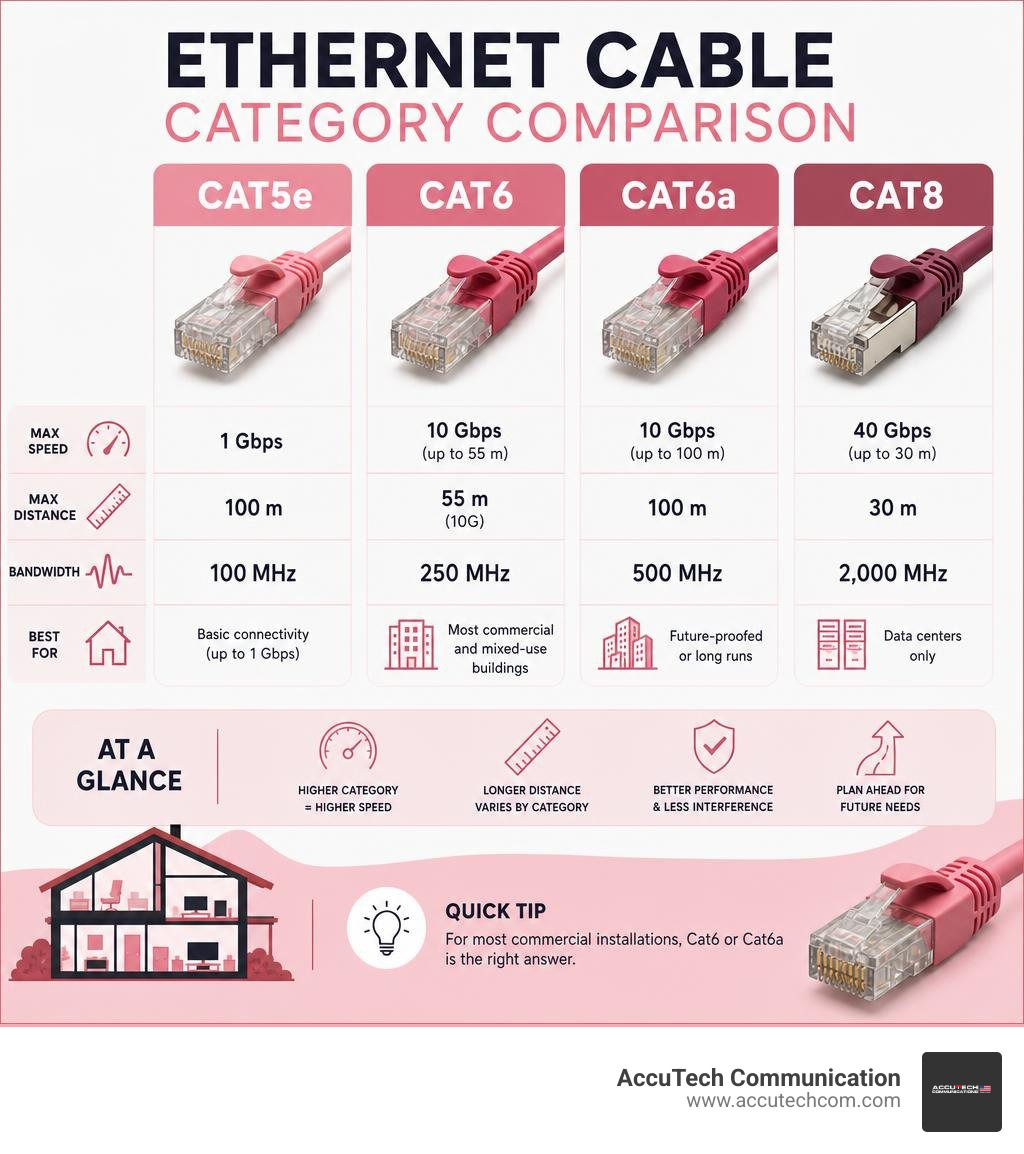
What type of ethernet cable to use in house wiring definitions:
Understanding What Type of Ethernet Cable to Use in House Wiring
When designing modern commercial properties, mixed-use developments, and high-end remote work environments, implementing a robust physical network is no longer optional. The infrastructure must support high-density data, VoIP systems, video conferencing, and smart building automation. To achieve this, we rely on structured cabling.
Structured cabling is a planned, standardized cabling system designed to handle multi-gigabit speeds and scale easily over time. In commercial-grade standards, every cable run originates from a central distribution point—such as a server room or network closet—and runs directly to dedicated wall outlets. This “star” topology ensures that if one cable fails, the rest of the network remains completely unaffected.
With the rise of high-performance remote work infrastructure, executive home offices, and multi-dwelling units (MDUs) throughout Boston, Worcester, and Providence, the demand for enterprise-grade bandwidth in residential layouts has skyrocketed. Many developers and property owners are realizing that standard, low-cost telephone wires or basic Wi-Fi setups simply cannot handle modern traffic. That is why professional low-voltage contractors are brought in to install commercial-grade cabling systems that ensure flawless performance.
For a deeper dive into how structured cabling can transform a multi-use or residential-style layout, check out this guide on Structured Cabling for Home Networks.
Technical Specifications: What Type of Ethernet Cable to Use in House Wiring for High-Speed Performance
To make an informed decision, you must first understand the physics behind copper data lines. An Ethernet cable consists of eight individual copper wires twisted into four pairs. These twists are not random; they are carefully engineered to prevent electromagnetic interference (EMI) and crosstalk between the pairs.
As technology has advanced, the frequency at which these cables operate has increased dramatically. Higher transmission frequencies allow the cable to carry more data over longer distances. For example, older Cat5e runs at a frequency of 100 MHz, limiting its efficient bandwidth. Cat6 cables operate at 250 MHz, while Cat6a steps up to 500 MHz.
These technical specifications directly impact your data rates and bandwidth. Bandwidth refers to the maximum capacity of the cable to transmit data, while data rate is the actual speed of transmission. If you run a high-speed fiber-optic internet connection into a building, but use outdated copper runs within the walls, those runs become a severe bottleneck. To learn more about how these frequencies dictate your network’s capacity, refer to our comprehensive guide on ethernet cable standards.
Professional Recommendations on What Type of Ethernet Cable to Use in House Wiring and Commercial Spaces
When we consult with commercial property owners and business managers across New England, our primary goal is future-proofing. The cost of the physical cable itself is actually a very small fraction of an installation project; the true cost lies in the labor required to route cables through walls, ceilings, and conduit. Therefore, installing a cable that will become obsolete in five years is a costly mistake.
For modern multi-gigabit networks, we strongly recommend a minimum of Cat6 for standard runs and Cat6a for critical paths. Cat6 comfortably supports 10 Gbps speeds over shorter distances, which is perfect for smaller commercial offices or mixed-use suites. However, if you are planning long-distance runs or connecting key network switches together, Cat6a is the industry standard.
Investing in professional installation ensures that your cables are run without kinks, terminated using high-quality keystone jacks, and certified with advanced testing equipment to guarantee they meet industry performance benchmarks. If you want to explore why Cat6 is the sweet spot for modern properties, look at our dedicated breakdown of Cat6 ethernet cables.
Comparing Ethernet Cable Categories: From Cat5e to Cat8
To choose the right cable, it is helpful to look at how different categories compare in terms of speed, frequency, and maximum distance limitations.
| Cable Category | Maximum Data Rate | Bandwidth (Frequency) | Max Distance at Max Speed | Best Use Case |
|---|---|---|---|---|
| Cat5e | 1 Gbps | 100 MHz | 100 meters | Legacy systems, basic IP phones |
| Cat6 | 10 Gbps | 250 MHz | 55 meters (1 Gbps up to 100m) | Standard offices, desktop drops |
| Cat6a | 10 Gbps | 500 MHz | 100 meters | Backbone cabling, PoE, high-performance offices |
| Cat7 | 10 Gbps | 600 MHz | 100 meters | Non-TIA standard, proprietary connectors (Avoid) |
| Cat8 | 40 Gbps | 2000 MHz | 30 meters | Short switch-to-switch runs in data centers |
As the table shows, Cat5e is no longer suitable for high-performance setups because it maxes out at 1 Gbps. While 1 Gbps sounds fast, modern local networks regularly transfer massive files, back up servers, and support dozens of concurrent video streams, which can easily saturate a gigabit link.
Cat6 is an excellent, cost-effective choice for general desk drops because it can handle 10 Gbps speeds up to 55 meters (about 180 feet). However, in larger commercial buildings or multi-story properties, cable runs can easily exceed 55 meters once you account for vertical routing and service loops. For these longer paths, Cat6a is mandatory to maintain 10 Gbps performance over the full 100-meter limit.
We advise our clients to avoid Cat7. It is not officially recognized by the TIA/EIA standard, uses non-standard GG45 or TERA connectors, and offers no performance advantage over the widely supported Cat6a. Cat8, while incredibly fast, is limited to 30-meter runs and is designed specifically for data center server racks, not general building distribution. To explore the wider world of copper and fiber options, read our guide on the different types of cables.
Physical Cable Construction: Solid vs. Stranded and Shielding Options

When buying bulk cable, you will need to choose between solid-core wire and stranded wire.
Solid-core wire features a single, solid piece of copper for each of the eight conductors. This design offers the lowest electrical resistance, making it highly efficient for transmitting data over long distances. It is also the only choice for Power over Ethernet (PoE) applications, as solid copper dissipates heat much better than stranded copper. However, solid-core cable is stiff and can break if bent repeatedly. Therefore, it is used exclusively for permanent runs inside walls, ceilings, and conduit.
Stranded wire uses multiple tiny strands of copper twisted together for each conductor. This makes the cable highly flexible and resistant to metal fatigue. Stranded copper is perfect for patch cords—the short cables that connect your wall jack to your computer, or your patch panel to your switch. However, because of its higher electrical resistance, stranded cable should not be used for runs longer than 10 meters, as signal degradation occurs quickly.
Another critical choice is shielding:
- UTP (Unshielded Twisted Pair): This is the most common cable type. It relies solely on the twisting of the wire pairs to fight interference. It is thin, highly flexible, easy to terminate, and perfectly suited for standard commercial environments.
- STP/FTP (Shielded/Foiled Twisted Pair): These cables feature an internal foil shield wrapped around the wire pairs to block external electromagnetic interference. Shielded cables are essential in industrial environments, near heavy machinery, or when cables must be packed tightly alongside high-voltage power lines. However, they are stiffer, harder to terminate, and require specialized grounded jacks to work correctly.
To understand more about the physical makeup of these wires, you can read Ethernet Cable Types Explained or check out our basic overview answering what are ethernet cables.
Safety Standards, Building Codes, and Professional Installation Costs

Running low-voltage cable is not just about performance; it is also about safety and compliance. The National Electrical Code (NEC) sets strict rules on how and where communication cables can be installed to prevent fire hazards.
When routing cables through walls and ceilings, you must pay close attention to jacket ratings:
- Plenum (CMP): Plenum spaces are the areas in a building used for air circulation, such as the space above a drop ceiling or under a raised floor. If a fire occurs, standard PVC jackets will burn and release highly toxic halogen gas into the air ducts. Plenum-rated cables use special low-smoke, fire-resistant plastics that do not emit these toxic chemicals. By code, any cable run through an air-handling space must be CMP-rated.
- Riser (CMR): Riser-rated cables are designed for vertical runs between floors through non-plenum shafts. They are engineered to prevent a fire from climbing up the cable from one floor to another. While you can use a plenum cable in a riser space, you cannot use a riser cable in a plenum space.
In Massachusetts, New Hampshire, and Rhode Island, local building inspectors strictly enforce these fire safety codes. Failing an inspection because the wrong cable jacket was used can result in costly delays and forced tear-outs.
When it comes to budgeting for a professional installation, prices can vary based on building construction, run lengths, and accessibility. Based on general public internet data, here is what you can expect for average industry installation costs:
- Cost Per Drop: A single network run (one cable pulled, terminated at both ends, and certified) typically ranges from $150 to $450 per drop.
- Multi-Run Installations: For a complete office or commercial space requiring multiple runs, standard industry rates generally fall between $800 and $2,500 for small to mid-sized projects.
Note: These ranges represent average industry costs sourced from public online data and do not reflect the actual pricing of AccuTech Communications, which varies based on specific project site assessments.
If you want to understand the physical process of navigating walls safely, read our step-by-step guide on how to run ethernet cable through wall.
Frequently Asked Questions About Home and Commercial Ethernet Wiring
Is Cat6 or Cat6a better for future-proofing?
For long-term peace of mind, Cat6a is the superior choice for future-proofing. While Cat6 is highly capable and supports 10 Gbps speeds, it can only do so over distances up to 55 meters (180 feet) under ideal conditions. If your building has long cable paths, or if there is significant electromagnetic interference from fluorescent lights and electrical panels, your speed may drop.
Cat6a is designed to support 10 Gbps over the full 100-meter (328-foot) limit without signal degradation. It also features tighter wire twists and better insulation, making it the ideal choice for backbone cabling between network closets and for supporting high-power PoE devices like security cameras and Wi-Fi access points.
Can I run Ethernet cables parallel to electrical wiring?
No, you should never run unshielded Ethernet cables directly parallel to high-voltage electrical wiring. Power lines create a strong electromagnetic field that can bleed into your data lines, causing packet loss, slow speeds, and dropped connections.
According to the National Electrical Code (NEC), you must maintain at least a 12-inch clearance between unshielded communication cables and electrical lines when running parallel. If your network cables must cross paths with power lines, they should always cross at a clean 90-degree angle to minimize the area of contact and prevent interference.
Why should I avoid Copper Clad Aluminum (CCA) cables?
Copper Clad Aluminum (CCA) cables are cheap alternatives that use aluminum wires coated with a very thin layer of copper. While they are highly appealing to budget-conscious buyers, they represent a major safety and performance hazard.
Aluminum has a much higher electrical resistance than pure copper. This means CCA cables degrade data signals quickly over distance. More importantly, because of their high resistance, CCA cables get dangerously hot when used for Power over Ethernet (PoE) applications, creating a real fire risk inside your walls. Aluminum is also brittle and oxidizes quickly when exposed to air, leading to broken wires and connection failures. Professional low-voltage contractors will only use 100% solid copper cables to ensure safety and performance.
Conclusion
Choosing what type of ethernet cable to use in house wiring or commercial environments is a decision that impacts your organization’s productivity and infrastructure safety for decades. While wireless technology continues to improve, a certified, physical copper backbone remains the only way to guarantee stable, lag-free, multi-gigabit speeds.
Since 1993, AccuTech Communications has been the trusted partner for businesses across Massachusetts, New Hampshire, and Rhode Island. We specialize in providing certified, reliable low-voltage installation with competitive pricing and an absolute commitment to quality. Whether you are building out a new office in Boston, upgrading a facility in Manchester, or expanding a network in Providence, our team is here to help.
Ready to build a reliable network infrastructure? Contact us today to learn more about our structured cabling services and request a custom estimate for your next project.
