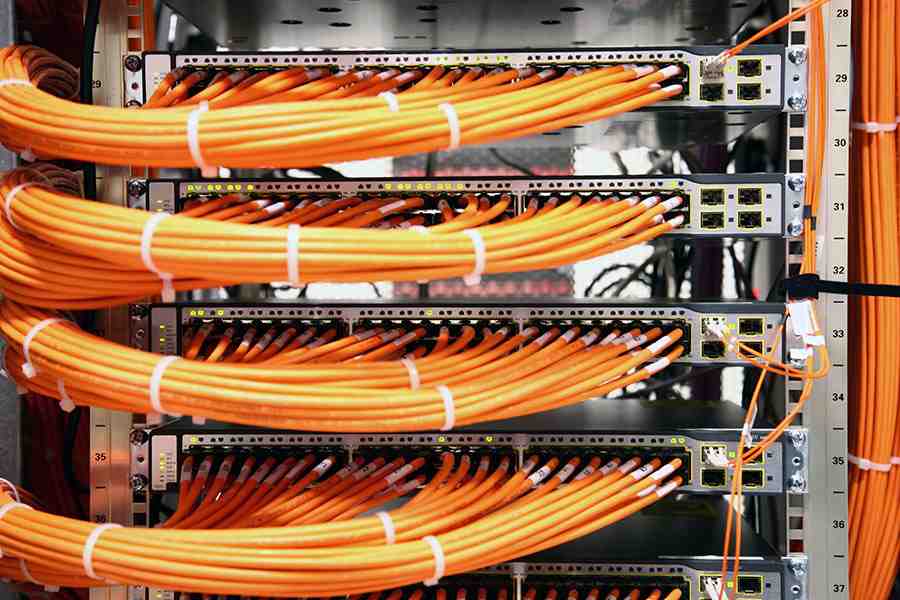
What You Need to Know About Running Ethernet Cable Through Walls
Running Ethernet cable through a wall in a commercial building is one of the most reliable ways to build a fast, stable, and secure business network. Unlike Wi-Fi, a wired connection is not slowed down by interference, walls, or competing devices.
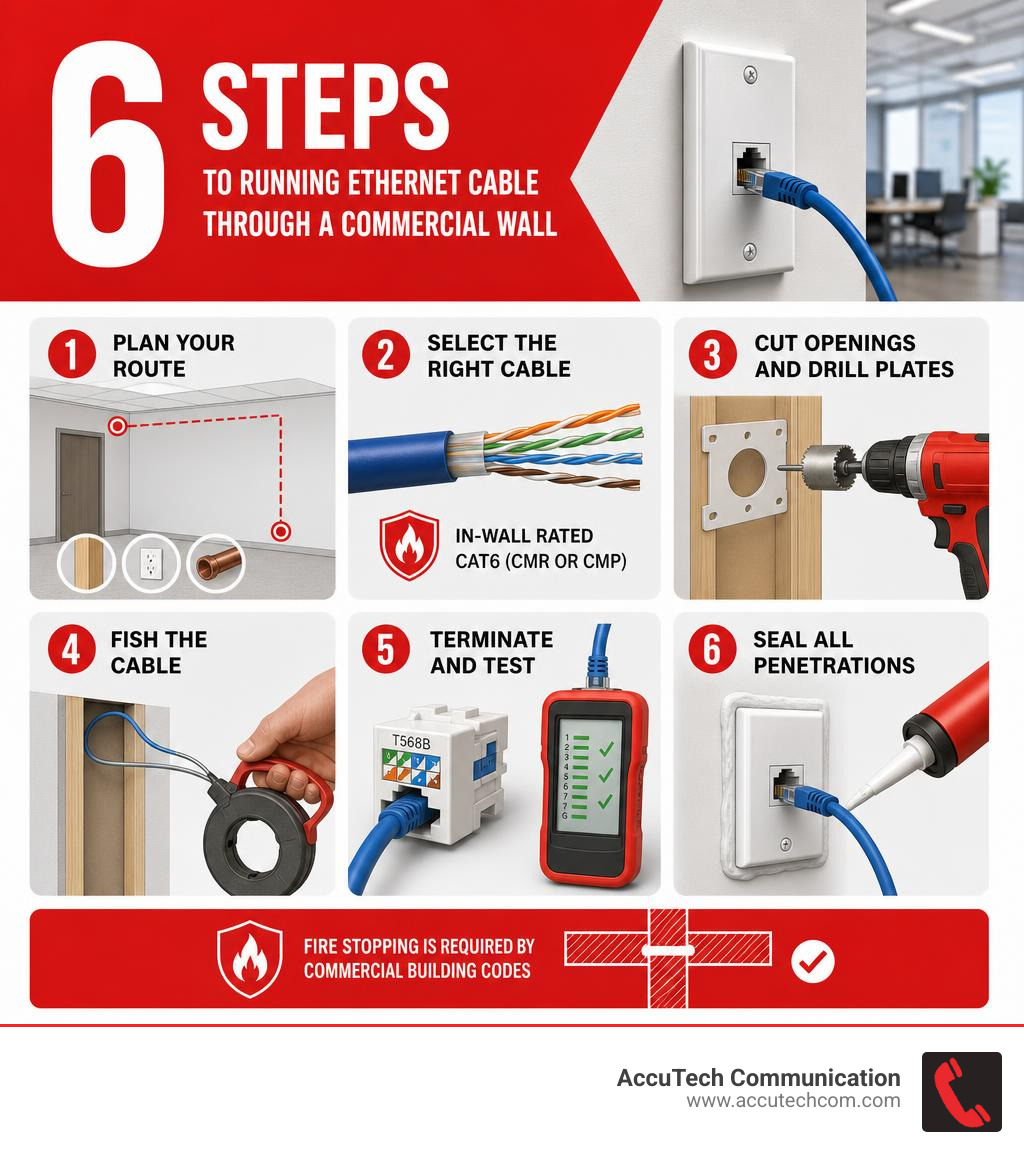
Here is a quick overview of the core steps:
- Plan your route — identify entry and exit points, locate studs, and check for electrical lines, plumbing, and fire blocking
- Select the right cable — use in-wall rated Cat6 (CMR or CMP) for most commercial runs
- Cut openings and drill plates — use a stud finder, low-voltage brackets, and a ship auger bit for clean, code-compliant holes
- Fish the cable — use fish tape or glow rods to pull cable through wall cavities
- Terminate and test — punch down to keystone jacks using the T568B standard, then verify every run with a cable tester
- Seal all penetrations — apply fire-rated caulk or putty pads at every plate penetration, as required by commercial building codes
Keep reading for a detailed breakdown of each step, including cable selection, fire stopping compliance, and when to bring in a certified low-voltage technician.
I’m Corin Dolan, owner of AccuTech Communications, and I’ve spent decades running Ethernet cable through walls across commercial facilities in Massachusetts, New Hampshire, and Rhode Island. That hands-on experience — from healthcare buildings to manufacturing floors — is what shapes every recommendation in this guide.
Running ethernet cable through wall further reading:
Planning and Safety for Running Ethernet Cable Through Wall
Before anyone cuts drywall, drills a plate, or pulls a cable, the most important work happens on paper. In commercial buildings, Ethernet installation is not just a “get the cable from A to B” task. It affects fire ratings, ceiling spaces, electrical separation, network performance, and future serviceability.
A good plan should answer:
- Where is the telecommunications room, network closet, rack, or patch panel?
- Which offices, conference rooms, workstations, wireless access points, cameras, phones, or access control devices need drops?
- Will cables run through walls, ceilings, conduit, cable tray, riser shafts, or existing pathways?
- Are the walls fire-rated?
- Is the ceiling a plenum air space?
- Are permits, inspections, or licensed low-voltage technicians required in your jurisdiction?
- Can the cable be serviced later without opening finished walls again?
For commercial facilities in Massachusetts, New Hampshire, and Rhode Island, we always recommend confirming local requirements before work begins. Low-voltage rules vary by municipality, building type, occupancy, and scope. For more background, see our guide: Do You Need a License to Install Low Voltage Cable?.
Safety checks should include:
- Scan the wall with a stud finder and live-wire detection tool.
- Review drawings if building plans are available.
- Open carefully and inspect before drilling deeply.
- Avoid electrical wiring, plumbing, sprinkler lines, HVAC ductwork, gas piping, and structural members.
- Identify fire blocking before attempting long vertical pulls.
- Shut off nearby circuits when practical before drilling in uncertain wall cavities.
- Use proper PPE, including eye protection, gloves, and a dust mask when cutting drywall or ceiling tile.
Commercial walls often contain more surprises than residential walls: metal studs, fire-rated assemblies, conduit, MC cable, insulation, soundproofing, security wiring, and fire alarm circuits. If a wall feels like a mystery novel, do not make the drill bit the detective.
For a technical overview of wall structure and cable routing methods, this outside guide on running cable through walls offers helpful general background.
Selecting the Right Commercial Network Cables
Cable choice affects speed, code compliance, signal quality, and long-term network value. For commercial in-wall work, the cable must be rated for the environment where it is installed.
The three most common twisted-pair Ethernet categories are Cat5e, Cat6, and Cat6a. For most new commercial installations in 2026, we typically recommend Cat6 as the baseline and Cat6a where higher bandwidth, longer 10 Gbps support, or additional noise resistance is needed.
For a broader breakdown, see our guides to Types of Cables in Computer Network, Best Ethernet Cable for Commercial Wiring, and Category 6 Cable.
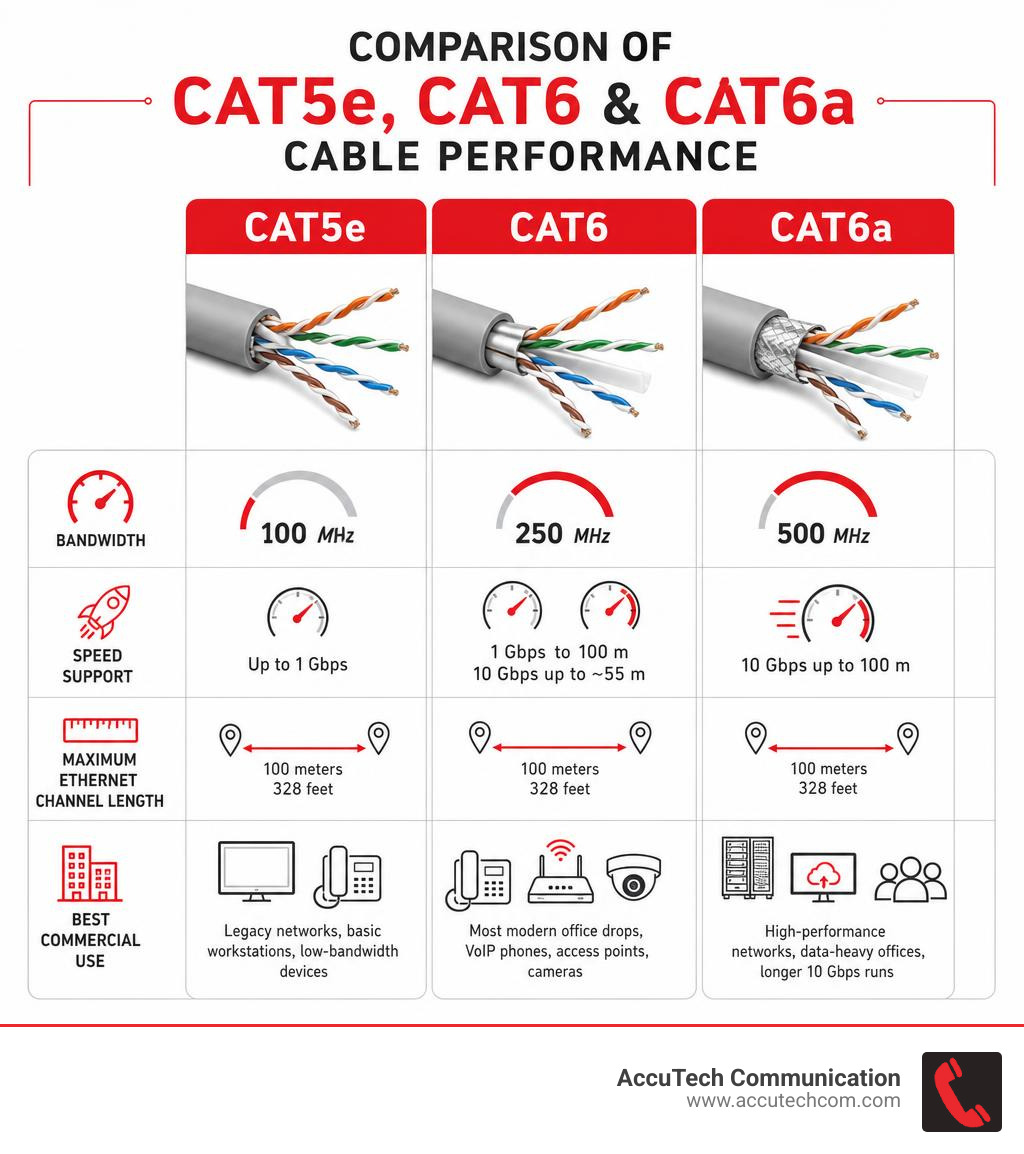
| Cable type | Typical bandwidth | Speed support | Maximum Ethernet channel length | Best commercial use |
|---|---|---|---|---|
| Cat5e | 100 MHz | Up to 1 Gbps | 100 meters / 328 feet | Legacy networks, basic workstations, low-bandwidth devices |
| Cat6 | 250 MHz | 1 Gbps to 100 meters; 10 Gbps up to about 55 meters | 100 meters / 328 feet | Most modern office drops, VoIP phones, access points, cameras |
| Cat6a | 500 MHz | 10 Gbps up to 100 meters | 100 meters / 328 feet | High-performance networks, data-heavy offices, longer 10 Gbps runs |
Important cable jacket ratings include:
- CM: General-purpose communications cable
- CMR: Riser-rated cable for vertical runs between floors in non-plenum spaces
- CMP: Plenum-rated cable for environmental air spaces, such as certain drop ceilings used for HVAC air return
Do not use patch cords inside walls. Patch cables are usually stranded conductors and are intended for flexible equipment connections, not permanent structured cabling. In-wall permanent links should use solid-conductor cable designed for punch-down terminations.
A complete commercial cabling system usually includes:
- Solid-conductor Cat6 or Cat6a cable
- Patch panel
- Keystone jacks
- Wall plates or surface-mount boxes
- Cable management
- Labels
- Patch cords
- Test documentation
Step-by-Step Guide: Running Ethernet Cable Through Wall Cavities

The exact method depends on the building, but the basic workflow is consistent: plan, open, drill, fish, pull, terminate, test, label, and document.
Essential low-voltage tools include:
- Stud finder with live-wire detection
- Voltage tester
- Tape measure and level
- Drywall saw or oscillating multi-tool
- Low-voltage mounting brackets
- Drill and right-angle drill attachment
- Ship auger bits or installer bits
- Fish tape
- Glow rods
- Pull string
- Electrical tape
- Cable jacket stripper
- Punch-down tool
- Keystone jacks
- Wall plates
- Label maker
- Cable tester or certifier
- Fire-rated caulk or putty where required
- PPE: safety glasses, gloves, dust mask
Planning the Route and Entry Points
Start at the network source, usually the telecom room, server room, IDF, MDF, rack, or structured cabling cabinet. From there, map each run to its destination.
Commercial routing should consider:
- Shortest practical path
- Accessible ceiling space
- Existing conduit or sleeves
- Fire-rated walls and floors
- Future expansion
- Service loops
- Avoiding fluorescent ballasts, motors, transformers, and high-voltage lines
- Accessibility for future troubleshooting
When choosing entry and exit points, keep wall plates at a consistent height unless the device requires another location. For example, a workstation outlet may sit near standard receptacle height, while a wireless access point or camera cable may terminate above the ceiling.
Use a stud finder to locate studs. Many commercial interiors use metal studs instead of wood. Metal framing can be easier in some ways, but sharp edges can damage cable jackets if bushings or grommets are not used. Protect the cable anywhere it passes through metal.
Avoid running Ethernet parallel to electrical wiring. When parallel routing is unavoidable, keep separation whenever possible. A common best practice is at least 12 inches of separation from standard power wiring and more distance from high-amperage circuits. If Ethernet must cross electrical wiring, cross at a 90-degree angle.
Cutting Openings and Drilling Plates
Once locations are confirmed, trace the low-voltage bracket opening on the wall. Cut slowly and carefully. A low-voltage bracket is usually preferred over a full electrical box because it gives more room for bend radius and makes cable termination easier.
Before drilling:
- Confirm the wall cavity is clear.
- Check both sides of the wall.
- Verify there are no electrical, plumbing, sprinkler, or mechanical systems in the drill path.
- Confirm whether the wall or floor is fire-rated.
- Choose the correct bit size for the number of cables.
For a single Ethernet cable, a smaller hole may be enough. For multiple cables, installers often use larger holes, such as 3/4 inch to 1 inch, depending on cable count, code, and structural conditions. The hole should be sized appropriately without weakening framing members.
A ship auger bit is often used for wood top or bottom plates because it cuts cleanly and pulls through material well. In tight wall cavities, a flexible installer bit can help reach top or bottom plates from an opening. However, flexible bits require experience because they can wander. That is great when fishing cable, less great when accidentally fishing for plumbing.
In commercial buildings, drilling through rated assemblies must be handled carefully. Any penetration may need approved fire stopping after the cable is installed.
Best Practices for Running Ethernet Cable Through Wall Cavities
Fishing cable is where patience matters. The main tools are fish tape, glow rods, and pull string.
- Fish tape is useful for long, straight pulls through wall cavities and conduit.
- Glow rods are great in ceiling spaces, insulated walls, and dark cavities.
- Pull string should be left in place when possible for future cable additions.
A common process looks like this:
- Insert fish tape or glow rods from the wall opening toward the ceiling, floor, or access point.
- Attach pull string or cable securely using electrical tape.
- Create a smooth leading end so it does not snag.
- Pull slowly and steadily.
- Have one person feed cable while another pulls.
- Stop immediately if the cable binds.
- Leave slack at both ends for termination and future service.
Do not yank Ethernet cable. Cat6 cable commonly has a maximum pulling force around 25 pounds. Pulling too hard can stretch conductors and damage performance in ways that may not be visible. Also avoid sharp bends. A good rule is to maintain a bend radius of at least four times the cable diameter, or follow the cable manufacturer’s specification.
Use cable supports designed for low-voltage cabling. Avoid tight staples, zip ties pulled too hard, or anything that crushes the cable. Velcro-style wraps, J-hooks, cable tray, and approved supports are usually better options.
For commercial projects, conduit may be required or strongly recommended in exposed areas, mechanical spaces, manufacturing environments, warehouses, or places where cables need added protection. It also makes future upgrades easier. See our guide to Installing Conduit for Network Cable.
For another general overview of wall cable installation, this guide on how to run Ethernet cable through walls covers several basic steps.
Terminating and Testing the Connections
Once the cable is in place, terminate it properly. In commercial structured cabling, permanent horizontal cable is typically punched down to keystone jacks at the work area and patch panels in the telecom room.
Best practices include:
- Use the same wiring standard on both ends.
- T568B is common in many commercial installations.
- Keep pair twists as close to the termination as practical.
- Do not strip too much jacket.
- Do not untwist pairs more than necessary.
- Use a proper punch-down tool.
- Label both ends immediately.
- Leave enough service loop for future re-termination.
The T568B color order is:
| Pin | Wire color |
|---|---|
| 1 | White/orange |
| 2 | Orange |
| 3 | White/green |
| 4 | Blue |
| 5 | White/blue |
| 6 | Green |
| 7 | White/brown |
| 8 | Brown |
After termination, test every run. At minimum, use a cable tester to check:
- Continuity
- Opens
- Shorts
- Reversed pairs
- Crossed pairs
- Split pairs
- Miswires
For business-critical networks, certification testing is recommended. Certification goes beyond basic continuity and verifies that the cable meets performance requirements for its category. It may test parameters such as insertion loss, return loss, near-end crosstalk, propagation delay, and length.
For more detail, see our Ethernet Cable Tester resource.
Commercial Fire Stopping and Code Compliance
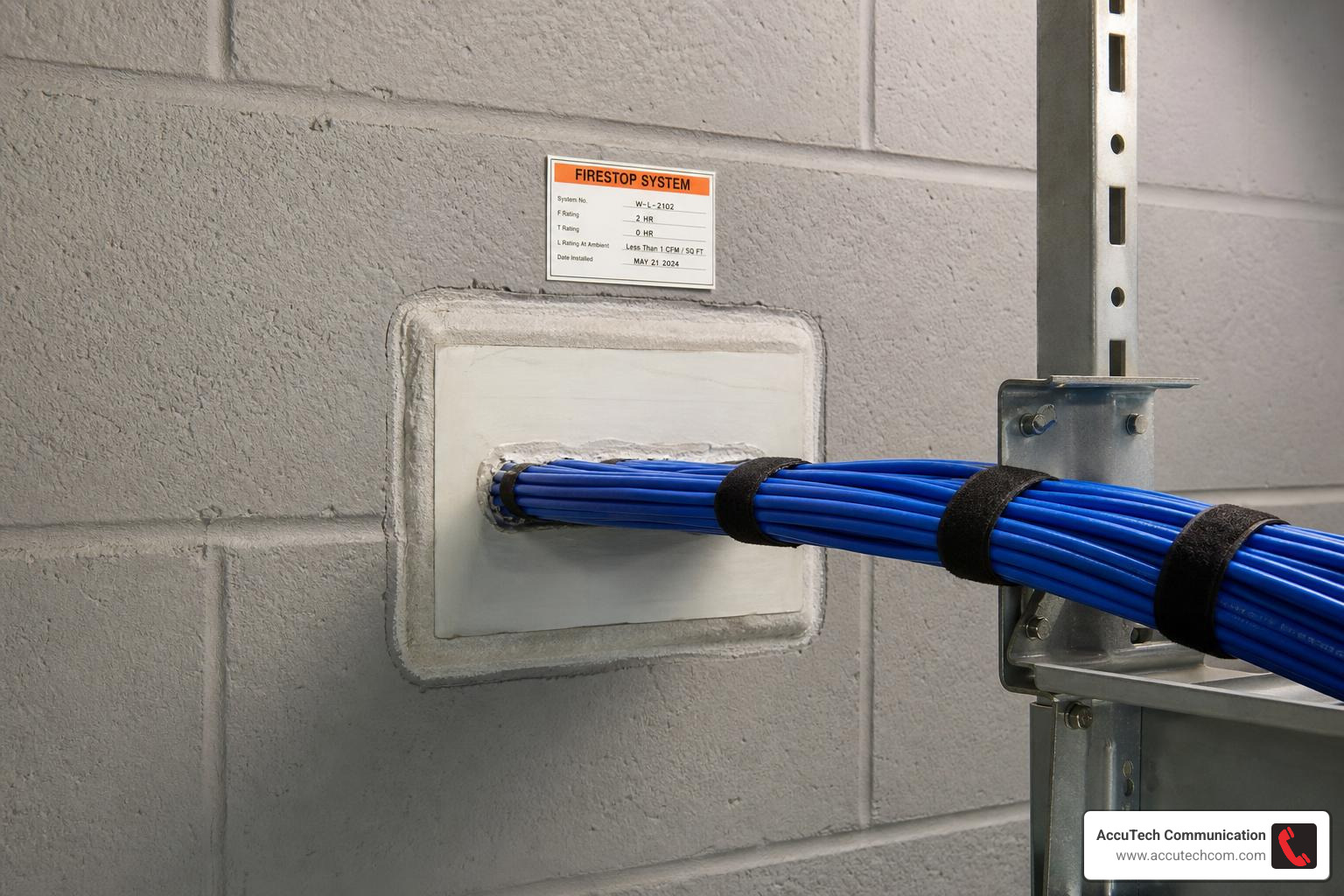
Fire stopping is one of the biggest differences between casual cable pulling and professional commercial cabling. When running Ethernet cable through wall penetrations, especially between floors or through rated walls, the opening cannot simply be left as a hole around the cable.
Commercial buildings are divided into fire-rated assemblies to slow the spread of smoke and flame. When a cable passes through those assemblies, the penetration must be sealed with an approved fire-stopping system.
This can include:
- Intumescent firestop caulk
- Firestop putty
- Putty pads
- Fire-rated sleeves
- Firestop collars
- Listed firestop systems designed for the wall or floor type
Intumescent materials expand when exposed to heat, helping seal gaps during a fire. Standard caulk, spray foam, or “whatever was in the truck” is not an acceptable substitute unless it is specifically listed and approved for that firestop application.
Fire Safety Codes for Running Ethernet Cable Through Wall Penetrations
Commercial low-voltage cabling must follow applicable codes and standards, which may include the National Electrical Code, local building codes, fire codes, and project specifications. Requirements vary based on building type, occupancy, jurisdiction, and cable pathway.
Key compliance points include:
- Use CMP cable in plenum spaces when required.
- Use CMR cable for riser applications where appropriate.
- Seal penetrations through rated walls and floors.
- Do not compromise fire blocking.
- Support cable properly above ceilings.
- Do not lay cable directly on ceiling tiles.
- Maintain separation from electrical conductors.
- Use approved bushings when passing through metal studs.
- Follow manufacturer instructions for firestop products.
- Document pathways and labels for future maintenance.
Floor-to-floor runs deserve special attention. If cable passes through a floor assembly, shaft, sleeve, or riser pathway, the cable type and firestop method must match the application. This is one area where hiring a certified low-voltage contractor is almost always the safer choice.
Professional vs. DIY Commercial Cable Installation Costs
For commercial environments, we do not recommend treating in-wall Ethernet installation as a casual DIY project. A small mistake can cause failed inspections, damaged cable, network outages, firestop violations, or expensive wall repairs.
That said, it is helpful to understand general market cost factors. Publicly available online industry data often shows broad average ranges for commercial Ethernet drops, sometimes around $150 to $1,200 per run depending on conditions. This is not AccuTech Communications pricing, not a quote, and not a guarantee. Actual project cost varies widely based on site conditions and scope.
Factors that affect commercial cabling cost include:
- Number of drops
- Cable category: Cat5e, Cat6, or Cat6a
- Ceiling access
- Wall type
- Distance from telecom room
- Need for conduit
- Fire-rated penetrations
- After-hours work requirements
- Patch panel and rack work
- Testing and certification level
- Labeling and documentation requirements
- Existing pathway availability
Professional installation provides several advantages:
- Code-aware pathway planning
- Proper cable rating selection
- Cleaner wall plate and patch panel termination
- Fire stopping compliance
- Reduced risk around electrical and mechanical systems
- Better testing and documentation
- Faster deployment for multiple locations
- Scalable design for future network growth
For commercial Cat6 projects, see our Cat 6 Installation Near Me resource.
Frequently Asked Questions About Commercial Ethernet Installation
Can I run Ethernet cable parallel to electrical wiring in commercial walls?
It is best to avoid it. Running Ethernet parallel to power wiring can increase electromagnetic interference, especially near high-load circuits, motors, lighting systems, and transformers.
As a practical best practice, maintain at least 12 inches of separation from standard electrical wiring when running parallel. Use more separation near high-amperage circuits or noisy equipment. If Ethernet and electrical wiring must cross, cross at a 90-degree angle.
Also remember: Ethernet cable should not share the same conduit, box, or raceway with power conductors unless the installation is specifically designed and approved for that purpose under applicable code.
Do commercial low-voltage installations require conduit?
Sometimes. Conduit requirements depend on the building, local code, project specifications, cable exposure, fire rating, and physical protection needs.
Conduit may be required or recommended in:
- Exposed wall areas
- Warehouses
- Manufacturing spaces
- Mechanical rooms
- Garages or loading areas
- Areas subject to impact
- Outdoor transitions
- Riser pathways
- Locations where future cable replacement is likely
Even when conduit is not required, it can be a smart investment. It protects cable and makes future upgrades easier. The tradeoff is that conduit must be sized properly for cable fill and bend radius.
What is the maximum length for a commercial Ethernet cable run?
The maximum recommended channel length for Cat5e, Cat6, and Cat6a Ethernet is 100 meters, or 328 feet. This total channel length includes the permanent cable plus patch cords at both ends.
A common structured cabling layout allows:
- Up to 90 meters for the permanent link
- Up to 10 meters total for patch cords
Performance depends on cable category:
- Cat5e supports up to 1 Gbps at 100 meters.
- Cat6 supports 1 Gbps at 100 meters and 10 Gbps up to about 55 meters.
- Cat6a supports 10 Gbps up to 100 meters.
If a commercial run must exceed 100 meters, the design may require an intermediate telecom room, switch, fiber backbone, or another approved network architecture.
Conclusion
Running Ethernet cable through wall cavities in a commercial building is not just about hiding wires. It is about building reliable network infrastructure that supports phones, computers, wireless access points, cameras, access control, cloud applications, and daily business operations.
The key steps are:
- Plan the route carefully.
- Choose the right Cat6 or Cat6a cable with the correct CMP or CMR rating.
- Avoid electrical, plumbing, sprinkler, and mechanical systems.
- Drill and cut cleanly.
- Pull cable without exceeding bend radius or pulling force.
- Terminate with keystone jacks and patch panels.
- Test every run.
- Firestop every required penetration.
- Label and document the installation.
AccuTech Communications provides certified commercial network cabling services throughout Massachusetts, New Hampshire, and Rhode Island. Since 1993, we have helped businesses build reliable cabling systems with a focus on quality, safety, and competitive value.
If your facility needs new Ethernet drops, Cat6 upgrades, structured cabling, or a larger network buildout, learn more about our structured cabling services.