
Ethernet Cable Tester: 3 Best for 2025
Why Every Network Toolkit Needs a Cable Tester
The Anatomy of a Test: Key Features to Look For
When we talk about an ethernet cable tester, it’s not a “one-size-fits-all” gadget. Think of it like choosing a wrench: you wouldn’t use a tiny adjustable wrench for a massive plumbing job, right? The same goes for these testers. There’s a whole range of devices out there, each with features designed for different tasks. Your choice really depends on what you need to do, whether you’re an IT pro managing huge data centers or just trying to get your home gaming setup perfect.
First things first: cable compatibility. While our main focus is Ethernet, many testers are incredibly versatile. They often support different cable types and connectors, not just the standard RJ45.
You’ll find testers ready for:
- RJ45: This is the champion for your Ethernet cables, connecting everything from computers to routers and switches. Want to dive deeper? Check out our page on RJ45 Network Cable.
- RJ11: Often found in older telephone lines, many testers include this for voice network checks.
- Coaxial: These are your TV cables or connections for older internet setups. Some testers can even check these, making them super handy for a mix of home or office wiring.
Beyond just the connector, a good ethernet cable tester needs to handle various Network Cable Categories. A basic continuity tester might be fine for a simple Cat5e cable. But for networks using higher speeds, like those needing Cat 5 Cable Speed or even robust Cat6 Network Cable, you’ll need a tester that can actually verify those higher performance standards.
Next up is the display type, which makes a huge difference in how easy it is to use your tester:
- LED Indicators: These are common on simpler ethernet cable testers. They usually have a row of lights – one for each wire pair, sometimes a ground too. They light up in order to show if the connection is good and if the wires are in the right place. They’re great for quick, visual checks.
- LCD Screen: You’ll find these on more advanced testers. An LCD screen gives you a digital readout with much more detail. We’re talking cable length, how far away a fault is, specific fault types (like “open on pin 3”), and sometimes even a clear picture of the wiring. This level of detail is priceless for pinpointing problems fast.
- Backlit Display: If you’ve ever had to troubleshoot in a dimly lit server room or behind a desk, you know a backlit display is a lifesaver. It means you can clearly read your results no matter how dark it is.
A game-changing feature for anyone who often works alone is a remote unit. Many ethernet cable testers come in two parts: a main unit and a smaller, detachable remote unit. This setup allows for super convenient one-person testing of installed cable runs. You plug one end of the cable into the main unit and carry the remote unit to the other end, perhaps across the office or even in another building. No more yelling “Is it working yet?!” down the hallway!
Finally, let’s talk practicalities:
- Power Source: Most testers run on batteries, usually a 9V battery or a few AAA batteries. It’s always smart to have fresh batteries on hand for accurate readings. Low power can sometimes give you unreliable results, which is the last thing you want when troubleshooting!
- Durability: Network environments can be pretty rough. Testers can get dropped, kicked, or covered in dust. Investing in a robust, durable design means your tester can handle the bumps and scrapes of fieldwork. It’s an investment that pays off in the long run.
Considering these features will help you pick the perfect ethernet cable tester to keep your network running smoothly, no matter the challenge.
From Simple Checks to Full Certification: Types of Ethernet Cable Testers
Now that we’ve explored the essential features of an ethernet cable tester, let’s dive into the different types you’ll encounter. Not all testers are created equal! They range from simple, continuity-checking gadgets to sophisticated certification tools. Understanding these differences is key to picking the right tool for your specific job. It’s a bit like choosing between a simple screwdriver and a full power tool kit – both have their place, but one is definitely more powerful for big jobs!
Here’s a quick comparison of the main types of ethernet cable testers:
| Feature | Basic Testers (Continuity & Wiremappers) | Verifiers (with Tone Generators) | Certifiers (Advanced Network Certifiers) |
|---|---|---|---|
| Wiremap | Yes | Yes | Yes |
| Length Measurement | No | Yes (basic) | Yes (highly accurate) |
| Crosstalk (NEXT/FEXT) | No | No | Yes |
| Attenuation | No | No | Yes |
| Return Loss | No | No | Yes |
| PoE Test | No | Some models | Yes |
| Certification Report | No | No | Yes (Pass/Fail to industry standards) |
| Ideal Use Case | DIY, quick checks, basic troubleshooting | Installation, troubleshooting, cable tracing | Professional installation, warranty, compliance |

For home users or those just starting with DIY networking, a basic continuity tester is often all you need. It’s a great entry point! However, for professional applications and commercial installations, we rely on much more advanced tools. These ensure every cable meets strict performance standards, guaranteeing the network will perform as expected.
Curious to get started with the basics? Take a look at How to Test an Ethernet Cable: A Quick Guide to Cable Testers for a fantastic primer.
The Essential Ethernet Cable Tester: Continuity & Wiremappers
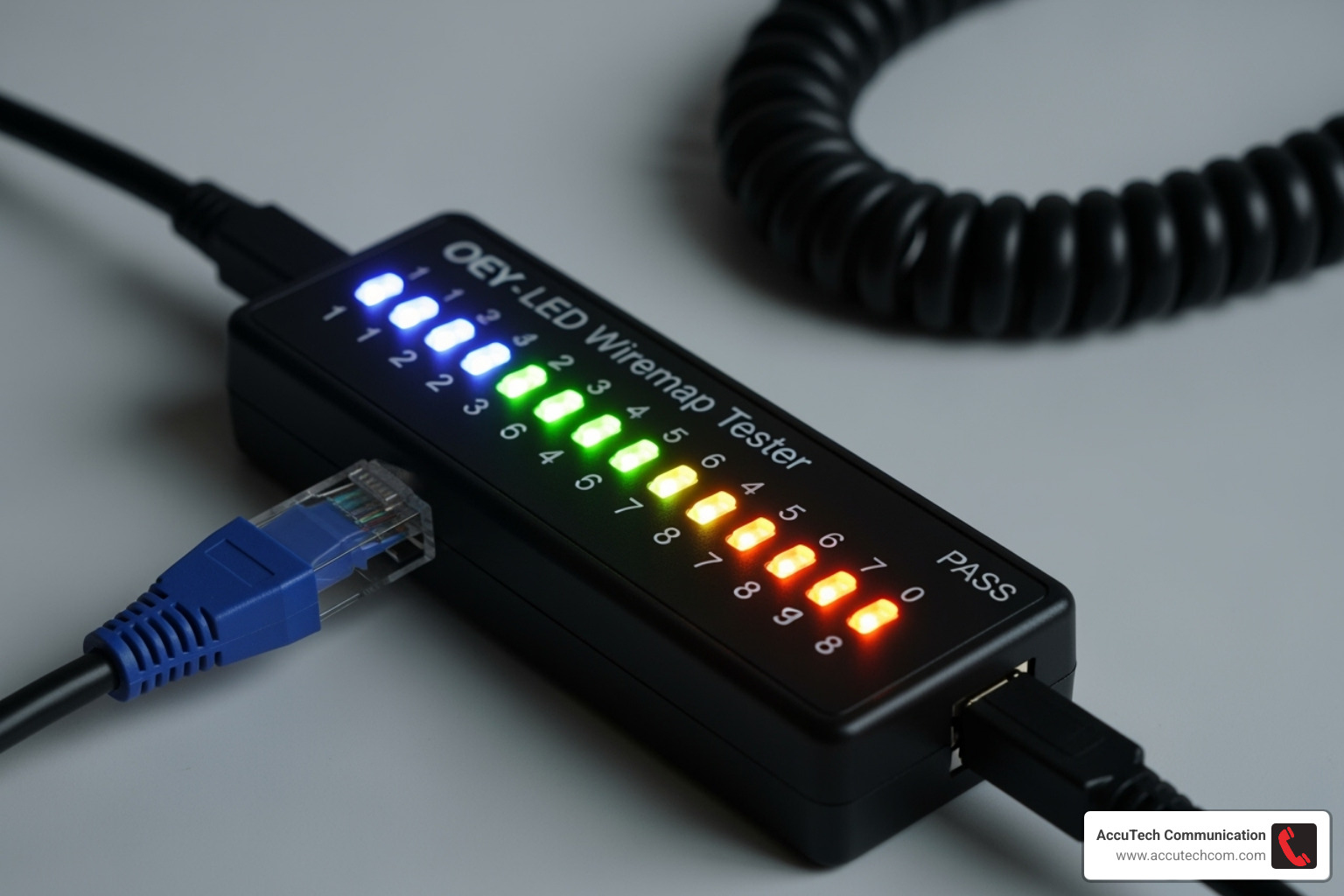
The most common and budget-friendly type of ethernet cable tester is the continuity and wiremap tester. These little marvels are truly indispensable for basic cable checks. Their main job is continuity testing, which simply tells you if electricity can flow from one end of a wire to the other. Think of it as making sure the “lights are on” for each individual wire inside the cable.
But they do more than just that! They also perform a wiremap function. This means they check that each wire within the cable is connected to the correct pin at both ends. It also makes sure no wires are touching each other where they shouldn’t. This is super important because Ethernet cables have a very specific wiring order (like T568A or T568B) that must be followed perfectly for the cable to work right.
These testers are excellent at spotting common cable problems:
- Open Circuits: This is like a broken wire – no connection from one end to the other. The light for that specific wire just won’t come on.
- Short Circuits: Here, two wires are accidentally touching. The lights for those pins might light up strangely or at the same time.
- Crossed Pairs: This happens when wires within a pair get swapped. It can lead to poor signal quality or even make the cable completely useless.
- Reversed Pairs: The polarity of a pair is flipped. While some modern network gear can handle this, it’s still a wiring fault.
- Split Pairs: This is a sneaky one! Wires from different pairs get swapped, but the overall pinout might look correct. A basic wiremapper might not catch this, but it can seriously mess with network performance, especially at higher speeds.
These testers are perfect for quickly checking new patch cables you’ve made or for finding obvious connection issues in your home network. They are incredibly budget-friendly and a must-have for any DIY networking enthusiast.
The Professional’s Go-To: Verifiers with Tone Generators
Stepping up from basic continuity testers, we find verifiers. These ethernet cable testers do more than just check if a connection exists; they verify the cable’s ability to carry data. While they don’t certify performance to strict industry standards, they offer incredibly valuable diagnostic features.
A fantastic feature on many verifiers is a built-in tone generator. This little tool sends an audible tone down the cable, which you can pick up with a separate probe (often included with the tester). This is a lifesaver for cable tracing – imagine trying to find one specific cable among a tangled mess of dozens in a wiring closet or a busy server rack! The tone generator makes it easy to identify that elusive cable. It’s also super handy for managing your patch cables and using features like hub blink or port identification to figure out which network port a cable is connected to.
Many verifiers can also perform cable length measurement. They use clever technology to send a signal down the cable and calculate its length based on how long it takes for the signal to return. This is crucial for making sure your cables aren’t longer than they should be (like the 100-meter limit for Cat5e/6/6a). Even better, some can pinpoint the exact distance-to-fault, telling you precisely how many feet or meters from your tester a break or short circuit is located. This saves a huge amount of time when you’re trying to fix hidden cables in walls or ceilings!
Another increasingly important feature is Power over Ethernet (PoE) detection. More and more devices, like security cameras, VoIP phones, and wireless access points, get their power directly through the Ethernet cable. A verifier that can check for PoE presence and voltage is critical. Our Network Data Wiring services often involve verifying these PoE capabilities for our clients.
The Gold Standard: Advanced Network Cable Certifiers
For serious commercial network installations, especially those that need warranties or must meet strict industry standards, advanced network cable certifiers are the absolute champions. These aren’t just testers; they perform a full-blown certification of the entire cabling system.
Certifiers don’t just check for simple continuity; they measure the cable’s actual performance against established industry standards like TIA/EIA. They run complex tests that can uncover subtle issues that might prevent high-speed data from flowing smoothly. These include:
- Crosstalk (NEXT/FEXT): This measures how much signal “bleeds” from one wire pair to another. Too much crosstalk can corrupt data, slowing things down or causing errors.
- Attenuation: This measures how much signal strength is lost over the length of the cable. If too much signal is lost, it won’t reliably reach its destination.
- Return Loss: This shows how much signal bounces back down the cable due to imperfections. High return loss can also lead to data errors.
These high-end devices are absolutely essential for verifying the integrity of critical network infrastructure, from the cables running through your office walls to the main Backbone Cabling that connects different parts of a building. They are the go-to tools for professional Commercial Data Cabling projects where reliability and top-notch performance are non-negotiable.
A major benefit of certifiers is their ability to generate detailed reports. These comprehensive documents provide a clear “Pass” or “Fail” for every single tested parameter, complete with detailed measurements and graphs. These reports are often required by cable manufacturers to validate their warranties (some can be as long as 25 years!). They provide undeniable proof that your cabling meets all the performance specifications needed for today’s high-speed networks.
While we’re focusing on copper Ethernet cables here, it’s worth noting that similar certification tools exist for fiber optics. If you’re curious about those specialized tools, our page on How to Test Fiber Optic Cable goes into more detail.
Solving Network Mysteries: How Testers Maintain Performance
An ethernet cable tester is truly a network’s best friend. It’s not just for fixing problems, but also for keeping your network running smoothly and preventing issues before they even start. We rely on them constantly in our work to ensure networks perform at their very best.
Imagine your network suddenly slows down, or a computer just won’t connect. It feels like a mystery, right? Often, the culprit is a simple cable issue. This is where the troubleshooting process begins, and an ethernet cable tester becomes your detective tool. It helps with rapid fault identification. Instead of endless guessing, you can quickly find out if the problem is an open circuit (a broken wire), a short (wires touching), or a miswired connection (you can learn more about proper wiring in our Ethernet Cable Wiring guide). This quick diagnosis saves a lot of time and frustration.
By swiftly finding and fixing these cable faults, testers play a huge role in preventing network downtime. Every moment your network is down means lost work, lost sales, and unhappy users. A simple, quick test can prevent a minor cable hiccup from turning into a costly, major outage. Testers also help ensure you’re getting the optimal Network Cable Speeds you pay for. A cable might seem to “work,” but if it has hidden issues like high crosstalk, it won’t deliver the fast speeds you expect.
Beyond fixing existing problems, these testers are vital for installation verification. When we put in a brand-new Structured Cabling System, we test every single cable. This isn’t just a formality! It’s a crucial step to make sure the entire setup is perfect from day one. It catches any small mistakes right away, saving you from expensive re-work down the road.
This leads us to proactive maintenance. Regular testing, especially in busy places like data center applications or for complex office network management, can spot a cable starting to degrade before it completely fails. This means we can fix or replace cables during planned maintenance times, instead of having to react to a sudden, unexpected crash. The result? Maximizing uptime and ensuring your network is always reliable and high-performing, supporting your business without a hitch.
Frequently Asked Questions about Ethernet Cable Testers
How do you use a basic ethernet cable tester?
Using a basic tester is straightforward:
- Insert a fresh battery for accurate readings.
- Plug one end of the cable into the main unit and the other into the remote (or wall jack).
- Power the tester on; choose the slower scan mode if you need extra time to watch the LEDs.
- Read the lights:
- Sequential 1-8 (and G) = correctly wired, straight-through cable.
- Out-of-order lights = crossed or swapped wires.
- Missing light = open circuit (broken wire).
That quick check confirms the cable’s basic health.
What’s the difference between testing a straight-through vs. a crossover cable?
A straight-through cable lights 1-1, 2-2, 3-3, and so on. A crossover swaps the transmit and receive pairs, so the tester shows 1-3, 2-6, 3-1, 6-2 while pairs 4-5 and 7-8 remain straight. Modern hardware with Auto-MDI/MDI-X works with either, but the pattern lets you verify which style you have.
Can a cable pass a test but still cause network problems?
Absolutely. Basic testers only prove continuity—they don’t measure performance. Issues that can slip through include:
- Runs longer than 100 m (328 ft).
- Electromagnetic interference from power circuits or lighting.
- Low-quality connectors or cable.
- Intermittent breaks that appear when the cable bends.
- Excessive crosstalk, attenuation, or return loss.
For business-critical links, use a verifier or full certifier to ensure the cable meets speed and reliability standards.
Conclusion: Ensuring Your Network’s Foundation is Solid
So, we’ve explored the wonderful world of ethernet cable testers, from the simple gadgets to the high-tech certifiers. It really boils down to one thing: choosing the right tool for your job. Whether you’re a home user just trying to get your Netflix to stop buffering, or an IT pro managing a massive corporate network, your needs will be different. A basic LED continuity checker might be perfect for your home setup, while a sophisticated certifier is absolutely essential for professional projects that demand guaranteed performance.
Think of an ethernet cable tester not just as a piece of equipment, but as a smart investment in reliability. It’s like having a crystal ball for your network! It lets you perform proactive testing, sniffing out those little glitches and potential problems before they turn into frustrating, network-crippling outages. This not only saves you so much time and headaches, but it also significantly reduces potential downtime, keeping your network humming along beautifully, always performing at its very best.
Now, if you’re tackling a complex commercial project in Massachusetts, New Hampshire, or Rhode Island, where your network’s performance is directly linked to your business’s success, then professional testing and certification aren’t just ‘nice-to-haves’ – they’re absolutely key. That’s where we come in!
At AccuTech Communications, we take immense pride in our top-tier Structured Cabling Installation services. Our team of certified technicians isn’t just installing cables; they’re ensuring perfection. We use the most advanced ethernet cable tester equipment to make sure every single cable meets the highest standards of quality and performance. With over 26 years in business, we’ve proudly built our reputation on reliable service and a commitment to excellence all across MA, NH, and RI, serving areas like Metro-west Boston, Marlborough, Sudbury, Boston, Woburn, Waltham, and Worcester.
We truly believe that the strongest networks are built on the most solid foundations – and that means properly installed and carefully tested cabling. So, if you’re ready for professional network cabling installation and testing that you can truly rely on, don’t hesitate! For professional network cabling installation and testing, contact our experts today. We’re always here, ready to help you build a network that truly works as hard as you do!
