
What Is Infrastructure Cabling? (And Why It Matters for Your Business)
Infrastructure cabling is the complete, standards-based system of cables, connectors, and hardware that carries data, voice, and video signals throughout a commercial building, campus, or data center.
Quick answer: Here’s what you need to know at a glance:
| Question | Answer |
|---|---|
| What is it? | A structured system of cables and hardware connecting all networked devices in a building |
| What does it carry? | Data, voice, video, security, Wi-Fi, and building systems |
| Main cable types | Copper (Cat 5e, Cat 6, Cat 6A) and fiber optic (single-mode, multi-mode) |
| Key standard | ANSI/TIA-568, ISO/IEC 11801 |
| Max copper run | 90 m permanent link + 10 m patch cords |
| Who installs it? | Certified professionals (e.g., BICSI-trained technicians) |
Think of it as the nervous system of your business. Every Wi-Fi access point, IP phone, security camera, and workstation depends on it.
Without a well-designed cabling infrastructure, you get slow networks, tangled wiring, expensive downtime, and a system that can’t grow with your business.
With it, you get a clean, organized, scalable foundation that supports everything your team relies on — today and years from now.
This guide walks you through everything: how infrastructure cabling works, what types exist, how it’s designed and installed, and what standards govern it. Whether you’re building out a new office in Massachusetts or upgrading an aging network in an enterprise facility, this is the practical reference you need.
I’m Corin Dolan, owner of AccuTech Communications, and I’ve spent decades designing and installing infrastructure cabling systems for commercial clients across Massachusetts, New Hampshire, and Rhode Island. The insights in this guide are drawn directly from real-world experience delivering structured cabling projects for businesses of every size and complexity.
Know your infrastructure cabling terms:
Understanding Infrastructure Cabling vs. Point-to-Point Wiring
When planning a commercial network, businesses typically choose between two main cabling methods: structured infrastructure cabling and point-to-point wiring. Understanding the difference between these two approaches is critical for the long-term reliability and performance of your IT environment.
Point-to-point wiring is a direct, dedicated connection between two hardware devices. For example, running a single, continuous ethernet cable directly from a server to a computer station. While this might seem simple and cost-effective for a home office, it quickly becomes a nightmare in commercial environments.
Structured cabling, on the other hand, is a standardized, hierarchical network topology. Instead of direct runs, it uses a modular layout where cables terminate at centralized patch panels. This creates a highly organized network where any outlet can be easily patched to any switch port, making changes and upgrades seamless. To dive deeper into how these setups differ, read our guide on the Types of Network Wiring.
The Limitations of Point-to-Point Wiring
In commercial facilities across New England, we frequently encounter legacy point-to-point systems that have outgrown their usefulness. The limitations of direct connections include:
- Cable Clutter and “Spaghetti” Closets: Without centralized patch panels, cables accumulate in disorganized bundles. This restricts airflow in server racks, causing equipment to overheat.
- Troubleshooting Difficulty: If a port fails, finding the correct physical cable in a point-to-point mess is incredibly time-consuming.
- High Maintenance Costs: Making simple moves, adds, or changes (MACs) requires running entire new lines from point A to point B, which skyrockets labor costs.
- Lack of Scalability: Point-to-point setups cannot easily adapt to new technologies or office reconfigurations.
To prevent these headaches and maintain a clean, organized server environment, check out our best practices in Keeping Your Wires Straight: A Comprehensive Guide to Cabling Installation and Maintenance.
The Core Subsystems of Structured Cabling
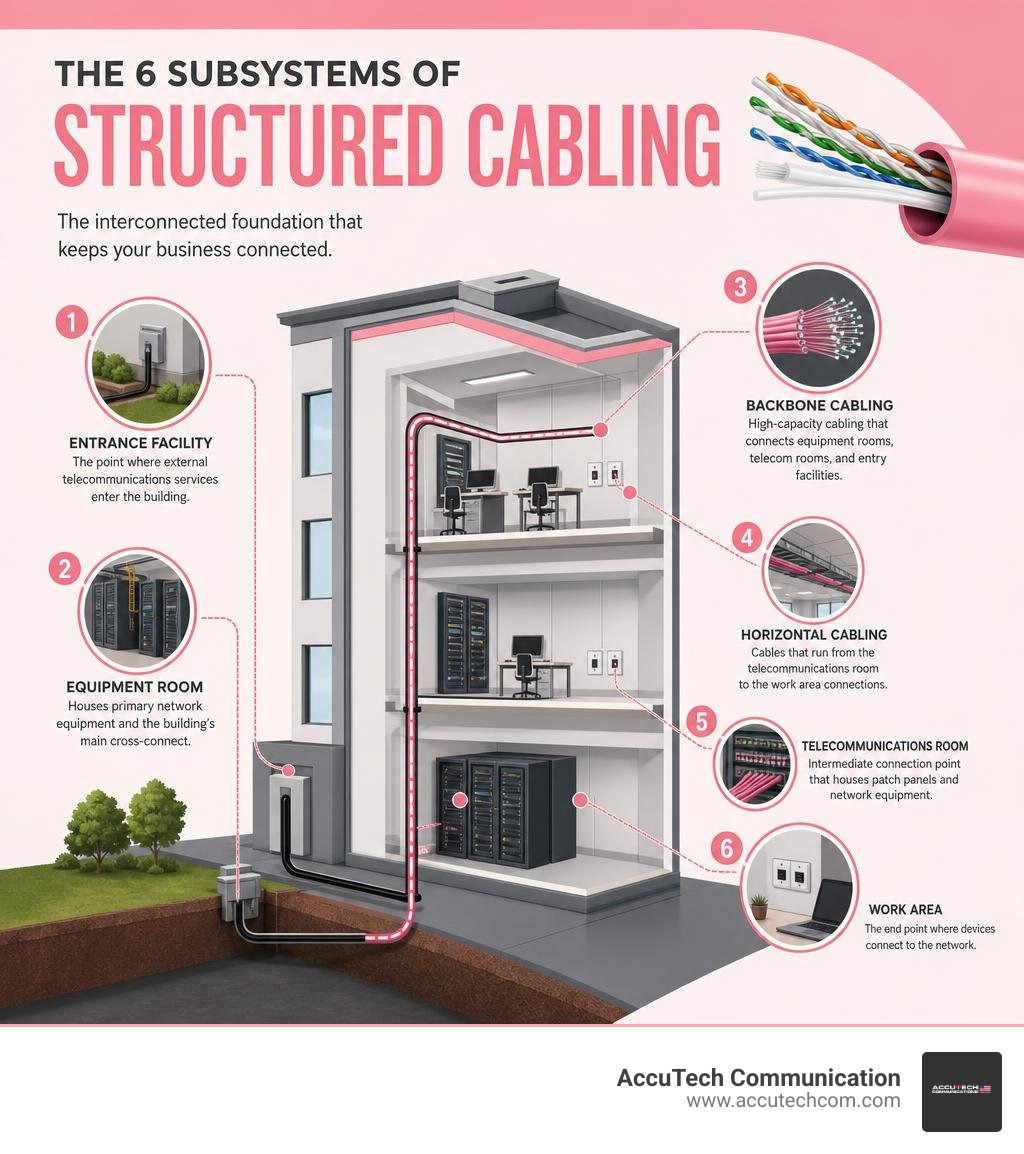
A standards-compliant structured cabling system is divided into six distinct, integrated subsystems. This modular design ensures that a change in one area does not disrupt the rest of the network:
- Entrance Facilities (EF): This is the physical location where the service provider’s external cables connect to the building’s internal wiring. It contains the transition point and necessary electrical protection devices.
- Equipment Rooms (ER): A centralized space housing major building-wide telecommunications systems, such as servers, PBX systems, and main cross-connects.
- Backbone Cabling: Also known as vertical cabling, this system connects the entrance facilities, equipment rooms, and telecommunications rooms. It typically utilizes high-bandwidth fiber optic cabling to handle heavy traffic.
- Telecommunications Rooms (TR) and Enclosures (TE): Located on individual floors, these rooms house the patch panels and network switches that bridge the backbone cabling to the horizontal cabling.
- Horizontal Cabling: This runs from the telecommunications room patch panels to individual work area outlets. It is usually copper twisted-pair cabling routed through conduits, ceiling trays, or under-floor systems.
- Work Area Components: These connect the end-user devices (computers, IP phones, printers) to the horizontal cabling outlets using flexible patch cords.
By segmenting your business network into these clean, standardized layers, you gain a robust foundation. Learn more about planning these subsystems on our dedicated Cabling Infrastructure Solutions page.
Cable Types, Performance Standards, and Use Cases
Selecting the correct transmission media is one of the most important decisions in network design. Your choice of copper or fiber optic cabling dictates your network’s maximum bandwidth, speed, and distance capabilities.

Copper and Fiber Media in Infrastructure Cabling
For most commercial networks, a combination of copper and fiber optic cabling yields the best balance of cost, speed, and distance. Copper is ideal for horizontal runs to individual desks, while fiber optic is the standard for high-speed backbones and long-distance runs.
Here is a quick reference table comparing the most common commercial cable categories:
| Cable Type | Category / Mode | Max Data Rate | Max Distance | Primary Use Case |
|---|---|---|---|---|
| Copper | Category 5e | 1 Gbps | 100 m | Legacy systems, basic IP phones |
| Copper | Category 6 | 1 Gbps / 10 Gbps | 100 m / 37-55 m | Standard office workstations, gigabit speeds |
| Copper | Category 6A | 10 Gbps | 100 m | Modern enterprise networks, high-power PoE, Wi-Fi 7 |
| Copper | Category 8 | 40 Gbps | 30 m | Data center switch-to-server connections |
| Fiber Optic | Multi-Mode (OM3/OM4) | 10 Gbps – 100 Gbps | 300 m – 400 m | Intra-building backbones, server room uplinks |
| Fiber Optic | Single-Mode (OS2) | 100+ Gbps | 10 km+ | Campus backbones, long-haul outside plant (OSP) |
Copper twisted-pair cables have a strict physical limitation: they support a maximum permanent link distance of 90 meters (295 feet), plus an allowance of up to 10 meters (33 feet) of combined patch cords at both ends, totaling a 100-meter channel. Beyond this distance, signal attenuation and crosstalk degrade network performance. For high-performance enterprise setups, we recommend Cat 6A, which handles 10 Gbps speeds across the full 100-meter channel and offers superior heat dissipation for Power over Ethernet (PoE) devices. Explore our copper cabling options on our Commercial Data Cabling page.
High-Density Fiber Innovations
As modern applications demand higher bandwidth, physical space inside conduit pathways and server rooms has become highly competitive. Fortunately, fiber optic manufacturing has advanced rapidly to address this challenge:
- Micro Cables: Innovative micro-cables, such as MiniXtend® Cable Solutions | HD Micro Cable Solution | Corning, are up to 50% smaller than standard loose tube cables. High-density HD micro cables can deliver up to 432 fibers while being up to 20% smaller than standard micro cables, allowing businesses to maximize their existing conduit space.
- FlexRibbon Technology: For ultra-high-density applications, MassLink ™ 2880 to 3456f Indoor and Indoor/Outdoor Cable with 200µm FlexRibbon ® Technology packs thousands of fibers into a compact, highly flexible bundle. This technology allows fibers to roll up tightly, reducing outer cable diameter by up to 60% and cutting cable preparation time by up to 30%.
- Ruggedized and Armored Glass: Modern polymer-encapsulated glass, like Ruggedized Single-Mode Micro-Distribution Cable – SSF – Cleerline Technology Group, features a 2000x greater flex cycle rating and 1500x better impact rating than traditional fiber. For outdoor or direct-burial applications, using a corrugated steel armored variant, such as Armored Direct Burial Micro-Distribution Cable – SSF – Cleerline Technology Group, protects the glass from crushing forces, water intrusion, and rodents.
Designing Cabling Systems for Commercial Environments
A successful cabling project starts with a meticulous design that considers the physical layout of the building, current bandwidth needs, and future expansion plans.

Small Offices vs. Multi-Floor Enterprise Buildings
The complexity of a structured cabling design depends heavily on the size and layout of your facility:
- Small Offices: In a small, single-floor office space, the design is relatively straightforward. A single telecommunications closet (often acting as both the building distribution point and the horizontal cross-connect) can handle all horizontal runs directly to the workstations. There is typically no need for complex backbone cabling.
- Multi-Floor Enterprise Buildings: Large-scale facilities require a hierarchical star topology. A central Equipment Room (ER) houses the Main Cross-Connect (MC). From there, vertical backbone cabling runs through dedicated utility risers to individual Telecommunications Rooms (TRs) on each floor. Each TR contains horizontal cross-connects that distribute copper lines to the local work area outlets.
Proper planning of pathways, such as J-hooks, cable trays, and conduits, is essential to prevent sag and tension issues. To learn more about selecting the right low-voltage infrastructure for your space, visit our Low Voltage Cabling page or read about our comprehensive Data and Network Cabling design services.
Data Center Build-Outs and High-Density Environments
Data centers have extremely strict infrastructure requirements. Because of the sheer volume of high-speed connections, every rack unit must be optimized for space, accessibility, and thermal efficiency.
In these environments, we utilize overhead cable tray systems (like basket trays) to keep heavy cable bundles out of raised-floor spaces, keeping the under-floor pathways clear for cold-air distribution. Proper pathway design, correct bend radii, and neat vertical and horizontal cable managers are critical to preventing signal degradation and ensuring that technicians can easily access patch panels.
Whether you are building out a new facility or upgrading an existing server room, professional design is key. See how we handle these high-stakes projects on our #1 Best Data Center Build Out Abington MA | Accutech page and learn about our structured Network Cable Installations.
Installation Best Practices, Safety, and Industry Standards
To guarantee that your network operates at peak performance, all cabling must be installed in strict compliance with international standards and local codes. The primary standards governing structured cabling design and testing are ANSI/TIA-568 (used widely in North America) and ISO/IEC 11801 (the international standard).
Additionally, installations must comply with the National Electrical Code (NEC) to ensure fire safety and proper low-voltage electrical isolation. For detailed guidelines on standard procedures, you can reference the Installation Standard 2025 V1 published by the Fiber Optic Association.
Future-Proofing Your Business with Infrastructure Cabling
Designing a network for the needs of July 2026 requires looking ahead to the technologies of tomorrow. Modern cabling infrastructure must support:
- Power over Ethernet (PoE): PoE allows a single ethernet cable to deliver both data and electrical power to devices like IP cameras, smart LED lighting, and wireless access points. Using Cat 6A cabling is highly recommended for modern PoE applications because its larger conductors reduce power dissipation and heat buildup inside tight cable bundles.
- Wi-Fi 7 and 5G Integration: The latest wireless access points require multi-gigabit backhaul connections. Installing dual Cat 6A runs to every wireless access point ensures your physical cabling won’t bottleneck your wireless speeds.
Partnering with certified Structured Cabling Installation Contractors ensures your physical plant is ready to handle these emerging technologies.
Testing, Certification, and Safety Protocols
A professional installation is never complete without rigorous testing and certification. We use specialized cable analyzers to perform two key types of copper tests:
- Permanent Link Testing: Tests the permanent physical cabling installed in the walls, from the patch panel in the TR to the wall outlet in the work area. This is the most critical test for certifying installation quality.
- Channel Testing: Tests the entire connection path, including the permanent link plus the user patch cords at both ends.
During installation, safety protocols must be strictly followed. For fiber installations, technicians must wear safety glasses with side shields to protect against glass shards, and all fiber scraps must be disposed of in designated, puncture-proof containers. Furthermore, installers must adhere to maximum pull-tension limits and minimum bend radius rules (such as keeping copper bends at a minimum of four times the cable diameter) to prevent internal physical damage to the conductors. Our team is fully committed to these safety and quality standards; read more on our Professional Wiring page.
Frequently Asked Questions about Structured Cabling
What is the maximum distance for copper permanent link installations?
The maximum distance for a copper permanent link (the cable run inside the walls from the patch panel to the wall jack) is 90 meters (295 feet). An additional 10 meters (33 feet) is allowed for patch cords (split between the telecommunications closet and the work area), bringing the total end-to-end channel length to a maximum of 100 meters. Exceeding these limits leads to signal attenuation, packet loss, and slow network speeds.
Why is professional installation preferred over DIY for commercial cabling?
While a DIY approach might seem tempting for a small business, commercial cabling is highly technical and tightly regulated. Professional installers ensure:
- Code Compliance: Commercial spaces must adhere to strict local building and electrical codes, including the use of plenum-rated cables in air-handling spaces to prevent toxic smoke in a fire.
- Guaranteed Performance: Professionals use expensive calibration tools to certify that every cable run meets ANSI/TIA standards for bandwidth and crosstalk.
- Warranties and Organization: Certified installations come with manufacturer warranties and are fully labeled, making future troubleshooting fast and simple.
To get the job done right the first time, explore our Network Cabling Installation Services.
How much does commercial infrastructure cabling cost?
The cost of a commercial cabling project varies widely based on the size of the facility, the type of cable used (Cat 6 vs. Cat 6A vs. Fiber), physical routing challenges, and labor requirements.
According to publicly available online data, a typical commercial installation can range anywhere from $150 to $450+ per cable run (drop), with complex, high-density data center or multi-floor fiber projects running significantly higher. Please note that these are average industry costs sourced from public data and do not represent the actual pricing of AccuTech Communications. Every building is unique, and we provide customized, competitive quotes tailored to your specific project needs.
Conclusion
Your physical cabling is the literal foundation of your business’s technology. Investing in a professionally designed, standards-compliant infrastructure cabling system ensures that your network remains fast, reliable, and easy to manage as your business grows.
At AccuTech Communications, we have been delivering certified, high-quality network cabling, business phone systems, and data center technologies to commercial clients across Massachusetts, New Hampshire, and Rhode Island since 1993. We pride ourselves on offering reliable service, competitive pricing, and a commitment to quality that keeps our clients connected.
Ready to build a reliable network foundation for your business? Contact us today to discuss your project or request a custom estimate on our Structured Cabling Services page.
