
Why Choosing the Right Cables for Network Infrastructure Matters
The cables for network infrastructure you choose can make or break your business operations. Every dropped connection, every bottleneck, every compliance failure often traces back to one thing: the wrong cable for the job.
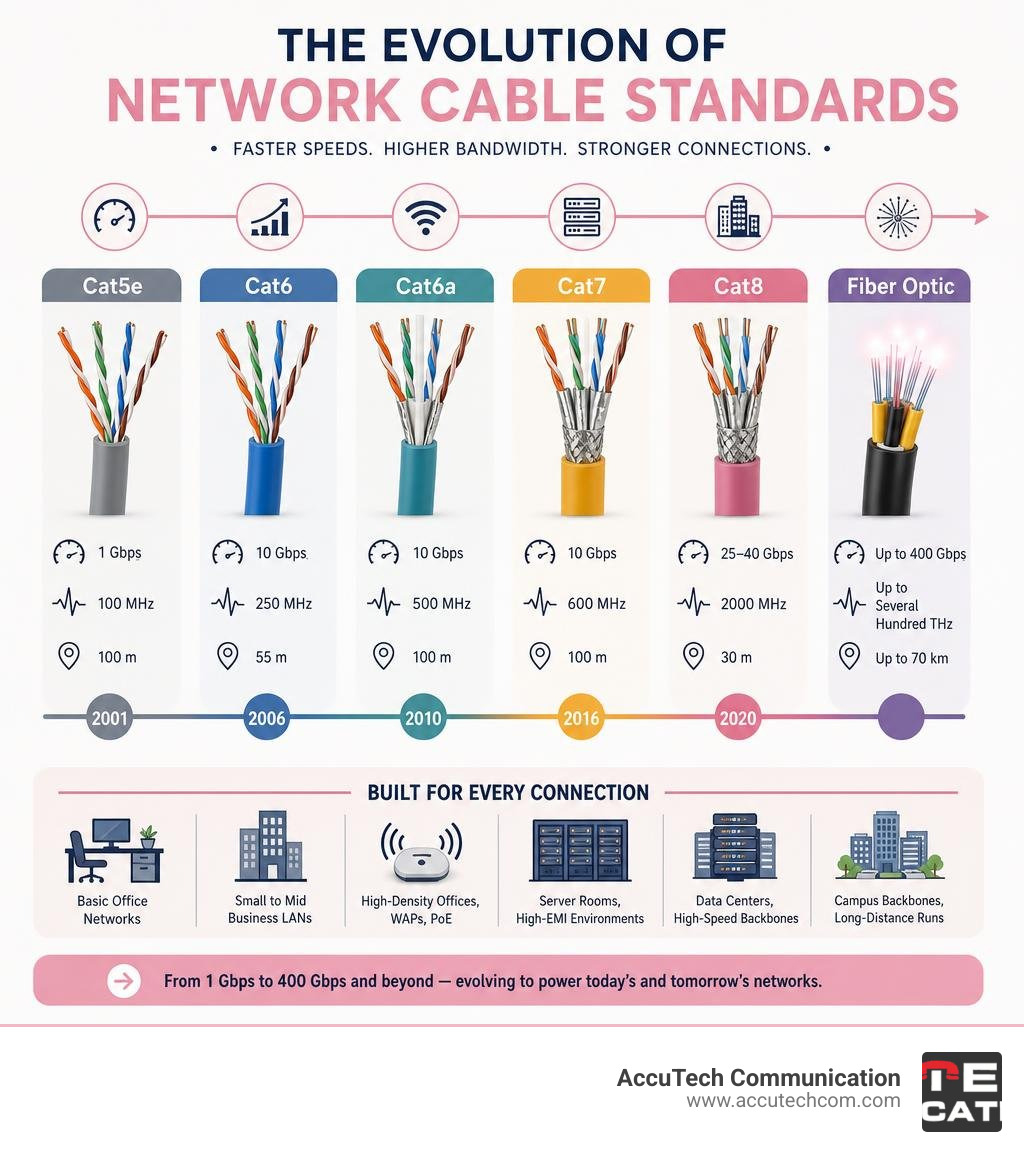
Here is a quick-reference summary of the most common network cable types and what they are best used for:
| Cable Type | Max Speed | Max Distance | Best For |
|---|---|---|---|
| Cat5e | 1 Gbps | 100 m | Basic office networks, VoIP |
| Cat6 | 10 Gbps | 55 m | Small-to-mid business LANs |
| Cat6a | 10 Gbps | 100 m | High-density offices, WAPs, PoE |
| Cat7 | 10 Gbps | 100 m | Server rooms, high-EMI environments |
| Cat8 | 25–40 Gbps | 30 m | Data centers, high-speed backbones |
| Fiber Optic | Up to 400 Gbps | Up to 70 km | Campus backbones, long-distance runs |
| Coaxial | Up to 10 Mbps | Varies | Legacy systems, specialized applications |
The global Ethernet cable market is on track to reach $14.5 billion by 2027, growing at a 9.2% annual rate. That growth reflects how central physical cabling remains — even in an era of Wi-Fi and cloud networking. Most permanent, high-reliability commercial networks still depend on physical cables. Wireless fills gaps; copper and fiber carry the load.
For businesses across Massachusetts, New Hampshire, and Rhode Island, getting this right is not just a performance question — it is a compliance and continuity question. The wrong cable in a plenum space, or an undersized category feeding a high-power PoE device, can create real liability.
I’m Corin Dolan, owner of AccuTech Communications, and I have spent decades designing and installing cables for network infrastructure across commercial environments — from healthcare facilities and manufacturing floors to corporate headquarters and educational campuses. In this guide, I will walk you through everything you need to make confident, future-proof cabling decisions for your business.
Basic cables for network glossary:
Understanding Ethernet Cable Categories and Performance Specs

To select the right physical foundation for your commercial network, you first need to understand how copper twisted-pair categories are classified. Copper cables rely on pairs of insulated copper wires twisted together. This physical twisting is not just for flexibility; it is a critical engineering feature designed to cancel out electromagnetic interference (EMI) and reduce crosstalk between adjacent pairs.
When evaluating copper cables for network deployments, we look at several key parameters:
- Bandwidth (Frequency): Measured in Megahertz (MHz), this defines the frequency range over which the cable can reliably transmit signals. Higher frequency means more data can travel down the pipe simultaneously.
- Transmission Speed: Measured in Gigabits per second (Gbps), this is the actual data throughput rate.
- Shielding: The physical barriers (foil or braiding) wrapped around the copper conductors to protect the signal from external noise.
For a comprehensive breakdown of how these factors interact, you can explore our resources on Types of Cables in Computer Network and Network Cable Categories.
Cat5e vs. Cat6 vs. Cat6a Capabilities
For most standard commercial office spaces, the choice comes down to three primary categories: Category 5e (Cat5e), Category 6 (Cat6), and Category 6a (Cat6a).
- Cat5e: This is the legacy standard of modern networking. It supports data speeds up to 1 Gbps (Gigabit Ethernet) at a bandwidth of 100 MHz. While it is highly cost-effective and perfectly adequate for basic IP phone systems or small-office printer connections, it lacks the performance ceiling required for modern, data-intensive commercial operations.
- Cat6: A significant step up, Cat6 supports Network Cable Speeds of up to 10 Gbps. However, there is a major catch: it can only maintain this 10 Gbps speed over a maximum distance of 55 meters (180 feet) in ideal conditions. At longer distances up to 100 meters, it drops back to 1 Gbps performance. It operates at 250 MHz, which helps reduce crosstalk compared to Cat5e.
- Cat6a: The “a” stands for Augmented. Operating at 500 MHz, Cat6a is designed specifically to support 10 Gbps speeds over the full 100-meter (328-foot) channel length. It features tighter twists and mandatory shielding or internal physical separators to eliminate alien crosstalk (noise from neighboring cables). For new commercial installations, we almost always recommend Cat6a as the baseline standard to future-proof your building’s infrastructure.
Cat7 and Cat8 for High-Density Data Centers
When we move beyond standard office floors and enter high-density server rooms, enterprise data centers, or telecom backbones, we look toward Cat7 and Cat8.
- Cat7: Operating at up to 600 MHz (and tested up to 1000 MHz in some premium variations), Cat7 supports 10 Gbps speeds over 100 meters. What makes it unique is its strict requirement for individual shielding on each of the four twisted pairs, plus an overall outer shield (S/FTP). If you are looking for premium bulk options, products like the Cat7 Bulk Ethernet Cable, Shielded and Foiled (SFTP), 305m (1000ft) – FS.com United Kingdom are engineered specifically to provide this level of high-frequency performance in challenging environments.
- Cat8: This category represents the absolute limit of copper twisted-pair performance. Operating at an incredible 2000 MHz (2 GHz), Cat8 can transmit data at speeds of 25 Gbps or even 40 Gbps. However, this massive throughput comes with a strict distance limitation of 30 meters (98 feet). Because of this short reach, Cat8 is not used for workstation connections; instead, it is deployed almost exclusively within server racks to connect high-speed switches to servers.
Selecting the Right Copper Cables for Network Infrastructure
Choosing the correct category is only half the battle. You must also determine how those copper conductors are shielded and structured physically to withstand their environment. For a deeper look into this decision-making process, read our A Comprehensive Guide to Choosing the Right Ethernet Cable.
Shielded (STP/SFTP) vs. Unshielded (UTP) Signal Quality
The debate between Shielded Twisted Pair (STP) and Unshielded Twisted Pair (UTP) is one of the most critical decisions in commercial network design.
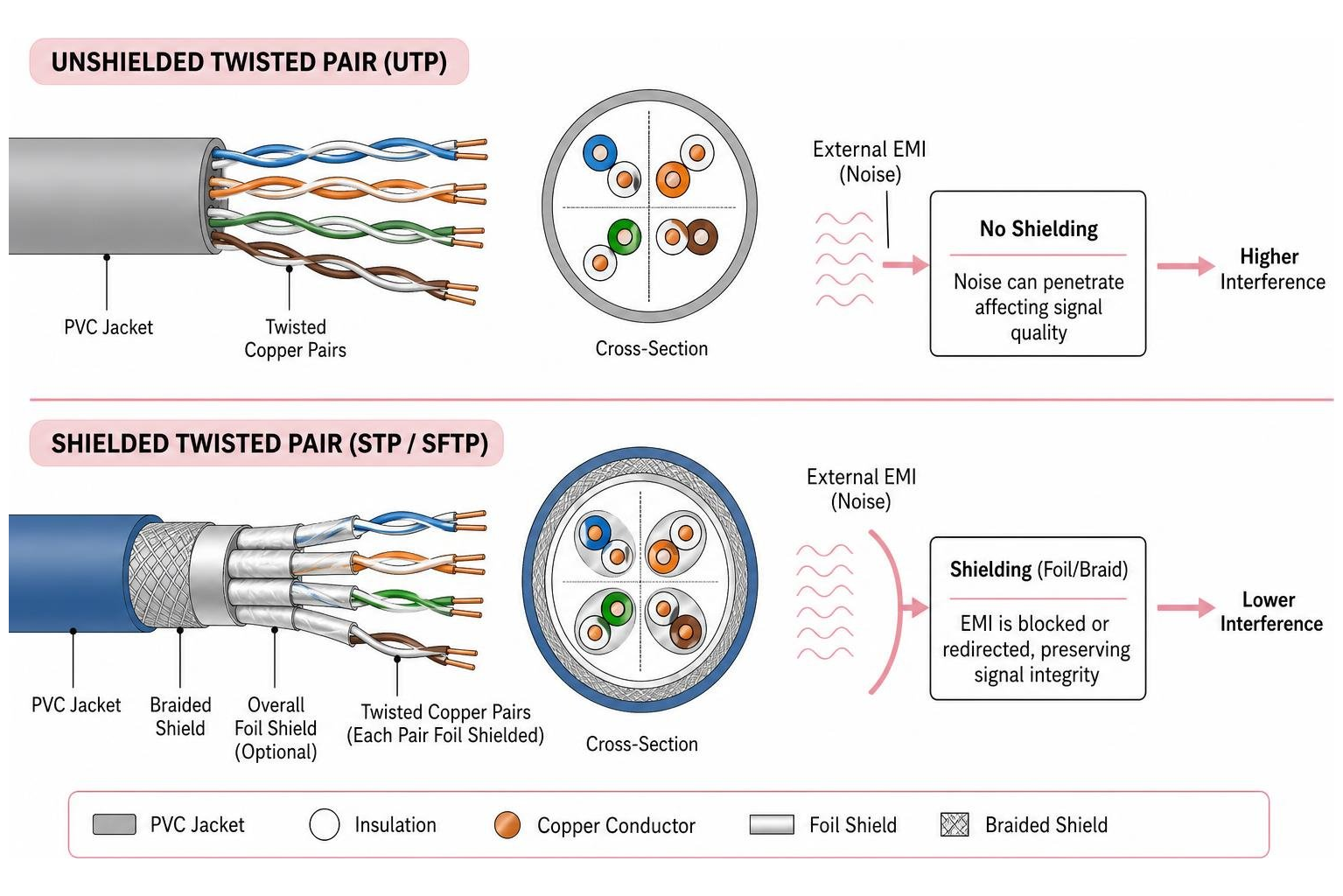
- Unshielded Twisted Pair (UTP): UTP cables are the most common variety. They rely solely on the physical twisting of the wire pairs to cancel out noise. They are highly flexible, thinner, easier to terminate, and cost-effective. In a standard office environment with minimal electrical interference, UTP works beautifully.
- Shielded Twisted Pair (STP/SFTP): STP cables introduce foil wrapping around individual pairs, a braided metal shield around the entire bundle, or both. This shielding acts as a Faraday cage, reducing electromagnetic interference (EMI) and radio frequency interference (RFI) by up to 90% compared to unshielded cables. For high-speed 10G applications, shielded patch cords like the Cat6a 10G Snagless Shielded STP Ethernet Cable (RJ45 M/M), PoE, Blue, 25 ft. (7.62 m) ensure that high-frequency data signals are not degraded by nearby power lines or fluorescent lighting.
High-Performance Shielded Cables for Network Environments
In industrial environments, manufacturing floors, or high-density server rooms, the air is thick with electromagnetic noise. Heavy machinery, motors, generators, and even large bundles of power cables generate significant EMI.
If you run unshielded cables through these areas, you will experience packet loss, CRC errors, and mysterious network slowdowns. Utilizing double-shielded patch cables, such as the Monoprice Cat7 Ethernet Patch Cable – Double Shielded (S/FTP), Snagless RJ45, 600MHz, 10G, 26AWG, 100ft, Blue – Monoprice.com , provides the heavy-duty shielding required to maintain clean signal paths through high-interference zones.
Standard Round vs. Flat Cables for Network Deployments
While standard round cables are the default for structural runs, flat Ethernet cables have carved out a niche in specialized installations.
- Standard Round Cables: These are the industry workhorses. Their round shape allows for optimal space between the internal twisted pairs, which naturally minimizes crosstalk. They are highly durable, pull easily through conduit, and are the only choice for long-distance, in-wall structural runs.
- Flat Cables: Flat cables, such as the EA3 Series CAT7 10GbE Shielded Flat Ethernet Network Cable | Edimax – EDIMAX , use ultra-thin 32AWG conductors arranged side-by-side rather than in a round bundle. This flat, slim profile is perfect for running under carpets, around tight corners, behind heavy office furniture, or along baseboards where standard round cables would create unsightly bulges or tripping hazards. However, flat cables should be reserved for short patch runs; they do not perform well over long distances and are generally unsuitable for high-power Power over Ethernet (PoE) applications due to heat buildup in their thin conductors.
Cable Construction, Fire Ratings, and PoE Compatibility
When we zoom in on the physical construction of a network cable, several design choices impact both safety and performance.
- Solid vs. Stranded Conductors: Inside the cable jacket are eight individual copper wires. In solid core cables, each wire is a single, solid piece of copper. Solid cables offer lower electrical resistance and better signal integrity over long distances, making them the standard choice for permanent runs inside walls and ceilings. In stranded cables, each wire is made of multiple tiny copper threads twisted together. This makes the cable highly flexible and resistant to breaking when bent, which is why stranded copper is used almost exclusively for patch cables that connect devices to wall jacks.
- AWG Wire Gauge: American Wire Gauge (AWG) measures the thickness of the copper conductors. Counterintuitively, a smaller AWG number means a thicker wire. Most standard network cables range from 23 AWG (thicker, typically found in Cat6a) to 26 AWG or 28 AWG (thinner, found in slim patch cords). Thicker copper wires have less resistance, meaning they can carry signals further and handle more electrical current without overheating.
- Snagless vs. Molded Boots: The plastic RJ45 connector at the end of a patch cable has a small, fragile locking tab. A molded boot covers the connection point but leaves the tab exposed. A snagless boot features a built-in plastic arch that covers the locking tab, preventing it from catching and snapping off when you pull the cable through tight bundles or behind server racks.
Fire Safety Ratings: CM, CMR, and CMP
In commercial installations, building codes strictly regulate the jacket materials of the cables we run through walls and ceilings. This is not about network performance; it is about saving lives during a fire.
- CM (Communications General Purpose): This is the basic rating for patch cables used in open spaces. It is not rated for in-wall or vertical runs.
- CMR (Riser Rated): Engineered for vertical shafts (risers) that run between floors. CMR jackets are designed to prevent fire from spreading vertically from one floor to another.
- CMP (Plenum Rated): This is the highest and most restrictive fire safety rating. A “plenum” space is any area of a building used for environmental air handling, such as the space above a drop ceiling or below a raised floor. If a fire breaks out, the heating and cooling system will pull smoke from these spaces and distribute it throughout the building. CMP cables are jacketed with specialized plastics (like Teflon FEP) that are self-extinguishing and emit extremely low levels of toxic smoke and fumes when exposed to high heat. Running non-plenum cable in a plenum space is a major building code violation in Massachusetts, New Hampshire, and Rhode Island.
Power over Ethernet (PoE) and Thermal Management
Power over Ethernet (PoE) allows a single network cable to deliver both high-speed data and electrical power to devices like IP security cameras, VoIP phones, and wireless access points.
Modern standards like PoE++ (IEEE 802.3bt Type 4) can deliver up to 90W or even 100W of power down standard network copper. When you bundle dozens of these power-carrying cables together in a tight tray or conduit, they generate heat. This heat raises the electrical resistance of the copper, which can degrade data transmission speeds.
To manage this thermal load, we recommend using Cat6a cables with 23 AWG solid copper conductors, which dissipate heat much better than thinner 24 or 26 AWG cables. Additionally, choosing cables with Low Smoke Zero Halogen (LSZH) jackets, such as the 7m CAT6 Ethernet Cable – LSZH (Low Smoke Zero Halogen) – 10 Gigabit 250Mhz 100W PoE RJ45 10GbE UTP Network Patch Cord Snagless with Strain Relief – Black, CAT 6, ETL Verified, 24AWG , ensures that the cables can safely handle high-power PoE applications while meeting strict environmental and fire safety standards.
Fiber Optic and Coaxial Alternatives for Commercial Networks
While copper twisted-pair cables are the standard for connecting individual workstations, commercial networks frequently require other physical media to handle extreme distances, massive bandwidth demands, or legacy hardware.
- Fiber Optic Cabling: Fiber optics transmit data as pulses of light through ultra-pure glass strands, completely eliminating electromagnetic interference. Fiber is divided into two primary types:
- Single-mode Fiber: Uses a tiny glass core to transmit a single light path. It is used for extreme distances (up to 70 km or 43 miles) without signal degradation, making it the choice for campus backbones and metropolitan networks.
- Multi-mode Fiber: Features a larger core that allows multiple light paths to travel simultaneously. It is highly cost-effective for high-speed runs (up to 400 Gbps) within a single building or over distances of up to 400 meters.
- Coaxial Cabling: Coaxial cables feature a central copper conductor surrounded by a plastic insulator, a braided metal shield, and an outer jacket. While legacy Ethernet systems (like 10BASE5 and 10BASE2) relied on coax, modern commercial applications use it primarily for cable television feeds, broadband internet entry points, and specialized security systems.
The demand for high-speed fiber backbones is expanding rapidly across New England. For instance, the recent Lightpath Announces Major Expansion of its Boston Metro Network highlights how critical fiber-optic infrastructure is to supporting the region’s commercial data needs.
Whether you are connecting a business in a highly connected municipality like Acton, MA (see Cable TV & Internet Information | Acton, MA – Official Website ), assessing high-speed options in Andover (see Compare Internet Providers in Andover, MA | Find the Best Plans ), or setting up high-bandwidth commercial services in Arlington (see Compare Internet Providers in Arlington, MA | Find the Best Plans ), fiber is the gold standard for high-speed backhauls.
To see how these local connections link into the massive global network, you can explore the Submarine Cable Map , which tracks the underwater fiber-optic cables that power the global internet.
Frequently Asked Questions About Network Cabling
What is the maximum recommended length for copper network cables?
The absolute maximum channel length for standard copper twisted-pair Ethernet (from Cat5e up to Cat6a) is 100 meters (328 feet).
This 100-meter channel is typically divided into two parts:
- 90 meters of permanent link: The solid-core cable run through the walls and ceilings from the patch panel in your server room to the RJ45 wall outlet.
- 10 meters of patch cords: The combined length of the stranded-core patch cables used to connect the patch panel to the switch, and the workstation to the wall outlet.
If you exceed this 100-meter limit, the electrical signal begins to weaken (attenuate), resulting in dropped packets, slower transmission speeds, or a complete loss of connection. If you need to run a network connection beyond 100 meters, you must install an active network switch to regenerate the signal, or transition to fiber-optic cabling.
How do Fluke, UL, and ETL certifications guarantee cable quality?
In the commercial cabling industry, you cannot rely on visual inspection to verify if a cable will perform at its rated speed. We rely on independent testing standards and certifications to guarantee quality:
- Fluke Testing: Fluke networks equipment, such as the DSX-8000 CableAnalyzer, is the industry standard for physical layer testing. A Fluke test analyzes the cable for wiremap, length, propagation delay, delay skew, DC resistance, insertion loss, and various forms of crosstalk (like NEXT and PS-NEXT). A “Fluke Certified” cable run is your guarantee that the physical installation meets or exceeds ANSI/TIA-568 performance standards.
- UL (Underwriters Laboratories) & ETL (Intertek): These are Nationally Recognized Testing Laboratories (NRTLs). They test and certify that network cables comply with safety and performance standards. A UL or ETL mark on a cable jacket proves that the cable has been independently verified to meet fire safety ratings (like CMP or CMR) and physical performance specifications.
What is the difference between straight-through and crossover cables?
This distinction comes down to how the individual copper wires are pinned out at each end of the cable using the T568A and T568B wiring standards:
- Straight-Through Cables: Both ends of the cable are terminated using the same standard (almost always T568B in commercial installations). These are used to connect unlike devices, such as a computer to a switch, or a router to a modem.
- Crossover Cables: One end is terminated using T568A, and the other is terminated using T568B. This physical swap connects the transmit pins on one end to the receive pins on the other, allowing two like devices (such as two computer workstations or two switches) to communicate directly without a hub or switch in between.
In modern networking, crossover cables are largely obsolete. Almost all modern switches, routers, and network interface cards (NICs) feature Auto-MDIX (Automatic Medium-Dependent Interface Crossover) technology. This software feature automatically detects the required cable pinout and adjusts the internal connection electrically, allowing you to use standard straight-through cables for almost every connection.
Conclusion
Designing, installing, and maintaining the right physical cables for network infrastructure is a complex undertaking that requires careful planning, deep technical knowledge, and strict adherence to local building and safety codes. Attempting a DIY installation in a commercial setting often leads to costly troubleshooting, compliance fines, and network downtime.
Since 1993, AccuTech Communications has provided certified, reliable, and competitively priced commercial networking solutions. We specialize in Structured Cabling Services, fiber optic installations, and data center build-outs for businesses throughout Massachusetts, New Hampshire, and Rhode Island.
Whether you need to upgrade an office network in Abington, MA (see Top 5 Internet Providers in Abington, MA ), design a structured cabling system for a school in Arlington, or deploy a high-density fiber backbone in Worcester, our BICSI-certified technicians are here to help.
Don’t leave your business’s digital foundation to chance. Contact us today to discuss your next commercial project or request an estimate from our local engineering team.
